AWS HIPAA Eligible Services: List, BAA, Best Practices

AWS HIPAA Eligible Services: List, BAA, Best Practices
Building healthcare applications means handling Protected Health Information (PHI), and that means HIPAA compliance isn't optional. If you're deploying on Amazon Web Services, you need to know exactly which AWS HIPAA eligible services you can use to store, process, and transmit patient data. Get this wrong, and you're looking at serious regulatory and financial consequences.
AWS offers over 200 services, but not all of them qualify for PHI workloads. The distinction matters because using a non-eligible service for healthcare data can invalidate your compliance posture entirely. Before you architect your solution, whether it's a patient portal, clinical decision support tool, or an integration layer connecting to EHRs, you need a clear picture of what's allowed and what's required from AWS's side.
At SoFaaS, we build on HIPAA-compliant, SOC 2 Type II certified infrastructure to help healthcare innovators connect applications to Electronic Health Records without the compliance headaches. We understand the infrastructure decisions that keep healthcare engineering teams up at night, which is why we've put together this guide.
This article covers the complete list of AWS HIPAA eligible services, explains how the Business Associate Agreement (BAA) works, and walks through best practices for configuring your AWS environment to maintain compliance. Whether you're starting fresh or auditing an existing setup, you'll find actionable guidance to move forward confidently.
Why HIPAA eligibility matters on AWS
You can't just drop patient data into any AWS service and call it HIPAA compliant. The Office for Civil Rights (OCR) enforces strict penalties for violations, with fines ranging from $100 to $50,000 per violation, and that's per record. If you process thousands of patient records through a non-eligible service, even unknowingly, you've created massive legal and financial exposure for your organization.
Financial and legal consequences of using non-eligible services
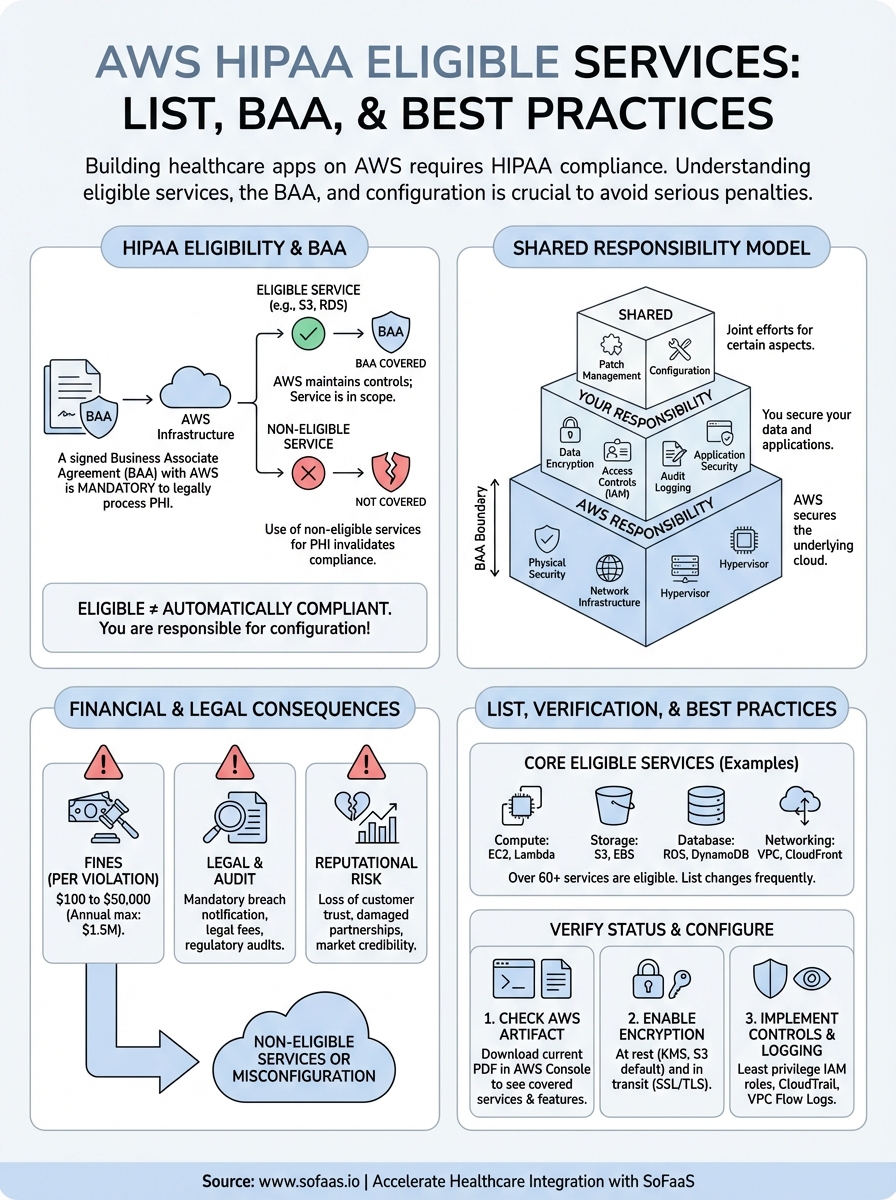
HIPAA violations carry steep financial penalties that scale with the level of negligence involved. Tier 1 violations, where you didn't know about the breach, start at $100 per violation with an annual maximum of $25,000. Tier 4 violations, which involve willful neglect, can hit $50,000 per violation with an annual cap of $1.5 million. Beyond fines, you face mandatory breach notification requirements, legal fees, regulatory audits, and potential criminal charges for intentional misuse.
Your organization also carries reputational risk that can destroy years of trust-building. Healthcare providers and patients expect absolute security when it comes to medical information. A single data breach traced back to improper use of AWS services can result in loss of customers, partnerships, and market credibility that takes years to rebuild.
Using AWS services that aren't covered under your Business Associate Agreement puts your entire compliance program at risk, regardless of how secure your application code is.
Impact on architecture and vendor relationships
When you build on aws hipaa eligible services, you maintain the ability to sign a BAA with AWS, which is legally required under HIPAA. Without that BAA in place, AWS cannot be considered a compliant business associate, and you cannot legally store or process PHI in their infrastructure. Your choice of services directly determines whether your entire technical stack qualifies for healthcare workloads.
This limitation affects every architectural decision you make. You need to evaluate compute options, database choices, storage solutions, and networking configurations through the lens of eligibility. Services like AWS Lambda, RDS, S3, and ECS are eligible, but you must configure them correctly and only use features that fall under the BAA scope.
What HIPAA eligible services are and are not
HIPAA eligible services are AWS products that Amazon has explicitly approved for storing, processing, and transmitting PHI under a signed BAA. These services meet specific technical and operational requirements that allow them to handle healthcare data securely. You'll find this eligibility status documented in AWS's official compliance materials, and the list changes as AWS adds new services or updates existing ones.
What makes a service HIPAA eligible
A service becomes eligible when AWS commits to maintaining controls that support HIPAA requirements and agrees to include it under the BAA scope. This means AWS has implemented encryption standards, access controls, audit logging, and data protection mechanisms that align with HIPAA's Security Rule. Services like Amazon S3, RDS, and Lambda have undergone the necessary technical evaluations and operational reviews to earn this designation.
HIPAA eligibility means AWS will sign a BAA covering that specific service, not that the service automatically makes your application compliant.
What eligible does not mean
Eligible status doesn't make your infrastructure automatically compliant. You still need to configure each aws hipaa eligible service correctly, implement proper access controls, enable encryption, and maintain audit trails. AWS provides the tools and infrastructure, but you're responsible for using them properly. A misconfigured S3 bucket or an RDS instance without encryption remains non-compliant even though the underlying service is eligible.
How the AWS BAA and shared responsibility work
You need to sign a Business Associate Agreement with AWS before you can legally process PHI on their infrastructure. This BAA establishes AWS as your business associate under HIPAA, making them legally obligated to protect the data you store in their eligible services. Without this signed agreement, you cannot use AWS for healthcare workloads, regardless of which services you choose or how secure your configurations are.

What the AWS BAA covers
The BAA explicitly lists which aws hipaa eligible services fall under its protection. AWS updates this list regularly as they add new services or modify existing ones. You'll find services like EC2, S3, RDS, Lambda, and DynamoDB included, but the BAA only applies when you configure these services correctly and use them exclusively for PHI workloads. Features or service components not listed in the BAA remain outside its scope, even if they're part of an otherwise eligible service.
Your BAA only protects data in services AWS has explicitly designated as eligible and configured according to HIPAA requirements.
Your responsibilities under the shared model
AWS operates on a shared responsibility model where they secure the infrastructure and you secure everything you build on top of it. AWS handles physical security, network infrastructure, and hypervisor-level protections. You handle encryption key management, access controls, audit logging, data classification, and application-level security. This division means you cannot assume AWS makes your application compliant just because you use eligible services. Configuration errors, weak access policies, or disabled encryption features create compliance gaps that you own entirely.
AWS HIPAA eligible services list and how to verify
AWS maintains a comprehensive list of eligible services that you can access through their compliance documentation portal. This list includes over 60 services spanning compute, storage, databases, networking, analytics, and machine learning capabilities. You need to check this list regularly because AWS updates it frequently as they add new services or modify existing ones. Your BAA automatically covers newly added services without requiring a new signature, but you must verify each service's eligibility status before deploying PHI workloads.
Core services covered under the BAA
The most commonly used aws hipaa eligible services include Amazon EC2 for compute, Amazon S3 for storage, Amazon RDS for relational databases, and AWS Lambda for serverless functions. You'll also find DynamoDB for NoSQL databases, ECS and EKS for container orchestration, CloudWatch for monitoring, and CloudTrail for audit logging. Network services like VPC, Route 53, and CloudFront qualify as well. Analytics tools including Athena, Glue, and EMR appear on the list, along with machine learning services like SageMaker.
Always verify that specific features or service components you plan to use fall under BAA coverage, not just the base service name.
How to verify current eligibility status
You can verify eligibility through the AWS Artifact portal in your AWS Console. Navigate to Artifact, select the HIPAA Eligible Services Reference document, and download the current PDF. This document lists every eligible service with the exact features covered. Cross-reference your architecture against this official list before deployment. AWS also provides a services in scope page on their compliance website that displays current eligibility status for all services.
How to configure AWS for HIPAA best practices
Using aws hipaa eligible services requires you to implement specific configuration settings that align with HIPAA's Security Rule. These settings don't enable automatically, and AWS won't configure them for you. You need to actively turn on encryption, restrict access, and enable logging across every service that touches PHI. Missing even one of these configuration requirements creates a compliance gap that auditors will flag.
Enable encryption everywhere
You must enable encryption at rest and in transit for all PHI data. In S3, turn on default bucket encryption using AWS KMS keys. For RDS databases, enable encryption during instance creation because you cannot add it later to existing instances. Configure your application to use SSL/TLS connections for all data transfers. EBS volumes attached to EC2 instances need encryption enabled at the volume level.
Encryption protections only work if you enable them explicitly in each service's configuration settings and maintain control over your KMS keys.
Configure access controls and audit logging
Implement least privilege access policies through IAM roles that restrict who can view or modify PHI. Create separate roles for administrators, developers, and applications with specific permissions tied to job functions. Enable AWS CloudTrail in all regions to capture every API call made to your resources. Turn on VPC Flow Logs to monitor network traffic patterns. Configure CloudWatch alarms that notify you when unusual access patterns occur or when someone attempts unauthorized actions on PHI-containing resources.
Next steps
You now have the complete picture of aws hipaa eligible services, the BAA requirements, and the configuration steps needed to build HIPAA-compliant infrastructure on AWS. Start by signing your BAA with AWS through the Artifact portal, then audit your current architecture against the official eligibility list. Review every service touching PHI to confirm it appears in the BAA and that you've enabled encryption, access controls, and audit logging.
Building compliant healthcare applications requires more than just infrastructure knowledge. Integration challenges, FHIR implementation complexity, and ongoing compliance maintenance can drain engineering resources fast. If you're connecting healthcare applications to Electronic Health Records, launch your SMART on FHIR app in a couple of steps with SoFaaS instead of building integration infrastructure from scratch. Our managed platform handles the complexity while maintaining SOC 2 Type II and HIPAA compliance, so you can focus on building features that matter to your users rather than wrestling with integration protocols and security configurations.
The Future of Patient Logistics
Exploring the future of all things related to patient logistics, technology and how AI is going to re-shape the way we deliver care.
Thank you! Your submission has been received!
Oops! Something went wrong while submitting the form.