
eClinicalWorks FHIR API: How to Get Started
If you're building an app that needs to pull patient data from eClinicalWorks, you've probably already hit the wall: scattered documentation, sandbox access that takes days to provision, and OAuth flows that don't quite match what you expected from other EHRs. Searching for the eclinicalworks fhir api shouldn't feel like detective work, but for most developers it does.
This guide gets you unstuck. We'll walk through exactly how to register as a developer, request sandbox credentials, and authenticate against eCW's SMART on FHIR endpoints, the same steps you'd need whether you found your way here through the ecw fhir api or went looking directly for eclinicalworks fhir api documentation. You'll see the specific scopes eCW supports, common authorization errors, and what actually happens once you get a valid access token.
We've built this from real integration work, not just a read-through of the spec. At SoFaaS, we connect apps to eClinicalWorks and other major EHRs every week, so we know where developers get stuck and how to skip past it. By the end, you'll know whether to build the connection yourself or hand off the integration work entirely.
Prerequisites for eClinicalWorks FHIR API access
Before you write a single line of OAuth code, get your paperwork and technical stack in order. eClinicalWorks (eCW) doesn't hand out FHIR API access on a whim. It runs through a formal developer program, and skipping steps here just means you'll get bounced back later when a practice or eCW's review team asks for something you don't have.
Developer account and business documentation
First, you need an account on eClinicalWorks' developer portal, healow Marketplace or the eCW Developer Program depending on which door you come in through. Registration asks for basic company information, but the real gate is what happens after: eCW wants to know who you are, what your app does, and how you'll handle patient data. Have these ready before you start the application:
- Legal business name and entity type (LLC, corporation, etc.)
- A named technical contact who can answer integration questions
- A privacy policy and terms of service URL, since eCW checks these before approving apps that touch PHI
- A description of your app's clinical or administrative use case, written in plain language, not just "we sync data"
Treat the application like a compliance review, not a signup form, because that's exactly what eCW treats it as.
HIPAA and security posture
Any app requesting access to PHI through the ecw fhir api needs to demonstrate it can protect that data. eCW doesn't audit your infrastructure line by line during the developer application, but practices and their compliance officers will ask, and eCW's own agreements assume you're HIPAA-capable. At minimum, you should have encryption at rest and in transit, an audit logging strategy, and a documented process for handling breach notification. If you don't have this built already, this is the point where a lot of teams realize they're about to spend months on infrastructure before writing a single feature. That's the gap platforms like SoFaaS exist to close, since HIPAA-compliant infrastructure and audit logging come built in rather than bolted on later.
Technical requirements
On the technical side, eCW's FHIR implementation follows the SMART on FHIR standard, so you'll need infrastructure that supports OAuth 2.0 authorization code flows, TLS 1.2 or higher for all endpoints, and the ability to store and refresh access tokens securely. eCW publishes its FHIR resources against the FHIR R4 specification, so your app should be built to parse R4-shaped JSON, not the older DSTU2 format some legacy EHR integrations still use.
Here's a quick rundown of what you'll need lined up before moving to registration:
| Requirement | Why it matters |
|---|---|
| Developer portal account | Gateway to app registration and credentials |
| Privacy policy and ToS | Required for app review approval |
| HIPAA-ready infrastructure | Expected by practices granting access |
| OAuth 2.0 / SMART on FHIR support | Required for authentication flow |
| FHIR R4 client capability | eCW's FHIR resources are R4-based |
| Sandbox test environment access | Needed before any production connection |
Sandbox access
Finally, request sandbox credentials as part of your developer registration. eCW's sandbox mirrors production behavior closely enough to build and test against, including realistic patient records and the same OAuth scopes you'll use later. Sandbox provisioning isn't instant, expect a short review period, so request it early rather than waiting until you're ready to write authentication code. Once you clear these prerequisites, you're ready to move into actual app registration, which is where the real integration work starts.
Step 1. Register your developer application
Once your prerequisites are lined up, log into the eCW developer portal and start a new app registration. This is where you formally define what your integration does, which EHR resources it touches, and how eCW should route authorization requests back to you. Treat this step as the blueprint for everything downstream, since the scopes and redirect URIs you set here determine what your app can actually do once it's live.
Create your app record
Name your app something that matches what a practice will see during authorization, not an internal codename. eCW reviewers and clinic staff both read this name, so vague titles slow down approval. You'll also select an app type, typically "patient-facing" or "provider-facing" (sometimes called backend/system app), which changes which FHIR scopes are available to you later.
Set your redirect URIs and scopes
Your redirect URI has to match exactly what your app sends during the OAuth handshake, down to trailing slashes and protocol. Mismatches here are the single most common reason integrations fail on first test. eCW requires HTTPS for all production redirect URIs; sandbox environments sometimes allow localhost for early testing, but don't build against that assumption long-term.
Request only the scopes your app actually uses. Common ones include:
patient/Patient.read
patient/Observation.read
patient/MedicationRequest.read
launch/patient
offline_access
Request narrow scopes now, because broad scope requests are one of the fastest ways to get an app application rejected or delayed.
Save your credentials securely
Once eCW approves the registration, you'll receive a client ID and, depending on your app type, a client secret. Store these the way you'd store any production secret, in a secrets manager, not in a config file committed to your repo. If you're using the eclinicalworks fhir api documentation as your reference during setup, cross-check your scope names against it directly, since eCW occasionally updates supported scopes between FHIR versions.
At this point you have a registered app, but no data access yet. Registration proves your app exists and is configured correctly; it doesn't grant you a connection to any specific practice's patient records. That authorization happens next.
Step 2. Get your app authorized by a practice
Registering your app with eCW only gets you a listing in their system. Before you can pull a single patient record, an actual practice running eClinicalWorks has to authorize your app inside their EHR instance. This is the step that trips up teams who assume developer approval and clinical authorization are the same thing. They're not, and eCW treats them as two separate gates.
Find a practice willing to sponsor the connection
Most developers start with a pilot practice, often one they already have a relationship with, since eCW doesn't hand out production access to apps with no clinical sponsor. Reach out to the practice's IT administrator or eCW account manager directly and explain what data your app needs and why. Practices are cautious here, understandably, so come prepared with your app description, requested scopes, and a plain explanation of the clinical workflow you're supporting.
Walk through the practice-side approval
Once a practice agrees, their eCW administrator enables your registered app inside their instance's marketplace or integration settings. This step, sometimes called the app authorization or activation step, is separate from the OAuth consent screen a patient or provider sees later. Expect the practice admin to review:
- Which FHIR scopes your app is requesting
- Whether your app is patient-facing or provider-facing
- Your organization's business associate agreement (BAA) status, if PHI is involved
- Any internal compliance sign-off their organization requires
No amount of clean OAuth code matters if a practice administrator hasn't flipped the switch enabling your app on their end.
Confirm activation before you test
Don't assume approval happened just because a practice said yes verbally. Ask the administrator to confirm your app shows as active in their eCW console, and get the specific practice or organization identifier you'll need during the OAuth launch sequence. Skipping this confirmation is a common reason developers troubleshoot authentication errors for hours when the real problem is that the practice never finished activation on their side.
Getting this step right early saves you from debugging phantom OAuth failures later. With an authorized, activated app tied to a real practice, you're ready to move into the actual authentication handshake, where SMART on FHIR launch context and OAuth 2.0 tokens come into play.
Step 3. Authenticate with OAuth 2.0 and SMART on FHIR
With your app registered and a practice activation confirmed, you're ready to run the actual OAuth 2.0 handshake. eCW follows the SMART on FHIR authorization code flow, which means your app redirects the user to eCW's authorization server, the user (or provider) logs in and grants consent, and eCW redirects back to you with a code you exchange for an access token. This is the same pattern used across most SMART-compliant EHRs, but eCW's specific endpoint URLs and parameter names are where most implementations stumble.
Choose your launch type
Decide upfront whether you're doing an EHR launch (the app opens from inside eClinicalWorks, and eCW passes a launch parameter with context) or a standalone launch (your app initiates the flow independently). Standalone launches are more common for patient-facing apps pulling data outside a clinical session, while EHR launches suit provider-facing tools embedded in the workflow.
Request authorization
Send the user to eCW's authorization endpoint with your client ID, redirect URI, requested scopes, and a state parameter for CSRF protection:
GET https://oauth.eclinicalworks.com/oauth/authorize?
  response_type=code&
  client_id=YOUR_CLIENT_ID&
  redirect_uri=https://yourapp.com/callback&
  scope=patient/Patient.read%20launch/patient%20offline_access&
  state=RANDOM_STRING&
  aud=https://fhir4.eclinicalworks.com/fhir/r4
A missing or mismatched
audparameter is one of the quietest ways this flow fails, since eCW uses it to route your token to the right FHIR endpoint.
Exchange the code for a token
Once eCW redirects back with an authorization code, exchange it server-side for an access token:
POST https://oauth.eclinicalworks.com/oauth/token
Content-Type: application/x-www-form-urlencoded

grant_type=authorization_code&
code=AUTH_CODE&
redirect_uri=https://yourapp.com/callback&
client_id=YOUR_CLIENT_ID&
client_secret=YOUR_CLIENT_SECRET
The response includes an access_token, expires_in, patient (the FHIR patient ID in context), and, if you requested offline_access, a refresh_token. Store the refresh token securely, since access tokens typically expire within an hour and you'll need to refresh without forcing the user through login again.
Step 4. Call FHIR resources to read patient data
With a valid access token in hand, you're finally ready to pull real data through the eclinicalworks fhir api. Every request from here follows standard FHIR REST conventions: a GET request to a resource endpoint, an Authorization: Bearer header carrying your access token, and a JSON response shaped according to FHIR R4. This is the payoff step, but it's also where scope mismatches from Step 1 show up as 403 errors if you didn't request the right permissions.
Build your first resource request
Start with something simple, like pulling the patient record tied to your current session context. Use the patient value returned in your token response as the resource ID:
GET https://fhir4.eclinicalworks.com/fhir/r4/Patient/{patient_id}
Authorization: Bearer YOUR_ACCESS_TOKEN
Accept: application/fhir+json
A successful call returns a single FHIR Patient resource in JSON. If you get a 401, your token likely expired. A 403 usually means your app never requested the scope covering that resource.
If a resource call fails, check your granted scopes before you check your code, since a missing scope produces the same generic error as a bad token.
Common FHIR resources eCW supports
eCW exposes most of the standard FHIR R4 resource types, though not every practice enables every resource for every app. The ones you'll use most often for clinical apps include:
Patientfor demographics and identifiersObservationfor vitals and lab resultsMedicationRequestfor active prescriptionsConditionfor problem list entriesAllergyIntolerancefor documented allergiesImmunizationfor vaccine records
Query each with the patient ID as a search parameter, for example Observation?patient={patient_id}&category=vital-signs, rather than assuming a bare resource call returns everything.
Parse the response structure
FHIR wraps search results in a Bundle resource, not a flat array, so your parsing logic needs to walk the entry array to reach individual resources. Skipping this step trips up developers coming from REST APIs that return plain lists, and it's a common source of "empty response" confusion when the data is actually there, just nested one level deeper than expected.
Step 5. Handle paging, rate limits, and ongoing sync
Once your app is pulling live data, the real work shifts from "can I get a resource" to "can I keep getting resources reliably, at scale, without eCW throttling or blocking you." This is where a lot of integrations that worked fine in testing start breaking in production, because a single patient bundle in a sandbox looks nothing like a panel of 50,000 patients hitting your app on a schedule.

Page through large result sets
Every FHIR Bundle from a search query can include a link array with a relation of next, and you're expected to follow that URL rather than assume you got everything in one response. eCW caps how many entries come back per page, so a query like Observation?patient={patient_id} for a patient with years of lab history will almost always span multiple pages. Loop through the next links until there's no more next relation left, and don't hardcode a page count, since eCW can change page size without warning.
Treat pagination as mandatory, not optional, because assuming a single page is complete is the fastest way to silently lose patient data.
Respect rate limits
eCW enforces rate limits on both the OAuth token endpoint and the FHIR resource endpoints, though exact thresholds vary by app tier and aren't always published in the public eclinicalworks fhir api documentation. When you exceed them, expect a 429 response with a Retry-After header. Build exponential backoff into your request logic rather than retrying immediately, and log every 429 you get, since a pattern of them usually means your polling frequency needs adjusting, not your retry logic.
Set up ongoing sync
For most apps, one-time pulls aren't enough. You'll need a strategy for keeping patient data current:
- Polling on a schedule, checking resources like
ObservationorMedicationRequestfor updates since your last sync timestamp - Refresh token rotation, using the
refresh_tokenfrom Step 3 to get new access tokens without re-prompting the user - Change tracking, storing
lastUpdatedmetadata from each resource so you only process what's actually new
eCW doesn't offer webhook-based push notifications the way some newer FHIR implementations do, so polling remains the practical default. Build your sync intervals around clinical relevance, hourly for active medication changes, daily for less time-sensitive data, rather than polling everything at the same aggressive frequency.
From API access to a working integration
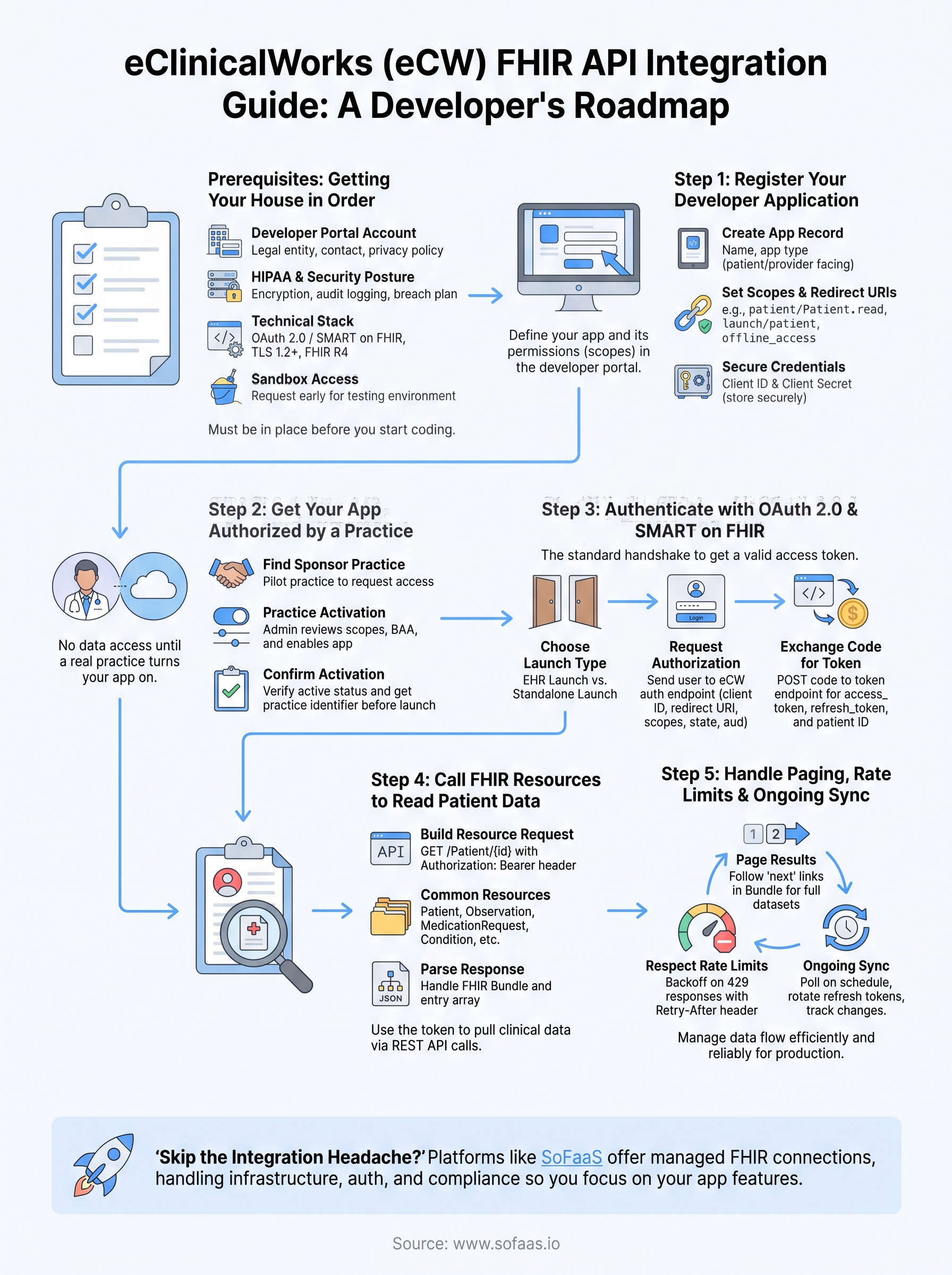
Getting the eclinicalworks fhir api working end to end takes real effort: developer registration, practice authorization, OAuth handshakes, scope management, pagination, and a sync strategy that holds up under production load. None of it is impossible, but it's also not a weekend project, and every step you skip shows up later as a support ticket or a compliance gap.
Teams that build this themselves usually spend weeks on infrastructure before they touch a single feature users care about. That's the tradeoff worth weighing before you commit engineering time to it. If you'd rather skip the OAuth debugging and rate-limit tuning and get straight to working with patient data, launch your SMART on FHIR app in a couple of steps with a platform built specifically for this problem. Your app's value comes from what you build on top of the data, not from wiring up the connection itself.