Doppler Secrets Manager: How To Set Up and Use It Securely

Doppler Secrets Manager: How To Set Up and Use It Securely
Healthcare integrations live and die by how well you protect sensitive credentials, API keys, OAuth tokens, database passwords, and EHR connection strings. If any of these leak, you're not just dealing with a security incident; you're facing potential HIPAA violations and broken patient trust. That's where Doppler secrets manager comes in: a centralized platform built to store, sync, and manage secrets across your environments without scattering .env files or hardcoding credentials into your codebase.
At SoFaaS, we help healthcare teams connect applications to EHRs like Epic, Cerner, and Allscripts through our managed SMART on FHIR platform. Secure credential handling is baked into everything we do, from OAuth token management to SOC 2 Type II compliance. We've seen firsthand how poor secrets management can stall integration projects and introduce unnecessary risk into production healthcare systems. Tools like Doppler solve a real problem for teams operating in regulated environments.
This guide walks you through exactly how to set up Doppler, organize your secrets by environment, integrate it into your development workflow, and follow security best practices that actually matter. Whether you're a solo developer shipping a health tech MVP or an engineering team scaling across multiple EHR integrations, you'll leave with a clear, working setup.
What Doppler Secrets Manager does and why it helps
Doppler secrets manager is a centralized platform that replaces scattered .env files, hardcoded credentials, and manual copy-paste workflows with a single source of truth for your application secrets. Instead of each developer on your team maintaining their own local credentials file, Doppler syncs the right secrets to the right environment automatically, whether that's local development, staging, or production. You access secrets through the CLI, the API, or native integrations with platforms like AWS, GCP, and Kubernetes.
Centralizing secrets in one place means you can rotate a compromised credential once and every connected service picks up the change immediately.
How secrets get centralized and synced
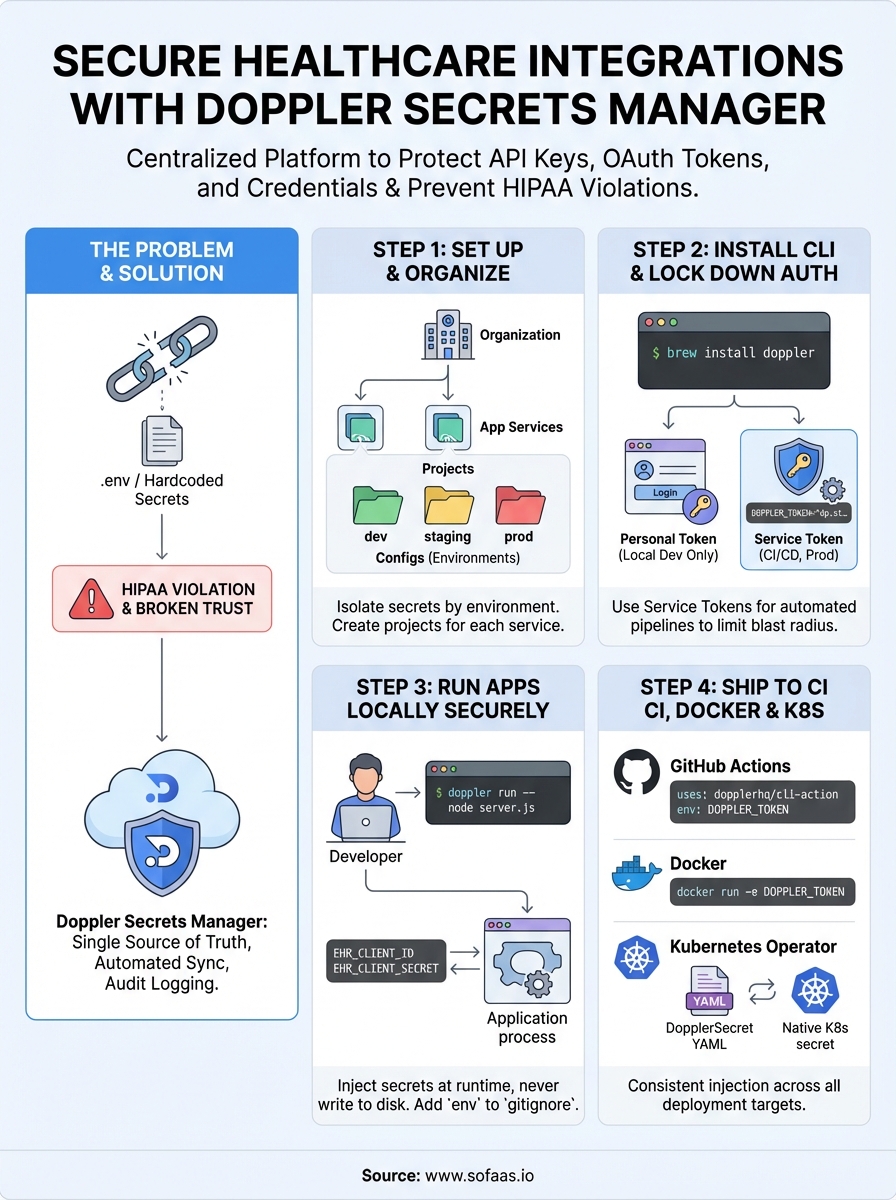
Doppler organizes your secrets around three core concepts: workspaces, projects, and configs. A workspace maps to your organization. A project maps to a service or application. A config maps to an environment, like dev, staging, or prod. When your app starts, instead of reading from a .env file, it reads from Doppler directly. Your team members never see raw credentials unless they have explicit access, and every secret access gets logged for audit purposes.
Here's how the data flow works in practice:
- You store a secret (for example,
EHR_CLIENT_SECRET) in your Doppler project config. - Your app fetches that secret at runtime through the Doppler CLI or SDK.
- When you rotate the secret, every environment and service using it updates automatically without any manual file edits or redeployment of config files.
Why Doppler fits regulated environments like healthcare
Healthcare applications handle protected health information (PHI) and connect to EHRs through OAuth tokens and client credentials. If those credentials leak, even briefly, you face both a security incident and regulatory exposure under HIPAA. Doppler's access controls and audit logging give you granular visibility into who accessed which secret and when, which directly supports the audit trail requirements you need in a healthcare context.
Beyond compliance, Doppler reduces operational friction. When your team rotates an OAuth client secret after an EHR re-credentialing event, you update it in one place rather than hunting through CI configs, Docker files, and developer laptops. That single-point update model matters especially when you're running multiple EHR integrations simultaneously, where credential sprawl across environments becomes both a maintenance problem and a security liability. Teams that adopt this model consistently spend less time chasing down stale or mismatched credentials and more time shipping features.
Step 1. Set up your workspace, project, and configs
Start by creating a free account at doppler.com. Once you log in, you land in your workspace, which represents your organization. Your workspace holds all your projects, so if your team builds multiple services, each service gets its own dedicated project inside the same workspace. This separation keeps credentials for different services isolated from each other, which matters when you're running separate integrations for Epic and Cerner simultaneously.
Create your first project and config
From the Doppler dashboard, click "Create Project" and give it a descriptive name like ehr-integration-service. Doppler automatically creates three default configs when you create a project: dev, staging, and prod. Each config holds its own set of secrets, so a database password in dev never bleeds into prod accidentally. Click into the dev config and add your first secret by selecting "Add Secret," entering a key like EHR_CLIENT_ID, and pasting in the value.

Treat each config as a completely isolated namespace: secrets in one config never automatically appear in another unless you explicitly reference them.
Organize configs by environment
Doppler supports root configs and branched configs, giving you flexibility to model your deployment pipeline. A root config like prod holds your canonical production secrets, while a branched config like prod_us_east can inherit those values and override specific ones for regional deployments. For most healthcare integration projects, three root configs cover the standard path:
| Config | Purpose |
|---|---|
dev |
Local development secrets |
staging |
Pre-production testing |
prod |
Live production credentials |
Use consistent key names across all configs, like EHR_CLIENT_SECRET, so your application code references the same variable name regardless of which environment it runs in. The doppler secrets manager dashboard gives you a side-by-side view of all configs in a project, making it straightforward to spot missing or mismatched keys before you deploy.
Step 2. Install the CLI and lock down auth
The Doppler CLI is your primary interface for pulling secrets into local processes, CI pipelines, and containers without writing credentials to disk. Installing it takes under two minutes, and once you authenticate, the doppler secrets manager handles credential injection automatically every time your application starts.
Install the CLI on your machine
Doppler provides native packages for macOS, Linux, and Windows. Run the command that matches your operating system:
macOS (Homebrew):
brew install dopplerhq/cli/doppler
Linux (Debian/Ubuntu):
(curl -Ls --tlsv1.2 --proto "=https" --retry 3 https://cli.doppler.com/install.sh || wget -t 3 -qO- https://cli.doppler.com/install.sh) | sh
Windows (Scoop):
scoop bucket add doppler https://github.com/DopplerHQ/scoop-doppler.git
scoop install doppler
After installing, run doppler --version to confirm the binary is available in your PATH before moving forward.
Authenticate and scope your token
Run doppler login to open a browser-based auth flow that ties the CLI to your Doppler account. That works fine for local development. For production systems and CI runners, skip the interactive login entirely and use a service token instead. You generate service tokens from the project config page in the dashboard, and each token is scoped to a single config with read-only access by default.

Never put a personal login token into an automated pipeline; service tokens carry only the permissions that specific environment needs, which limits your blast radius if one gets exposed.
Set your service token as an environment variable in your CI system:
export DOPPLER_TOKEN="dp.st.your_service_token_here"
Your service token for staging never touches production secrets, so a leak in one environment stays contained. You can revoke and reissue tokens directly from the dashboard without touching your application code or redeploying anything.
Step 3. Run apps locally without leaking secrets
The classic local development mistake is storing secrets in a .env file committed to version control, or passing them directly in shell commands where they show up in your shell history. Doppler secrets manager solves this cleanly: instead of reading from a file, your application process starts inside a Doppler-managed shell that injects secrets as environment variables at runtime, never writing them to disk.
Use doppler run to wrap your local process
The doppler run command wraps your start command and injects the correct secrets from your configured project and config automatically. Before running it, set your project and config scope once using:
doppler setup
This command prompts you to select your project and config interactively and writes a .doppler.yaml file to your project root. From there, starting your app looks like this:
doppler run -- node server.js
Your application reads EHR_CLIENT_ID, EHR_CLIENT_SECRET, or any other key you've stored in Doppler as if they were regular environment variables, but no file on disk ever holds the raw values.
Once you use
doppler run, delete any existing.envfiles from your repo and add.envto your.gitignorepermanently to close that exposure path.
Handle multiple services on one machine
Running a frontend and backend locally at the same time is straightforward. Each service lives in its own Doppler project, so you run each process with its own doppler run invocation in separate terminal sessions:
# Backend
doppler run --project ehr-integration-service --config dev -- node api.js

# Frontend
doppler run --project patient-portal --config dev -- npm start
Each process receives only the secrets scoped to its own project, so your backend credentials never bleed into your frontend process environment. That isolation holds even when both processes run on the same machine at the same time.
Step 4. Ship to CI, containers, and Kubernetes safely
Moving from local development to production is where secrets management failures tend to surface. Hardcoded credentials in Dockerfiles and secrets stored as plain-text CI variables are two of the most common patterns that cause breaches in production systems. The doppler secrets manager gives you a consistent injection model across CI pipelines, containers, and Kubernetes, so the same secret you tested locally reaches production without ever touching an unencrypted config file.
Inject secrets into GitHub Actions
Set your Doppler service token as an encrypted secret in your GitHub repository under Settings > Secrets and variables > Actions, using the key DOPPLER_TOKEN. Then call the Doppler CLI in your workflow to inject secrets directly into subsequent steps:
- name: Install Doppler CLI
  uses: dopplerhq/cli-action@v3

- name: Run tests with secrets
  env:
    DOPPLER_TOKEN: ${{ secrets.DOPPLER_TOKEN }}
  run: doppler run -- npm test
Each step that follows the doppler run call receives only the secrets scoped to that config, so your staging pipeline never touches production credentials.
Pass secrets into Docker containers
Avoid baking secrets into your image layers entirely. Instead, pass your service token at runtime using the --env flag and let the Doppler CLI handle injection inside the container:
docker run --rm \
  -e DOPPLER_TOKEN="dp.st.your_service_token_here" \
  your-image doppler run -- node server.js
Never use
ENVinstructions in a Dockerfile to set real credentials; those values get baked into every image layer and exposed in anydocker inspectcall.
Deploy to Kubernetes using the Doppler operator
The Doppler Kubernetes operator syncs your project config directly into Kubernetes secrets automatically. Install the operator in your cluster, then create a DopplerSecret resource that maps a service token to a native Kubernetes secret:
apiVersion: secrets.doppler.com/v1alpha1
kind: DopplerSecret
metadata:
  name: ehr-integration-secrets
spec:
  tokenSecret:
    name: doppler-token-secret
  managedSecret:
    name: ehr-app-secrets
    namespace: default
Your pods reference ehr-app-secrets like any standard Kubernetes secret, and Doppler keeps it in sync automatically whenever you update values in the dashboard.
Wrap up and next steps
You now have a complete picture of how to use Doppler secrets manager from initial setup through production deployment. You've seen how to organize secrets across projects and configs, authenticate the CLI safely, run local processes without writing credentials to disk, and ship to CI pipelines, Docker containers, and Kubernetes without ever hardcoding a value. Each step builds on the previous one, so you can adopt Doppler incrementally rather than overhauling your entire workflow at once.
Your next move is straightforward: pick one service, migrate its .env file to Doppler, and verify that every environment pulls the correct values before touching anything else. Start small, confirm it works, then expand across your stack.
If your application connects to EHRs and you need secure, compliant SMART on FHIR integration built on top of a managed platform, launch your SMART on FHIR app with VectorCare to get your integration running without building the infrastructure from scratch.
The Future of Patient Logistics
Exploring the future of all things related to patient logistics, technology and how AI is going to re-shape the way we deliver care.
Thank you! Your submission has been received!
Oops! Something went wrong while submitting the form.