FHIR Search Parameters: How They Work, Modifiers, Examples

Every FHIR-compliant API exposes potentially thousands of resources, patients, observations, medications, conditions, and without a structured way to filter them, you're drinking from a fire hose. That's where FHIR search parameters come in. They define how clients query a FHIR server to retrieve exactly the data they need, using standardized syntax for filtering, matching, and narrowing results across resource types.
But the specification is dense. Between parameter types, modifiers, prefixes, chained parameters, and composite searches, there's a lot of surface area to cover. Whether you're building a query against a Patient endpoint or filtering Observations by date range, understanding how search parameters work, and where they can trip you up, is essential for any developer working with EHR data. It's also one of the layers that SoFaaS by VectorCare abstracts for teams who need reliable EHR connectivity without hand-wiring every query pattern from scratch.
This article breaks down how FHIR search parameters work, walks through the core types and modifiers, and provides practical examples you can reference during implementation.
What FHIR search parameters are
FHIR search parameters are named, typed query variables that a client sends to a FHIR server to filter which resources get returned. Each parameter corresponds to a specific attribute on a resource, and the server uses that parameter to match records against your query. When you call a FHIR endpoint, you attach parameters to the URL as key-value pairs, and the server evaluates them against its index to return only the matching resources in a Bundle response.
The parameter types defined by the specification
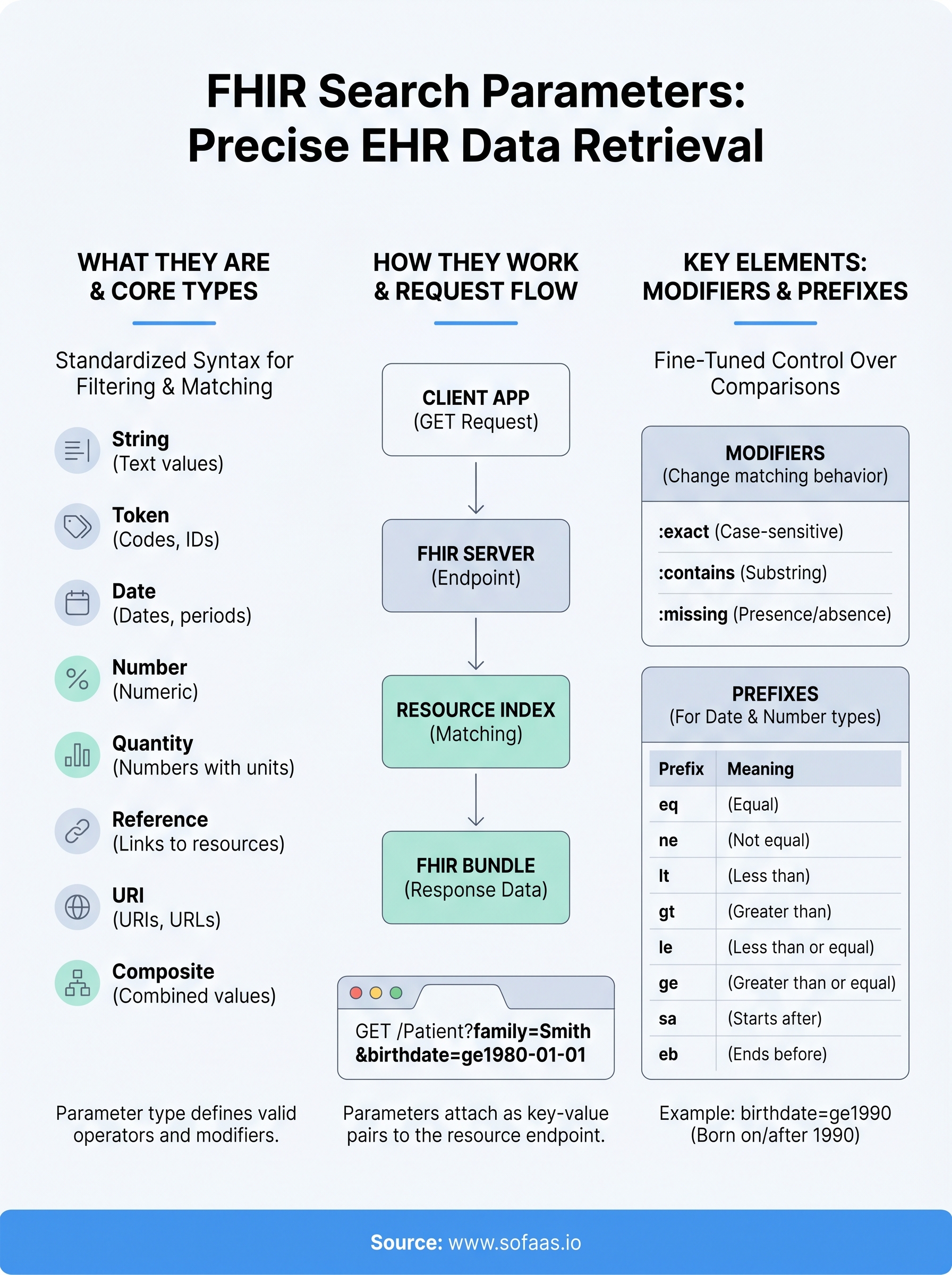
The HL7 FHIR specification defines eight core parameter types, and each one governs how the server interprets and compares values. Knowing which type applies to a given parameter determines what operators and modifiers you can use against it.
| Parameter Type | What it matches |
|---|---|
| string | Partial or full text values |
| token | Codes, identifiers, booleans |
| date | Date, dateTime, Period, Timing |
| number | Numeric values |
| quantity | Numbers with units |
| reference | Links to other resources |
| uri | URIs and canonical URLs |
| composite | Combined multi-component values |
The type of a parameter drives everything downstream, including which prefixes apply, which modifiers are valid, and how the server indexes the field.
How parameters attach to resources
Every FHIR resource type ships with a set of pre-defined search parameters documented in the specification. For example, the Patient resource supports parameters like family, birthdate, identifier, and gender. When you build a search query, you reference these parameter names directly in your request URL, and the server maps them to the underlying data model.
When working with fhir search parameters in practice, you construct a GET request against a resource endpoint and append parameters using standard query string syntax. A query like GET /Patient?family=Smith&birthdate=1980-01-01 asks the server to return all Patient resources where the family name is Smith and the birth date matches January 1, 1980. Each parameter filters the result set independently, and multiple parameters combine as logical AND conditions by default.
Why search parameters matter in real integrations
When you connect a healthcare application to an EHR, you rarely need everything on the server. A care coordination app might only need active patients assigned to a specific provider, while a medication management tool needs Medication resources filtered by status and date range. Without precise search parameters, your app pulls back entire resource collections and filters them client-side, which burns bandwidth, slows response times, and creates real data handling risks under HIPAA.
The cost of getting queries wrong
Poorly constructed queries create genuine operational problems, not just performance ones. If you over-fetch data, you're processing patient records you have no legitimate business reason to access, which is a direct compliance exposure. Under-fetching forces multiple round trips to the server, increasing latency and making your integration brittle under load. Getting your fhir search parameters right from the start means your application retrieves exactly what it needs, nothing more and nothing less.
Poorly scoped queries are one of the most common sources of HIPAA audit risk in EHR integrations, because they pull more protected health information than the use case actually requires.
Every parameter type, modifier, and prefix in the specification exists to give you surgical control over what the server returns. The teams that invest time in understanding the full parameter model build integrations that are faster, cheaper to operate, and far easier to maintain as their patient data volume scales over time.
How FHIR search requests work
A FHIR search request follows a predictable HTTP pattern that any developer familiar with REST APIs can pick up quickly. You send a GET request to a resource endpoint, append your search parameters as query string key-value pairs, and the server returns a Bundle resource containing all matching records along with pagination metadata.
Building the request URL
The base URL structure looks like this: [base]/[ResourceType]?[parameter]=[value]. For example, GET /Patient?gender=female&birthdate=ge1990-01-01 asks the server for all female patients born on or after January 1, 1990. Each parameter you add narrows the result set further, and by default the server treats multiple parameters as AND conditions, meaning every condition must be satisfied for a resource to appear in the response.
The server returns results as a FHIR Bundle, which includes a total count, navigation links for pagination, and the matching resource entries in a consistent structure regardless of which EHR system sits behind the API.
How the server processes parameters
When your request arrives, the server parses each parameter name and value pair, checks them against its internal search parameter index, and evaluates matches according to the parameter type. A token type match behaves differently from a date type match, which is why understanding the underlying type of each fhir search parameter directly shapes how you write the query. The server then applies any modifiers or prefixes you included before assembling the final result set and returning it to your client.
Modifiers, prefixes, and special parameters
The FHIR specification extends basic parameter matching with modifiers and prefixes that give you finer control over how comparisons work. Modifiers attach to parameter names with a colon, while prefixes attach to values. Together, they let you express queries like "starts with," "not equal to," or "greater than or equal to" without writing custom filtering logic on your client side.

Modifiers
Modifiers change how the server interprets a parameter's matching behavior. You append them to the parameter name using a colon, such as name:exact or subject:missing. The most commonly used modifiers include:
- :exact - requires a full, case-sensitive string match
- :contains - matches any substring within the value
- :missing - returns resources where the parameter is absent or present
- :not - excludes resources matching the specified token value
Prefixes for date and number types
Prefixes apply specifically to date, number, and quantity parameters, letting you express range conditions directly in the query value. You add them as a two-letter code immediately before the value itself.
| Prefix | Meaning |
|---|---|
eq |
Equal to (default) |
ne |
Not equal to |
lt / gt |
Less than / greater than |
le / ge |
Less than or equal / greater than or equal |
sa / eb |
Starts after / ends before |
Combining prefixes with date parameters is one of the most practical fhir search parameters techniques you will use when filtering Observations or Encounters by specific time windows.
Supported parameters, custom parameters, and indexing
Every FHIR server publishes a CapabilityStatement (or Conformance resource in older versions) that lists exactly which search parameters it supports. Before you write a single query, you should retrieve that document and verify that the parameters you plan to use are actually indexed on the target server. A parameter defined in the specification does not guarantee the server implements it, and querying against an unsupported parameter typically returns an error or, worse, silently returns unfiltered results.
Standard versus custom parameters
The HL7 specification defines a canonical set of search parameters for each resource type, covering the most commonly queried fields. Beyond that, individual EHR vendors can expose custom parameters specific to their implementation. These vendor-specific parameters follow the same query string syntax but are prefixed with a custom name to signal they are non-standard. When you build integrations against multiple EHRs using fhir search parameters, you need to account for these differences, because a query that works against one server may behave differently or fail against another.
Relying on custom parameters without a fallback strategy is one of the most common sources of brittle integrations when you scale across multiple EHR systems.
How servers index search parameters
Indexing determines how quickly and accurately the server resolves your queries. When a FHIR server ingests a resource, it extracts the indexed fields and stores them in a way that supports fast lookup. Unindexed parameters produce slow or failed queries, which is why understanding what your target server indexes directly impacts the performance of your application at scale.
Key takeaways and next steps
FHIR search parameters give you precise control over what data your application retrieves from an EHR server. Understanding the eight parameter types is your foundation, since each type determines which modifiers and prefixes are valid. Combining prefixes, modifiers, and chained parameters lets you filter resources with the same precision a SQL developer brings to a relational database, while keeping your data access scoped tightly enough to satisfy HIPAA requirements.
Before you write production queries, pull the server's CapabilityStatement to confirm which parameters are actually indexed on your target system. Custom vendor parameters exist across EHR implementations, and a query that works cleanly against Epic may not behave the same way against Cerner. Testing parameter behavior early in your build cycle prevents brittle integrations when your patient data volume scales.
If building and maintaining these query patterns across multiple EHR systems is slowing down your team, launch your SMART on FHIR app through SoFaaS and let a managed platform handle the integration layer so you can stay focused on your product.
The Future of Patient Logistics
Exploring the future of all things related to patient logistics, technology and how AI is going to re-shape the way we deliver care.
Thank you! Your submission has been received!
Oops! Something went wrong while submitting the form.