How to Prepare for a HIPAA Compliance Audit

An OCR letter in your inbox, or even a routine internal review, can turn into weeks of scrambling if you have not organized your compliance evidence ahead of time. HIPAA compliance audits examine how your organization handles protected health information, from access controls to breach notification procedures, and most teams underestimate how much documentation examiners actually expect to see. If you are building or running a healthcare application, that scramble usually starts with figuring out where your EHR integration touches patient data in the first place.
This guide walks through exactly what auditors look for and how to get ready without derailing your product roadmap. You will get a practical audit preparation checklist, a breakdown of who conducts these reviews (OCR, third-party auditors, or your own internal team), and realistic cost ranges based on organization size and audit scope.
We will also cover the technical side that trips up most software teams: access logging, encryption standards, and vendor risk documentation for anything connected to EHR systems. If your application integrates with Epic, Cerner, or Allscripts, you will see where integration architecture decisions directly affect your audit readiness, and what to fix before an examiner asks.
What a HIPAA compliance audit involves
A HIPAA compliance audit is a structured review of how your organization creates, stores, transmits, and disposes of protected health information (PHI). Auditors compare what your policies say against what your systems and staff actually do. That gap, between documented policy and daily practice, is where most organizations get flagged. Unlike a casual internal check, a formal audit produces a written record that regulators, business partners, or investors can request later, so precision matters more than good intentions.

Who performs the audit
Three types of reviewers show up in this space, and each one changes what you need to prepare. The Office for Civil Rights (OCR), part of the U.S. Department of Health and Human Services, runs both random compliance audits and complaint-driven investigations under its HIPAA enforcement authority. Third-party auditors, often hired by a business partner or as part of a SOC 2 or HITRUST certification effort, conduct contractual reviews that verify you meet the security expectations your partners require. Internal teams run self-assessments on a regular cadence, usually annually, to catch problems before an external party finds them.
The gap between your written policy and your daily practice is exactly what a HIPAA compliance audit is designed to expose.
The three rules every audit checks
Every audit, regardless of who runs it, maps back to three regulatory pillars. Auditors evaluate each one separately, and weakness in any single area can sink an otherwise strong review.
- Privacy Rule: how PHI is used, disclosed, and shared with patients and third parties, including your Notice of Privacy Practices.
- Security Rule: administrative, physical, and technical safeguards protecting electronic PHI (ePHI), including encryption, access controls, and audit logging.
- Breach Notification Rule: your process for detecting, assessing, and reporting a breach within the required timelines.
Given these three areas, most audits also pull a sample of your business associate agreements (BAAs) to confirm every vendor touching PHI, including your EHR integration partner, has a signed agreement on file.
What auditors actually request
Specifically, expect a document request list that goes far beyond your written policies. Auditors typically ask for risk assessment reports, access logs showing who viewed which patient records, training completion records, incident response logs, and evidence of encryption in transit and at rest. If your application connects to Epic, Cerner, or Allscripts, they will also want proof that your OAuth token handling and patient consent flows meet the SMART on FHIR authorization requirements those platforms enforce.
Cost and scope vary by organization size
Since budget planning matters just as much as technical prep, here's a rough range based on organization size and audit type:
| Organization size | Audit type | Typical cost range |
|---|---|---|
| Small practice or startup | Internal self-assessment | $2,000 - $8,000 |
| Mid-size health tech company | Third-party audit | $10,000 - $35,000 |
| Enterprise with multiple EHR integrations | Full third-party or HITRUST-aligned audit | $40,000 - $150,000+ |
| Any size, OCR-initiated | Investigation or random audit | Varies; potential fines from $100 to $1.5M per violation category |
These figures shift depending on how many systems are in scope and whether you need remediation work built into the engagement. Teams that integrate with multiple EHRs directly, rather than through a managed layer, tend to land at the higher end because auditors have more connection points and access logs to review. That's one reason healthcare software teams increasingly offload the integration layer itself to a platform built for HIPAA-compliant data exchange, rather than maintaining that surface area in-house.
Step 1. Designate a HIPAA privacy and security officer
Before you touch a single document, name the people who own this process. The HIPAA Privacy Rule and Security Rule both require a designated privacy officer and security officer, and auditors ask for this name on day one. Skipping this step, or leaving the role vaguely assigned to "whoever has time," signals to reviewers that compliance is an afterthought rather than a managed function.
Why this role can't be an afterthought
The privacy officer oversees how PHI is used and disclosed, handles patient rights requests, and manages your Notice of Privacy Practices. The security officer focuses on the technical and physical safeguards protecting ePHI, including access controls, encryption, and audit logging across every system that touches patient data. In smaller organizations, one person often holds both titles. That's fine as long as the responsibilities are documented separately and the person has actual authority to enforce policy changes, not just report on them.
An audit with no named privacy or security officer is an audit that fails before it starts.
What the role actually does before an audit
Specifically, this person becomes your single point of contact for the entire review. Give them the authority and time to do the following before an examiner ever asks:
- Maintain the master list of policies, procedures, and risk assessments
- Track every business associate agreement, including your EHR integration vendor
- Coordinate workforce training records and sign-off documentation
- Serve as the liaison if OCR or a third-party auditor requests information
- Approve any changes to access controls or data handling practices
For a software team building on Epic, Cerner, or Allscripts, the security officer also needs visibility into how your engineering team handles OAuth tokens, patient consent flows, and API access logs. That means pulling in a technical lead, not just a compliance generalist, if nobody on the security side understands SMART on FHIR authorization internals.
Document the designation formally
Don't just assign the role verbally in a team meeting. Auditors want to see it in writing, dated, and tied to a specific policy document. A simple internal memo works:
HIPAA Officer Designation
Effective Date: [date]
Privacy Officer: [name, title]
Security Officer: [name, title]
Approved by: [executive sponsor]
Review cadence: Annual, or upon role change
Keep this on file alongside your other governance documents. It's one of the first things an auditor will ask to see, and having it ready sets the tone for how organized the rest of your evidence will look.
Step 2. Define your audit scope and objectives
With your officers named, decide what the audit actually covers before you start pulling documents. A vague scope wastes weeks chasing paperwork nobody needs, while a scope that's too narrow leaves gaps an examiner will find anyway. Audit scope should map directly to where PHI lives, moves, and gets accessed across your organization, not just the systems you assume matter most.
Map every system that touches PHI
Start by listing every application, database, and vendor connection that creates, stores, or transmits patient data. This includes your EHR integration layer, any analytics tools that touch de-identified or identified data, cloud storage, backup systems, and even the helpdesk software your support team uses when a patient calls in. Teams building on Epic, Cerner, or Allscripts often forget that their OAuth token store and consent management logs count as PHI-adjacent systems too, since they control who can see what.
If PHI touches it, it belongs in your audit scope. There's no such thing as a system too small to review.
Set clear objectives, not just a checklist
Scope defines what you're reviewing; objectives define what you're trying to prove. Common objectives include:
- Confirming Security Rule safeguards match your documented risk assessment
- Verifying every business associate agreement is current and signed
- Demonstrating breach notification timelines meet the 60-day requirement under the HIPAA Breach Notification Rule
- Validating that access logs tie specific PHI views to authenticated users
Write these down. An objective like "make sure we're compliant" gives your team nothing to test against, while "confirm access logs retain 6 years of history per user" gives you a pass/fail standard.
Decide the audit boundaries in writing
Before moving to documentation gathering, put your scope and objectives in a short memo that your privacy and security officers sign off on. Include the date range under review (most audits cover the trailing 12 months), which business units or product lines are in scope, and which systems are explicitly excluded and why. This document becomes your reference point for the rest of the process, and it's usually the second thing an auditor asks for right after the officer designation. Skipping this step means every later step drifts, because nobody agreed in advance on what "done" looks like.
Step 3. Gather and organize your compliance documentation
With scope and objectives signed off, the real work starts: pulling every document that proves your policies match reality. Most teams keep this evidence scattered across shared drives, email threads, and someone's personal notes, which is exactly the mess that turns a two-week audit into a two-month one. Compliance documentation needs a single, organized home before an auditor asks for the first file, not after.
Build your master document inventory
Gather these categories before you touch the risk assessment step, since auditors will cross-reference them against each other:
- Written policies and procedures for the Privacy, Security, and Breach Notification Rules
- Signed business associate agreements, including your EHR integration vendor
- Prior risk assessments and any remediation records tied to them
- Workforce training completion logs, dated and tied to individual names
- Incident and breach response logs, even if no reportable breach occurred
- Access control records, including OAuth consent logs for any SMART on FHIR connection
- System inventories showing where PHI is created, stored, and transmitted
Missing documentation reads to an auditor as a missing control, even when the control actually exists.
Sort documentation by regulatory rule, not by folder habit
Instead of dumping everything into one shared drive labeled "Compliance," organize files by the rule they support. This mirrors how auditors actually review evidence and saves you from digging mid-interview.
| Rule | Document type | Where it usually lives |
|---|---|---|
| Privacy Rule | Notice of Privacy Practices, patient rights logs | Legal or compliance shared drive |
| Security Rule | Access logs, encryption configs, risk assessments | Engineering or IT security repository |
| Breach Notification | Incident logs, timeline records | Security officer's tracking system |
Grouping documents this way also exposes gaps early. If your Security Rule folder is thin on access logs from your EHR integration, you'll see it now instead of during a live audit interview.
Date and version everything
Auditors care about when a document was created and last reviewed, not just whether it exists. Stamp every policy with a version number and review date, and archive superseded versions rather than deleting them. A policy from three years ago with no update history looks worse than no policy at all, since it suggests nobody has checked whether it still reflects how your systems actually handle patient data.
Step 4. Conduct a risk assessment
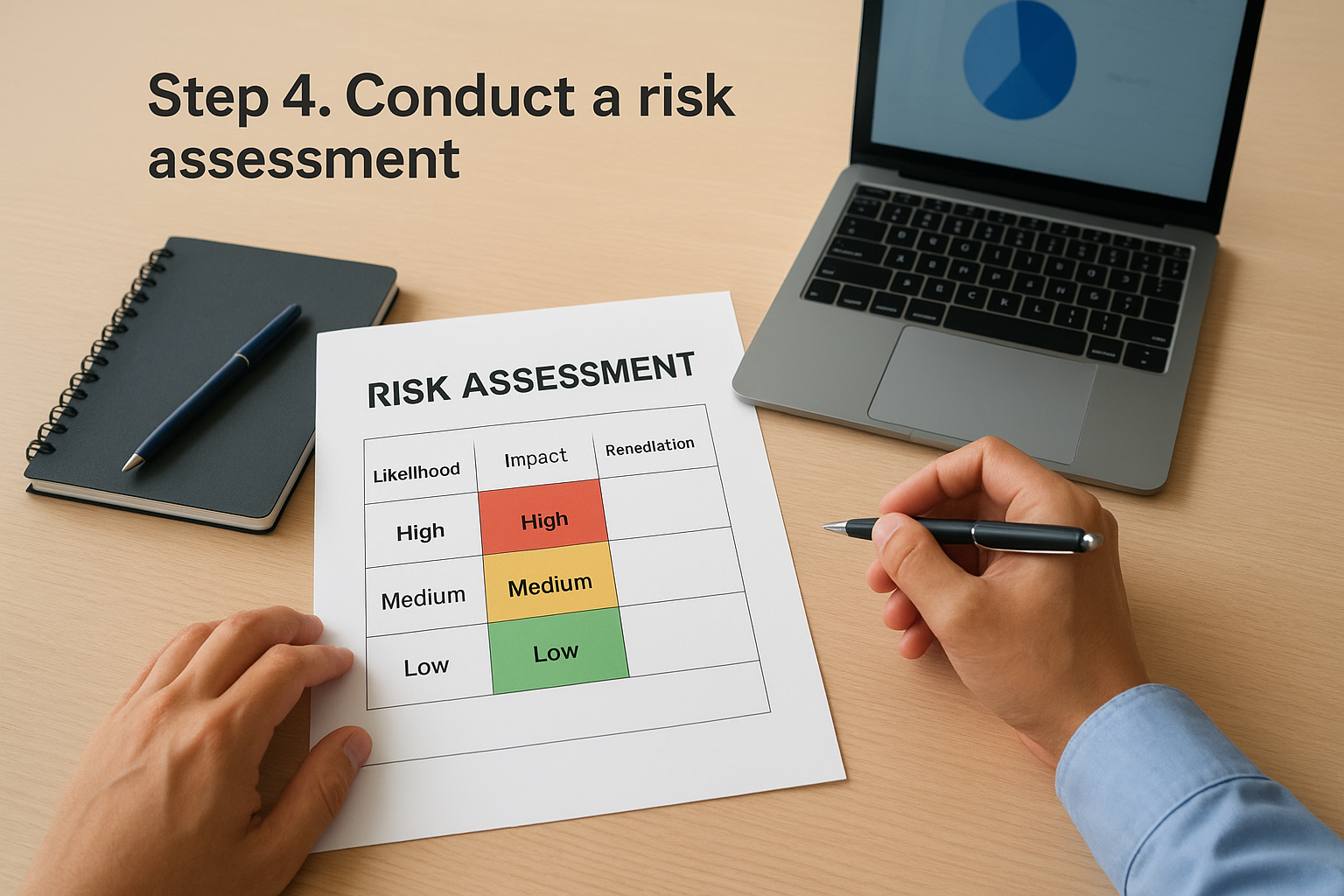
With documentation organized, you're ready for the piece auditors treat as the backbone of the entire review. A risk assessment identifies every place PHI could be exposed, ranks how likely and how damaging each exposure would be, and ties each risk to a specific remediation action. Skip this step, or treat it as a one-time checkbox from three years ago, and you've handed an auditor the easiest possible finding.
Identify where the actual risk lives
Start by walking through every system from your Step 2 scope and asking where PHI could leak, get accessed without authorization, or get lost entirely. For teams connected to Epic, Cerner, or Allscripts, this means scrutinizing your OAuth token storage, API rate limiting, and how patient consent revocation actually propagates through your system. A token that never expires, or a webhook endpoint without signature verification, is exactly the kind of gap a hipaa compliance audit is designed to surface before it becomes a breach.
A risk assessment that never gets updated is worse than no risk assessment, because it tells an auditor you stopped looking.
Score and prioritize what you find
Rank each identified risk by likelihood and impact, then assign an owner and a remediation deadline. A simple three-tier structure works for most organizations:
| Risk level | Example | Remediation timeline |
|---|---|---|
| High | Unencrypted PHI in transit between your app and EHR API | Immediate, before audit submission |
| Medium | Access logs missing user-level detail on some endpoints | 30-60 days |
| Low | Training records not centrally stored | 90 days |
Document the reasoning behind each score, not just the score itself. Auditors want to see the logic, not just a color-coded spreadsheet.
Refresh the assessment, don't just file it
Many organizations run a risk assessment once, file it away, and never touch it again until an audit forces them to. That approach fails immediately when an examiner asks for your most recent update and finds a document that predates your last three product releases. Update your assessment whenever you add a new EHR connection, change your authentication flow, or onboard a new vendor that touches patient data. According to NIST's guidance on HIPAA security risk assessments, risk assessments should be an ongoing process tied to your organization's actual technology changes, not a static annual exercise. Treat this document as a living artifact your security officer owns and revisits every time your integration architecture shifts, not a form you complete once and forget.
Step 5. Review your safeguards and security controls
With your risk assessment ranked, turn to the controls that are supposed to close those gaps. Security controls fall into three categories under the Security Rule: administrative, physical, and technical. Auditors test each one separately, and a strong technical setup won't save you if your administrative safeguards, like access termination procedures for departing employees, exist only on paper.

Administrative and physical safeguards
Check that your administrative safeguards include a documented sanction policy, periodic access reviews, and a workforce clearance process tied to job role. Physical safeguards cover facility access controls, workstation security, and device disposal procedures. If your team works remotely, auditors will also ask how you secure laptops and home networks that touch PHI, so document that policy explicitly rather than assuming it's understood.
Technical controls tied to your EHR integration
Given that most breaches trace back to technical gaps, this is where software teams need to slow down. Confirm the following before an examiner asks:
- Encryption in transit (TLS 1.2 or higher) and at rest for every database holding PHI
- Unique user IDs and role-based access controls, not shared logins
- Automatic session timeout and token expiration for any SMART on FHIR OAuth connection
- Audit logging that captures who accessed which record, when, and from where
- Signature verification on webhook endpoints receiving EHR data updates
A safeguard that exists in your architecture diagram but not in your logs doesn't count during an audit.
Test controls, don't just list them
Listing a control isn't the same as proving it works. Pull a sample of access logs and confirm they actually show user-level detail for a real patient record lookup. Trigger a test session timeout and verify it fires correctly. Review your encryption standards guidance from HHS against your actual configuration, not against what your engineering team believes is deployed. Organizations connecting directly to Epic, Cerner, or Allscripts often find that token refresh logic or consent revocation doesn't propagate as fast as documented, which is exactly the kind of finding that surfaces during live testing rather than a paper review.
Where a managed layer changes the math
Teams running their EHR connections through SoFaaS inherit encryption, audit logging, and OAuth token management as part of the platform rather than building and testing each control themselves. That doesn't eliminate the review, but it shrinks the surface area you have to verify and document from scratch.
Step 6. Verify workforce training and policies
Safeguards mean little if the people using your systems never learned how to follow them. Workforce training is one of the first things an auditor checks after documentation, because a policy nobody was trained on isn't really a policy in practice. Auditors want proof that every employee, contractor, and anyone else touching PHI completed HIPAA training, not just a signature on a form from three years ago.
Confirm training actually covers your real workflows
Generic HIPAA training videos rarely mention how your engineering team handles OAuth tokens or how your support staff should respond when a patient calls asking what data your app shares with their EHR. Tailor at least part of your training to the specific systems your organization actually uses. If your app connects to Epic, Cerner, or Allscripts, your technical staff should understand consent revocation and token expiration well enough to explain it, not just click through a slide deck.
Training that doesn't match how your team actually works isn't compliance, it's paperwork.
Track completion with real records, not assumptions
Build a simple tracking system that ties each training session to a name, date, and version of the material covered. At minimum, keep records for:
- New hire HIPAA training completed before system access is granted
- Annual refresher training for all staff with PHI access
- Role-specific training for engineers working on EHR integrations
- Sign-off acknowledgment for every policy update
Missing even one name from this list gives an auditor an easy finding, since it suggests access controls and training don't actually move together.
Review policies for accuracy, not just existence
While you're verifying training records, pull your written policies alongside them and confirm they still describe how your systems actually work. Policies written before you added a new EHR connection, changed your authentication flow, or onboarded a new vendor need updating before an audit, not during one. Cross-check each policy against your Step 3 documentation and Step 4 risk assessment to make sure nothing contradicts itself. An outdated policy that still references a retired system tells an auditor your compliance program isn't keeping pace with your product, which is a harder finding to explain away than a missing signature.
Step 7. Document findings and build a remediation plan
Every step so far has generated findings, whether that's a thin risk assessment, a training gap, or a webhook endpoint missing signature verification. Now you pull those threads together into a single audit findings report that an examiner, or your own leadership, can actually act on. Skipping this consolidation step means your work from Steps 1 through 6 stays scattered across spreadsheets nobody revisits, which defeats the purpose of running the audit in the first place.
Write findings the way an auditor would
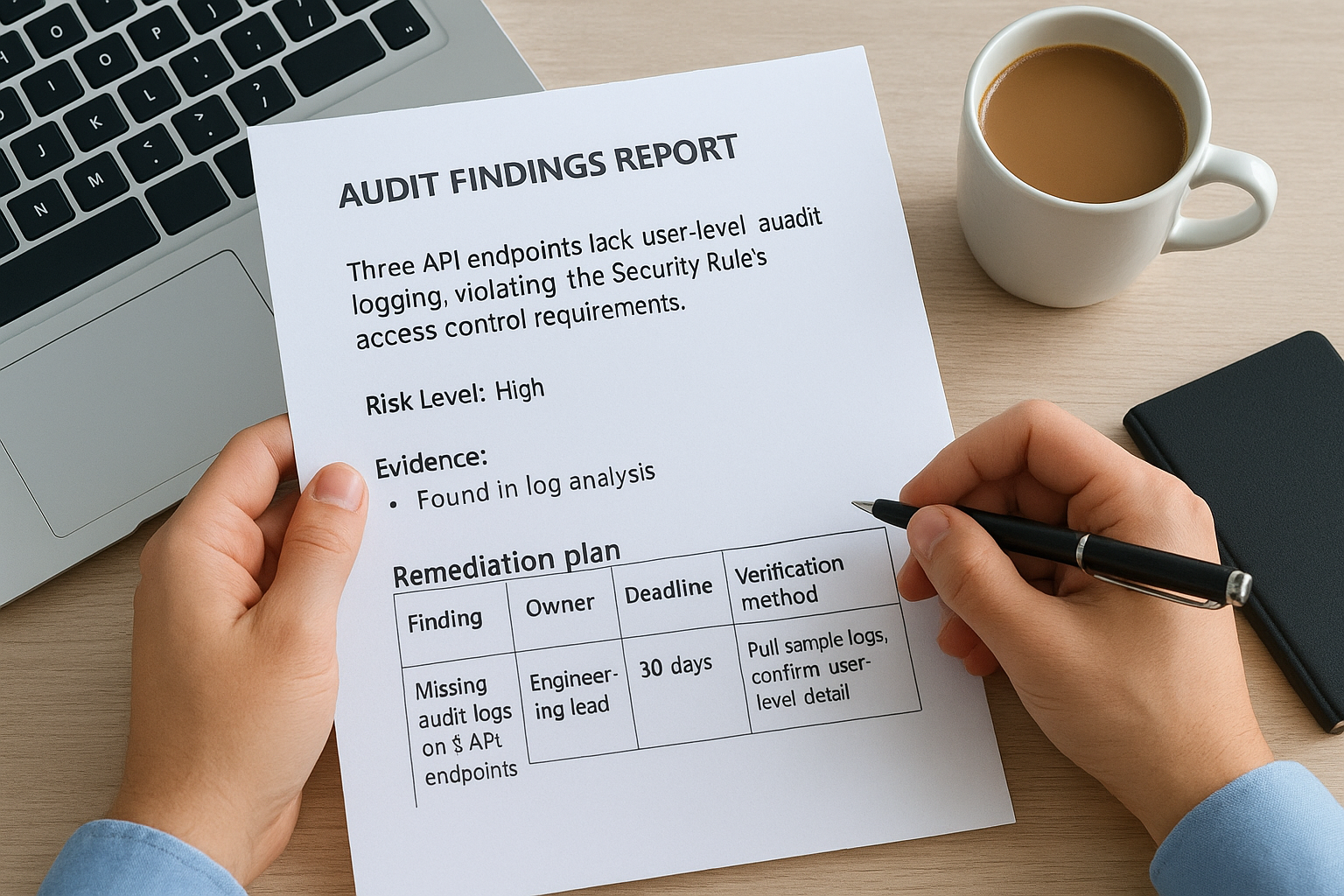
Format matters here. Each finding needs a description of the gap, the regulatory rule it touches, the risk level, and the evidence that surfaced it. Avoid vague language like "access controls need improvement." Write instead: "Three API endpoints lack user-level audit logging, violating the Security Rule's access control requirements." Specificity here saves you from vague remediation later, since a fuzzy finding produces a fuzzy fix.
A finding without a fix date is just a complaint with extra formatting.
Build the remediation plan
Attach a remediation plan to every finding, not just the high-risk ones. Each item needs an owner, a deadline, and a way to verify the fix actually worked. A simple table keeps this organized and gives your privacy and security officer something concrete to track:
| Finding | Owner | Deadline | Verification method |
|---|---|---|---|
| Missing audit logs on 3 API endpoints | Engineering lead | 30 days | Pull sample logs, confirm user-level detail |
| OAuth tokens without expiration | Security officer | 14 days | Test token expiry in staging and production |
| Training gap for 4 new hires | HR / Privacy officer | 15 days | Completion certificates on file |
Assign realistic deadlines. A 30-day fix that actually takes 90 days damages your credibility more than the original finding did.
Close the loop and archive the record
Finally, once a fix ships, document the closure with a date and the evidence that confirms it, not just a checkmark. Keep the full findings report and remediation history on file for at least six years, matching the HIPAA documentation retention requirement, since a future audit will likely ask what you found last time and whether you actually fixed it. Retaining this history also gives you a baseline for comparing risk trends year over year, which turns your audit process from a one-time scramble into a genuine compliance program.
Staying audit-ready long after the review ends
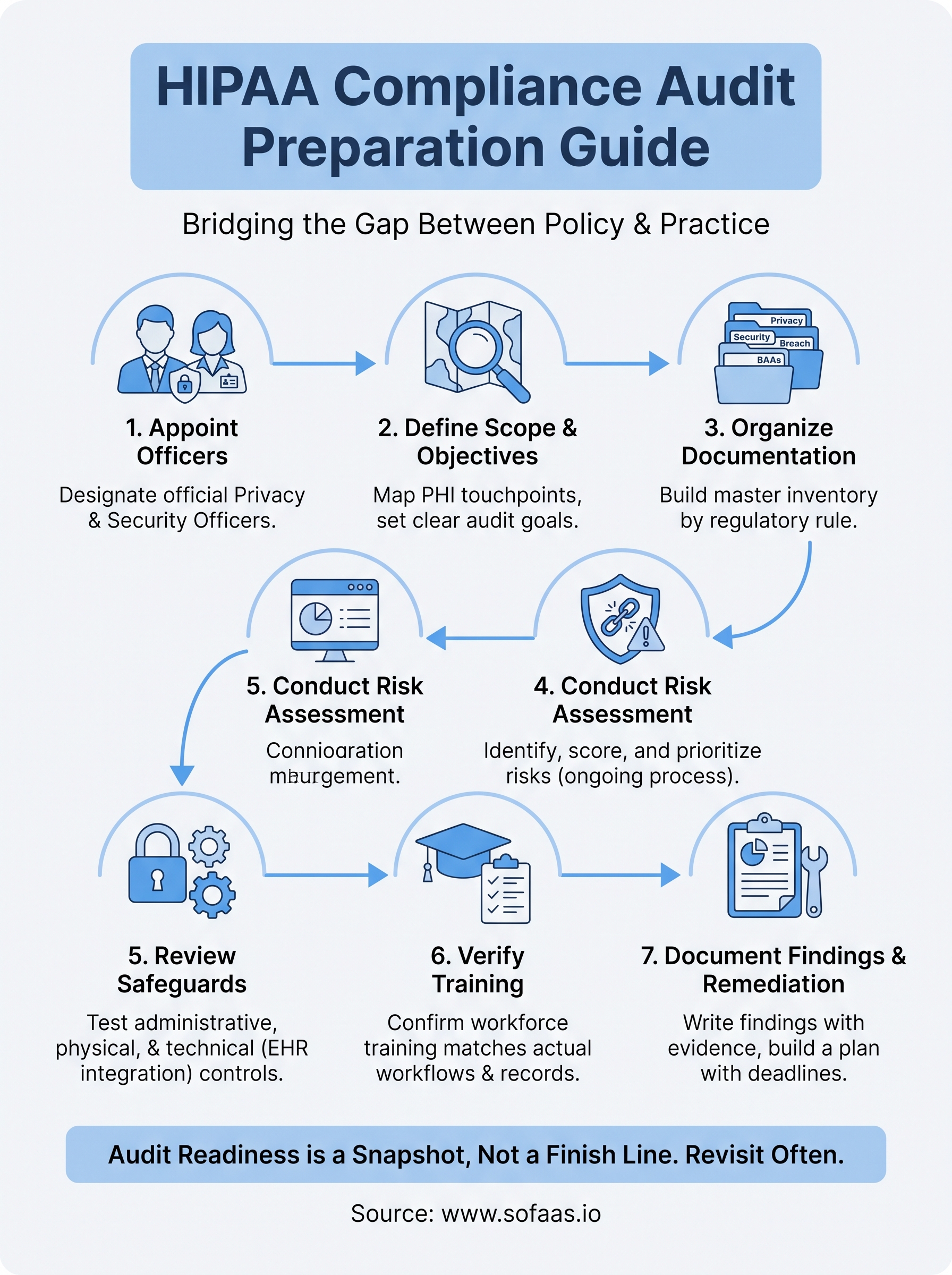
A passed audit isn't a finish line, it's a snapshot. Treat every artifact you built through these seven steps, your risk assessment, training logs, and remediation history, as living documents that get revisited whenever your product changes. Audit readiness holds up over time only when it's baked into your release process, not bolted on before an examiner shows up.
Much of that ongoing burden traces back to how your application connects to EHR systems in the first place. Every new integration point adds another surface auditors will want to see documented, logged, and tested. That's the real cost most software teams underestimate until the second or third audit cycle.
If you'd rather spend that time building your product instead of defending your integration layer, launch your SMART on FHIR app on VectorCare and inherit the compliance groundwork instead of rebuilding it from scratch every time an examiner calls.
The Future of Patient Logistics
Exploring the future of all things related to patient logistics, technology and how AI is going to re-shape the way we deliver care.
Thank you! Your submission has been received!
Oops! Something went wrong while submitting the form.