9 Best HIPAA-Compliant E-Signature Software Options in 2026

Every consent form, referral document, or intake packet you send patients to sign creates a compliance risk if the tool behind it wasn't built for healthcare. Generic e-signature apps like the free version of DocuSign or HelloSign might get a signature captured, but without a signed Business Associate Agreement and proper audit controls, you're exposing your organization to HIPAA violations that can cost thousands per incident. If you're searching for hipaa compliant e signature software, you already know a standard tool won't cut it.
This guide skips the marketing fluff and gets straight to what matters: which platforms actually offer a signed BAA, encrypt documents at rest and in transit, and keep the kind of audit trail that holds up if OCR ever comes knocking. We compare pricing, integration options, and ease of use across nine vendors so you can match the right one to your workflow, whether that's a small clinic or a multi-location health system.
We work with healthcare suppliers and app builders every day at SoFaaS, helping them connect securely to EHRs like Epic and Cerner without the compliance headaches, so we know how much detail matters when patient data and legal exposure are on the line. Read on for our breakdown of the nine best options heading into 2026.
1. What makes an e-signature platform HIPAA compliant
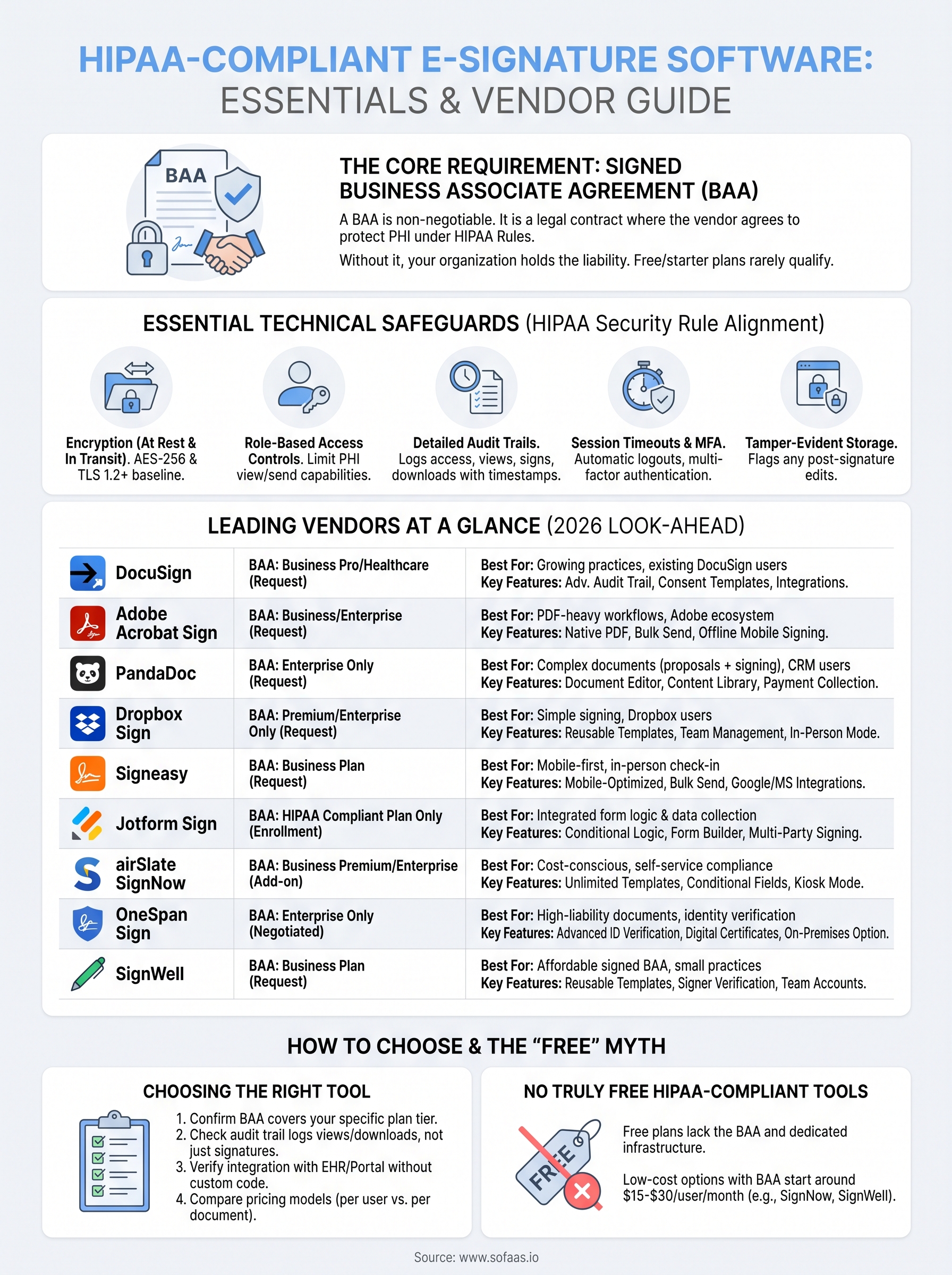
No government agency hands out a "HIPAA-compliant" seal of approval. There's no certification body, no badge you can verify against an official registry. Instead, compliance comes down to whether a vendor implements the specific administrative, physical, and technical safeguards HIPAA requires, and whether they'll sign a Business Associate Agreement (BAA) that puts legal weight behind those claims. Any hipaa compliant electronic signature software worth using should offer a BAA before you ever upload a patient document, not as an afterthought once you've already signed a contract.

Start with the BAA itself, since it's the single non-negotiable item. A BAA is a legal contract where the vendor acknowledges they're handling protected health information (PHI) on your behalf and agrees to protect it under HIPAA's Privacy and Security Rules. Some companies only offer a BAA on enterprise-tier plans, which is why the free or starter tiers of consumer e-signature tools rarely qualify, even if the underlying software is technically capable of encryption. Always ask directly: will you sign a BAA at my plan level, and what does it exclude?
A HIPAA-compliant e-signature platform is defined less by its features and more by whether it will put its compliance promises into a signed, legally binding BAA.
Beyond the paperwork, look at the technical controls. The U.S. Department of Health and Human Services (HHS) lays out the Security Rule's required safeguards, and a compliant platform should map to them cleanly. At minimum, expect:
- Encryption of documents both at rest and in transit (AES-256 and TLS 1.2 or higher are the current baseline)
- Role-based access controls so only authorized staff can view or send documents containing PHI
- Detailed audit trails that log who accessed, viewed, signed, or downloaded a document, with timestamps
- Automatic session timeouts and multi-factor authentication for user accounts
- Secure, tamper-evident storage that flags any post-signature edits
Governance matters just as much as the technology stack. A vendor should be able to describe their breach notification process, their data retention and deletion policies, and where their servers are physically hosted, since some healthcare organizations have contractual requirements around U.S.-based data centers. You can cross-reference HHS's own guidance on the Security Rule at hhs.gov for the baseline requirements any covered entity or business associate is expected to meet.
Watch for a specific gap: a platform can be "HIPAA-ready" in its architecture while still refusing to sign a BAA for smaller accounts. That distinction trips up a lot of clinics shopping for hipaa-compliant e-signature software on a budget. Treat the BAA as your first filter, then evaluate everything else, audit logging, integration options, ease of use, against the safeguards above. The next nine reviews apply exactly that filter to the market's leading platforms.
2. DocuSign
DocuSign dominates the e-signature market for a reason: it's the platform most patients and staff have already used somewhere else, which cuts down on training time. As one of the most recognized names offering hipaa compliant esignature software, it's often the first stop for healthcare organizations building out a signing workflow, especially those already using DocuSign for non-healthcare paperwork.

Key features
Beyond the signing itself, DocuSign packs in the infrastructure larger healthcare organizations expect:
- Advanced audit trail with certificate of completion for every document
- Template library for consent forms and intake packets
- API access for embedding signing directly into patient portals
- Identity verification options, including SMS and knowledge-based authentication
- Integrations with Salesforce, Microsoft, and major EHR-adjacent tools
HIPAA compliance and BAA
DocuSign will sign a Business Associate Agreement, but only on its Business Pro and higher plans, or through its dedicated Healthcare offering. You have to request the BAA directly through sales or support; it's not a checkbox you toggle in account settings. Once signed, DocuSign's infrastructure covers encryption at rest and in transit, role-based permissions, and detailed access logs that satisfy most compliance officers reviewing vendor risk.
If you're on DocuSign's free or personal tier, you don't have HIPAA-compliant e-signature software, no matter how the app looks and feels.
Pricing
| Plan | Monthly Cost (per user) | BAA Included |
|---|---|---|
| Personal/Standard | $10-$45 | No |
| Business Pro | ~$65 | Available on request |
| Healthcare/Enterprise | Custom quote | Yes |
Expect to talk to sales for exact enterprise pricing since volume and integration needs shift the quote significantly.
Best for
Growing practices and health systems that already run other business operations through DocuSign and want one vendor relationship instead of juggling multiple e-signature tools across departments.
3. Adobe Acrobat Sign
Adobe Acrobat Sign rides on the back of the PDF standard Adobe basically invented, which makes it a natural fit for practices that already manage patient forms as PDFs. If your intake packets, referral forms, or consent documents already live in Acrobat, adding hipaa-compliant electronic signature software from the same vendor means one less tool to reconcile with your document management workflow.
Key features
Acrobat Sign leans hard into its PDF heritage while still covering the compliance basics healthcare buyers expect:
- Native integration with Adobe Acrobat and Creative Cloud for form building
- Bulk send for distributing intake forms to large patient lists
- Mobile signing app with offline capture for field staff
- Reusable templates with pre-filled patient data merge fields
- Integrations with Microsoft 365, Workday, and Salesforce
HIPAA compliance and BAA
Adobe will sign a BAA for customers on its Business and Enterprise tiers, though it's not automatically included and requires a request through your account team. Once in place, Acrobat Sign applies AES-256 encryption, TLS in transit, and detailed audit trails tied to each signature event. Adobe also publishes a dedicated healthcare compliance page outlining how its infrastructure maps to HIPAA's Security Rule, which is more transparency than several competitors offer upfront.
Adobe's PDF-first design makes it a strong pick, but only after you've confirmed the BAA covers your specific plan tier.
Pricing
| Plan | Monthly Cost (per user) | BAA Included |
|---|---|---|
| Individual | $9.99-$19.99 | No |
| Business | ~$14-$40 | Available on request |
| Enterprise | Custom quote | Yes |
Best for
Organizations already standardized on Adobe products for document creation and management, particularly those with heavy PDF-based intake or referral workflows who want signing built into the same ecosystem rather than bolted on as a separate app.
4. PandaDoc
PandaDoc built its reputation on document workflow automation rather than pure e-signature, which shows up in how it handles healthcare paperwork. If your practice sends proposals, contracts, and consent forms that need more than a signature line, like pricing tables for private-pay services or bundled service agreements, PandaDoc's document editor gives you more flexibility than a signature-only tool. It's a solid pick for anyone comparing hipaa compliant electronic signature software that doubles as a document builder.
Key features
PandaDoc's strength lies in combining document creation with signing in one interface:
- Drag-and-drop document editor with healthcare-specific templates
- Content library for reusing approved clauses and consent language
- Real-time notifications when a patient opens or signs a document
- CRM integrations, including Salesforce and HubSpot, for practices tracking referrals
- Payment collection built into the signing flow for practices billing at time of consent
HIPAA compliance and BAA
PandaDoc offers a signed BAA exclusively on its Enterprise plan; it's not available on Essentials or Business tiers, even though those tiers include encryption and access logging. You'll need to contact sales directly to add HIPAA compliance to your contract, and PandaDoc explicitly states this in its own documentation rather than burying it. Once active, the platform applies AES-256 encryption at rest, TLS 1.2 in transit, and maintains a certificate of completion with a full audit trail for every signed document.
PandaDoc's document-building strength only matters for healthcare use if you upgrade to the one tier that actually includes a BAA.
Pricing
| Plan | Monthly Cost (per user) | BAA Included |
|---|---|---|
| Essentials | ~$19 | No |
| Business | ~$49 | No |
| Enterprise | Custom quote | Yes |
Best for
Practices that need to combine complex documents, like service agreements or itemized consent forms, with signing in a single tool, especially those already using a CRM that PandaDoc integrates with directly.
5. Dropbox Sign
Dropbox Sign, formerly HelloSign, appeals to practices that want a lightweight signing tool without the overhead of a full document platform. Since Dropbox acquired HelloSign, the product has leaned into simplicity, a clean signing experience with minimal setup, which makes it a reasonable fit for solo practitioners or small clinics comparing hipaa compliant esignature software that won't require a steep learning curve for staff.
Key features
Simplicity doesn't mean the feature set is thin. Dropbox Sign covers the essentials most small healthcare practices need day to day:
- Reusable templates for consent forms, intake documents, and referral paperwork
- In-person signing mode for front-desk tablets
- API access for developers embedding signing into a patient portal
- Team management with granular permissions by role
- Native Dropbox storage integration for document retention
HIPAA compliance and BAA
Getting a signed BAA from Dropbox Sign requires their Premium or Enterprise plan; it isn't available on Essentials or Standard, and Dropbox is upfront about that restriction in its own compliance documentation. Once you're on a qualifying plan, the platform applies AES-256 encryption at rest, TLS 1.2 in transit, and generates a tamper-evident audit trail for every completed document. Support staff can walk you through the BAA request process, though you'll still need to reach out directly rather than self-serve it from your account dashboard.
A clean interface doesn't guarantee compliance. Dropbox Sign only becomes HIPAA-ready once you've upgraded past its entry-level plans and requested the BAA.
Pricing
| Plan | Monthly Cost (per user) | BAA Included |
|---|---|---|
| Essentials | ~$20 | No |
| Standard | ~$30 | No |
| Premium/Enterprise | Custom quote | Yes |
Best for
Small to mid-size practices that want a straightforward signing experience without the added complexity of a full document builder, particularly those already storing files in Dropbox and looking to keep their tech stack consolidated.
6. Signeasy
Signeasy targets small practices and solo providers who want a mobile-first signing experience without wading through enterprise sales calls. Built for speed on phones and tablets, it's a common choice among clinics that see patients sign forms on an iPad at check-in rather than at a desktop. For practices comparing hipaa compliant e-signature software that needs to work as well in the exam room as it does in the back office, Signeasy is worth a look.

Key features
Signeasy keeps its feature set focused on fast, in-person and remote signing rather than complex document assembly:
- Mobile-optimized signing for iOS and Android, including offline mode
- In-person signing for front-desk devices with instant patient handoff
- Template library for recurring consent and intake forms
- Bulk send for distributing forms to multiple patients at once
- Integrations with Google Workspace, Dropbox, and Microsoft 365
HIPAA compliance and BAA
Signeasy will sign a Business Associate Agreement, but only for customers on its Business plan or above; the BAA isn't offered on Individual or Team tiers. You need to contact their sales team directly to add HIPAA coverage to your account, since it isn't a self-service toggle. Once active, Signeasy applies AES-256 encryption at rest, TLS in transit, and a documented audit trail covering every signature event, view, and download.
A mobile-friendly interface means nothing for compliance until you've confirmed your specific plan includes a signed BAA.
Pricing
| Plan | Monthly Cost (per user) | BAA Included |
|---|---|---|
| Individual | ~$10 | No |
| Team | ~$20 | No |
| Business | Custom quote | Yes |
Best for
Solo practitioners and small clinics that rely heavily on tablet-based, in-person signing at check-in and want a lightweight tool that doesn't require a dedicated document-management workflow to operate effectively.
7. Jotform Sign
Jotform Sign grew out of Jotform's form-building platform, so it appeals to practices that already collect patient information through online forms and want signing built into that same workflow. Instead of buying a standalone e-signature tool, you get signing as an extension of intake forms, surveys, and referral requests you might already be running through Jotform. That combination makes it a practical option for clinics comparing hipaa compliant electronic signature software that also needs to handle data collection, not just signatures.
Key features
Jotform Sign's strength is tying form logic directly to the signing step, which cuts down on separate tools for intake and consent:
- Conditional logic that adjusts which forms or fields a patient sees before signing
- Drag-and-drop form builder with healthcare-specific templates
- Multi-party signing for documents requiring provider and patient signatures
- Mobile app for signing on tablets at check-in
- Integrations with widely used EHR-adjacent tools and payment processors
HIPAA compliance and BAA
Jotform offers a signed BAA, but only to customers on its HIPAA Compliant plan, a distinct tier built specifically for healthcare accounts rather than a feature bolted onto general business plans. You have to explicitly enroll in this plan and agree to Jotform's HIPAA terms before uploading any patient data. Once enrolled, the platform applies AES-256 encryption at rest, TLS in transit, and restricts certain integrations and widgets that aren't vetted for PHI handling, which is worth noting since it limits some of Jotform's broader form-building flexibility.
Jotform separates its HIPAA-compliant tier from its standard plans entirely, so signing up for the wrong plan means no BAA and no compliant workflow, regardless of the features you see in the dashboard.
Pricing
| Plan | Monthly Cost | BAA Included |
|---|---|---|
| Starter/Bronze/Silver | $0-$39 | No |
| Gold | ~$99 | No |
| HIPAA Compliant Plan | Custom quote | Yes |
Best for
Practices that rely heavily on custom intake forms and want signing integrated into that same data-collection workflow, rather than treating signatures as a separate step handled by a different vendor.
8. airSlate SignNow
airSlate SignNow markets itself as the budget-friendly alternative to DocuSign and Adobe, and for small practices watching per-seat costs, that positioning matters. It's part of the larger airSlate workflow automation suite, so clinics that outgrow simple signing can layer in document generation and approval routing without switching vendors. For teams comparing hipaa compliant e-signature software that won't balloon in cost as staff count grows, SignNow deserves a spot on the shortlist.
Key features
SignNow keeps pricing low without stripping out the features healthcare teams actually use:
- Unlimited templates on paid plans, useful for practices juggling multiple consent forms
- Conditional fields that adjust document content based on patient responses
- In-person signing kiosk mode for front-desk tablets
- API and embedded signing for developers building patient portals
- Advanced audit trail with document access history and IP logging
HIPAA compliance and BAA
airSlate SignNow signs a Business Associate Agreement for accounts on its Business Premium plan or Enterprise tier; the BAA isn't available on Business or Starter plans. You add HIPAA compliance as a paid feature during checkout or through account settings, which is more self-service than several competitors on this list that require a sales call. Once enabled, SignNow applies AES-256 encryption at rest, TLS 1.2 in transit, and generates a tamper-evident audit trail tied to each document event.
SignNow is one of the few platforms here where you can add HIPAA compliance directly through account settings instead of waiting on a sales rep to unlock it.
Pricing
| Plan | Monthly Cost (per user) | BAA Included |
|---|---|---|
| Business | ~$8 | No |
| Business Premium | ~$15 | Yes (add-on) |
| Enterprise | Custom quote | Yes |
Best for
Cost-conscious practices and small health tech teams that need HIPAA-compliant signing without enterprise-level pricing, especially those willing to self-serve the compliance setup rather than negotiate through sales.
9. OneSpan Sign
OneSpan Sign built its name in identity verification and digital transaction security before e-signature became its main product line, and that heritage still shows in how the platform handles high-stakes documents. Banks and insurers use OneSpan for the same reason hospitals should consider it: the platform was designed around proving who signed something, not just capturing a scribble. For organizations that need hipaa-compliant e-signature software with bank-grade identity assurance behind every consent form, OneSpan fits a narrower but important niche.

Key features
OneSpan leans into verification and legal defensibility more than ease of use, which suits organizations handling sensitive or high-liability documents:
- Advanced identity verification, including knowledge-based authentication and biometric options
- Digital signature certificates with cryptographic tamper-sealing
- On-premises deployment option for organizations that can't use public cloud
- API-first architecture for embedding signing into custom patient portals
- Detailed forensic audit trail suitable for legal disputes
HIPAA compliance and BAA
Getting a signed BAA from OneSpan requires an Enterprise agreement negotiated directly with their sales team; there's no self-service tier that includes it. Once under contract, OneSpan applies AES-256 encryption at rest, TLS in transit, and role-based access controls that satisfy most enterprise compliance reviews. The platform's on-premises option also appeals to health systems with internal policies against storing PHI in third-party cloud environments.
OneSpan's identity-verification depth makes sense for high-liability documents, but its enterprise-only BAA process rules it out for smaller practices moving fast.
Pricing
| Plan | Monthly Cost | BAA Included |
|---|---|---|
| Standard/Business | Custom quote | No |
| Enterprise | Custom quote | Yes |
OneSpan doesn't publish self-service pricing tiers; every quote runs through a sales conversation regardless of practice size.
Best for
Health systems and health tech companies handling high-liability documents, like clinical trial consent or legal agreements tied to PHI, where identity verification and on-premises deployment outweigh the convenience of a faster self-service signup.
10. SignWell
SignWell (formerly Docsketch) targets small practices that want a straightforward tool without the bloat of a full document platform, and it does so at a price point most solo providers can justify without a budget conversation. If you're a small clinic comparing hipaa compliant e signature software and don't need identity verification or on-premises deployment, SignWell's stripped-down approach might be exactly what you're looking for.
Key features
SignWell keeps its interface simple while still covering the fundamentals a healthcare practice needs for consent and intake paperwork:
- Reusable templates for consent forms, intake packets, and referral documents
- Signer verification through email and SMS authentication
- Team accounts with role-based permissions for front-desk and clinical staff
- API access for developers embedding signing into patient-facing apps
- Real-time notifications when a patient views or signs a document
HIPAA compliance and BAA
SignWell offers a signed BAA on its Business plan, which makes it one of the more affordable options on this list that doesn't reserve compliance for an enterprise-only tier. You still have to request the BAA directly through their support team rather than toggling it on yourself, but the turnaround is typically fast compared to vendors requiring a full sales cycle. Once active, SignWell applies AES-256 encryption at rest, TLS in transit, and maintains a detailed audit trail logging every view, signature, and download tied to a document.
SignWell proves that a signed BAA doesn't have to come locked behind enterprise pricing, which matters for practices with a handful of users and a tight software budget.
Pricing
| Plan | Monthly Cost (per user) | BAA Included |
|---|---|---|
| Personal | ~$8 | No |
| Business | ~$24 | Yes |
| Enterprise | Custom quote | Yes |
Best for
Small practices and solo providers who need a signed BAA without paying enterprise rates, particularly those who don't require identity verification depth or on-premises hosting to meet their compliance needs.
11. Are there any free HIPAA-compliant e-signature tools
Short answer: not really, and you should be suspicious of any vendor that claims otherwise. Every platform reviewed above reserves its signed BAA for a paid tier, usually Business or Enterprise, because covering PHI exposure costs money in legal review, dedicated infrastructure, and staff who manage compliance requests. A free plan might technically encrypt your documents, but without a BAA in place, you're still the one holding the liability if something goes wrong.
There's no such thing as a truly free HIPAA-compliant e-signature tool, only free tiers that become compliant once you upgrade and request the paperwork.
Cheapest doesn't mean free, though, and a few vendors get close. SignNow's Business Premium plan runs around $15 per user monthly, among the lowest entry points that actually includes a BAA option. SignWell's Business tier sits near $24 per user and includes the BAA without an enterprise negotiation. Both beat the custom-quote-only approach you'll hit with OneSpan or PandaDoc's Enterprise plan.
Budget-conscious practices searching for hipaa compliant e-signature software should treat these low-cost tiers as the realistic floor, not free software:
- Expect to pay somewhere between $15 and $30 per user monthly for a plan that includes a BAA
- Watch for vendors that charge a separate "HIPAA add-on" fee on top of the base subscription
- Confirm the BAA covers every feature you plan to use, since some vendors exclude certain integrations or storage add-ons from coverage
- Ask whether pricing scales per user or per document, since high-volume clinics can get burned by per-envelope pricing that looked cheap at first glance
Skipping the BAA to save a few dollars a month is the kind of shortcut that turns into a six-figure problem after a breach. If a tool won't put its compliance claims in writing, it's not free, it's a liability you haven't priced in yet.
12. How to choose the right HIPAA-compliant e-signature software
Start with your actual workflow, not a feature list. A solo provider signing a handful of consent forms weekly needs something different than a multi-location practice routing referrals through an EHR. Before comparing vendors, map out who signs what, how often, and whether documents need to plug into a patient portal or existing software stack. This single step eliminates half the options on any list of hipaa compliant electronic signature software, since some tools shine at bulk intake while others focus on identity verification for high-liability paperwork.
Confirm the BAA covers your real usage
Next, get specific about the BAA itself instead of trusting a vendor's marketing page. Ask which plan tier includes it, whether it covers every integration you plan to use, and what happens if you exceed your document volume mid-contract. Some vendors quietly exclude certain add-ons or third-party connectors from BAA coverage, which creates a compliance gap you won't notice until an audit.
The right e-signature vendor isn't the one with the most features, it's the one whose BAA actually covers how your practice uses the tool.
Weigh these factors before signing a contract
Run through this checklist with any finalist:
- Does the BAA apply to your specific plan tier, not just the enterprise tier?
- Does the audit trail log views, downloads, and edits, not just signatures?
- Can it integrate with your EHR or patient portal without custom development?
- Does pricing scale per user or per document, and which fits your volume better?
- How fast does support respond when you request the BAA or a compliance question?
Finally, involve whoever owns compliance at your organization before finalizing a contract. A tool that looks compliant from a sales deck still needs sign-off from the person who answers to OCR if something goes wrong.
Making the right choice for your practice
No single vendor on this list wins for every practice. A solo provider signing intake forms on a tablet needs something different than a health system routing consent documents through an EHR-integrated portal. What matters is that you stop treating HIPAA compliant e-signature software as a checkbox and start treating the BAA, audit trail, and encryption standards as the actual product you're buying. Get those three right, and the interface differences between DocuSign, SignWell, or Jotform become secondary.
Once your signing workflow is locked down, the next compliance headache is usually connecting that signed data to the EHR itself. Pulling patient records to pre-fill a consent form, or pushing a signed document back into Epic or Cerner, is its own maze of OAuth flows and FHIR standards. If that's the wall you're about to hit, see how SoFaaS handles secure EHR integration so you can build the connection without becoming a healthcare integration expert yourself.
The Future of Patient Logistics
Exploring the future of all things related to patient logistics, technology and how AI is going to re-shape the way we deliver care.
Thank you! Your submission has been received!
Oops! Something went wrong while submitting the form.