5 Best HIPAA-Compliant Telehealth Software Options in 2026

Picking HIPAA compliant telehealth software feels harder than it should. Every vendor claims to be secure, but few explain what actually happens to patient data behind the video call, whether that's Business Associate Agreements, encrypted storage, or audit logging that holds up during an OCR investigation. If you've ever had to explain to a compliance officer why your video platform doesn't cut it, you know the stakes go well beyond a nice interface.
This article gives you a straight comparison of the best telemedicine software options available in 2026, so you can pick one without gambling on your practice's compliance posture. We looked at BAA coverage, encryption standards, EHR connectivity, and pricing structures across platforms built for general telehealth, telepsychiatry, and specialty practices alike.
You'll find five platforms worth your attention, what each does well, and where each falls short. We also touch on why the software you choose matters just as much as how well it connects to your EHR, since a hipaa compliant software for telehealth that can't sync patient records in real time just creates more manual work. At SoFaaS, we build the EHR integration layer that powers many of these platforms, so we know firsthand what separates a compliant tool from a risky one.
1. Doxy.me
Doxy.me built its reputation on one thing: a browser-based video visit that patients can join without downloading an app or creating an account. That simplicity, paired with a free HIPAA-compliant tier, made it one of the most widely adopted telemedicine software HIPAA compliant options among solo practitioners and small clinics.

How it works
A provider sends the patient a unique room link, the patient clicks it, and the call starts in a browser with no login required. Doxy.me signs a Business Associate Agreement with every paid account, and the platform encrypts video sessions end-to-end so no session data sits unprotected on its servers. There's no native EHR sync built in, which means charting still happens in a separate system unless you connect the two through an integration layer.
Key features
- Waiting room with customizable branding
- Screen sharing and virtual whiteboard for patient education
- Group video sessions for family consultations or group therapy
- Simple invite links instead of app downloads
- Basic call analytics for practice reporting
Who it's best for
Solo providers, small practices, and telepsychiatry clinicians who want a fast, low-friction video tool without a heavy IT lift will get the most out of Doxy.me. Practices needing HIPAA compliant telepsychiatry software with minimal onboarding friction for patients often land here first, since therapy sessions rarely require the deep EHR data exchange that a specialty medical practice needs.
A telehealth platform is only as compliant as its weakest data connection, not just its video encryption.
Growing practices that need bidirectional EHR data flow, though, will hit a ceiling fast. Doxy.me doesn't handle SMART on FHIR connections to Epic, Cerner, or Allscripts on its own, so any practice syncing patient records still needs a separate integration solution.
Pricing
| Plan | Price | What you get |
|---|---|---|
| Free | $0/month | 1 provider, unlimited HIPAA-compliant sessions, basic waiting room |
| Professional | ~$35/month | Custom branding, group calls, screen sharing |
| Clinic | ~$50/provider/month | Multi-provider management, admin controls |
| Enterprise | Custom pricing | SSO, API access, dedicated support |
Most solo clinicians start free and upgrade once they need branding or multi-provider scheduling.
Iise pilform of Zom's videoise-only video conferencing platform, builtilt for large enterprise IT s thatamsingance and reliability rather than clinical designed.ter. **theomplianceance features. A Business Associate Agreement covZoom for Healthcare specifically, so the same tool you already know from staff meetings gains encryption settings, waiting rooms, and recording controls once you activate the healthcare tier.Zzofor Healthcare gives you the same familiar interface as standard Zoom, but the account type unlocks encryption and compliance controls unavailable on personal plans. Administrators enable end-to-end encryption, disable local recording, and route session logs through HIPAA-compliant storage. Practices connect Zoom to their EHR through API partnerships, including Epic's integration marketplace, though the depth of that sync depends on the connector built underneath.crowd.ealth.
3. Amwell
Amwell built its platform for health systems and payers that need to launch virtual care at scale, not for the solo clinician working from a laptop. It's one of the oldest names in telehealth, and that enterprise pedigree shows in how deeply it plugs into hospital workflows.

How it works
Amwell offers a white-label platform that health systems configure under their own branding, plus a consumer-facing marketplace where patients book visits with Amwell's own network of providers. Behind the scenes, the platform signs a Business Associate Agreement with every client and runs on infrastructure built for large-scale, multi-site deployments. Connecting Amwell to an existing EHR usually means working through its partner integrations or a dedicated FHIR-based connection, since out-of-the-box syncing varies by health system contract.
Key features
- White-label branding for health systems
- Provider marketplace for on-demand visits
- Remote patient monitoring integrations
- Specialty programs for behavioral health and chronic care
- Analytics dashboards for population health tracking
Who it's best for
Because pricing and setup assume enterprise volume, Amwell suits hospital systems, payers, and large multi-specialty groups rather than independent practices. Smaller clinics often find the onboarding process heavier than their needs justify.
Enterprise telehealth platforms deliver scale, but they demand enterprise integration budgets to match.
Pricing
Amwell doesn't publish flat rates. Expect custom enterprise contracts negotiated per health system, typically bundling platform licensing, implementation, and support.
4. SimplePractice
SimplePractice started as practice management software for therapists and expanded into a full telehealth solution once video visits became a baseline expectation. It's built for behavioral health and wellness practices that need scheduling, billing, and documentation bundled with the video call itself, rather than a standalone conferencing tool.
How it works
Providers schedule an appointment inside SimplePractice, and the system automatically generates a secure video link tied to that session. Clients join through a client portal without downloading software, and every video session runs under the platform's Business Associate Agreement, with session notes, billing, and video history stored in one record. There's no separate EHR to sync because SimplePractice functions as the practice's system of record, though larger groups still need outside tools for lab data or hospital referrals.
Key features
- Integrated scheduling, billing, and video visits
- Client portal for intake forms and secure messaging
- Customizable documentation templates for therapy and wellness notes
- Insurance claim filing built into the platform
- Mobile app for providers running a practice from anywhere
Who it's best for
Solo therapists, counselors, dietitians, and small wellness practices get the most value here, since the platform replaces several separate tools at once.
The best telehealth tool for a solo therapist isn't the one with the most features, it's the one that also handles billing.
Pricing
| Plan | Price | What you get |
|---|---|---|
| Starter | ~$29/month | Scheduling, video, basic notes |
| Essential | ~$69/month | Insurance billing, unlimited clients |
| Plus | ~$99/month | Team features, advanced reporting |
5. Healthie
Healthie positions itself as an API-first platform for nutrition, wellness, and multi-disciplinary practices that need more than a video window. It combines telehealth, scheduling, and care plan tools with an infrastructure layer that developers can extend, which sets it apart from the consumer-facing tools earlier on this list.
How it works
Providers book visits through Healthie's scheduling system, and the platform generates a secure video session tied to that appointment, similar to SimplePractice's approach. What makes Healthie different is its open API, which lets health tech companies build custom patient experiences on top of Healthie's backend rather than using its interface as-is. Every account operates under a Business Associate Agreement, and data flows through encrypted channels whether you're using the native app or a custom build.
Key features
- Open API for custom app development
- Care plan and goal tracking tools
- Group class scheduling for wellness programs
- Billing and insurance eligibility checks
- Client-facing mobile app with messaging
Who it's best for
Nutritionists, dietitians, and health tech startups building a branded patient experience on top of existing infrastructure will get the most value here. It also suits teams that want hipaa compliant software for telehealth with room to customize beyond a fixed template.
An API-first telehealth platform only pays off once you have the developer time to build on it.
Pricing
Healthie prices per provider seat, starting around $85/month, with custom API access tiers for companies building on top of the platform.
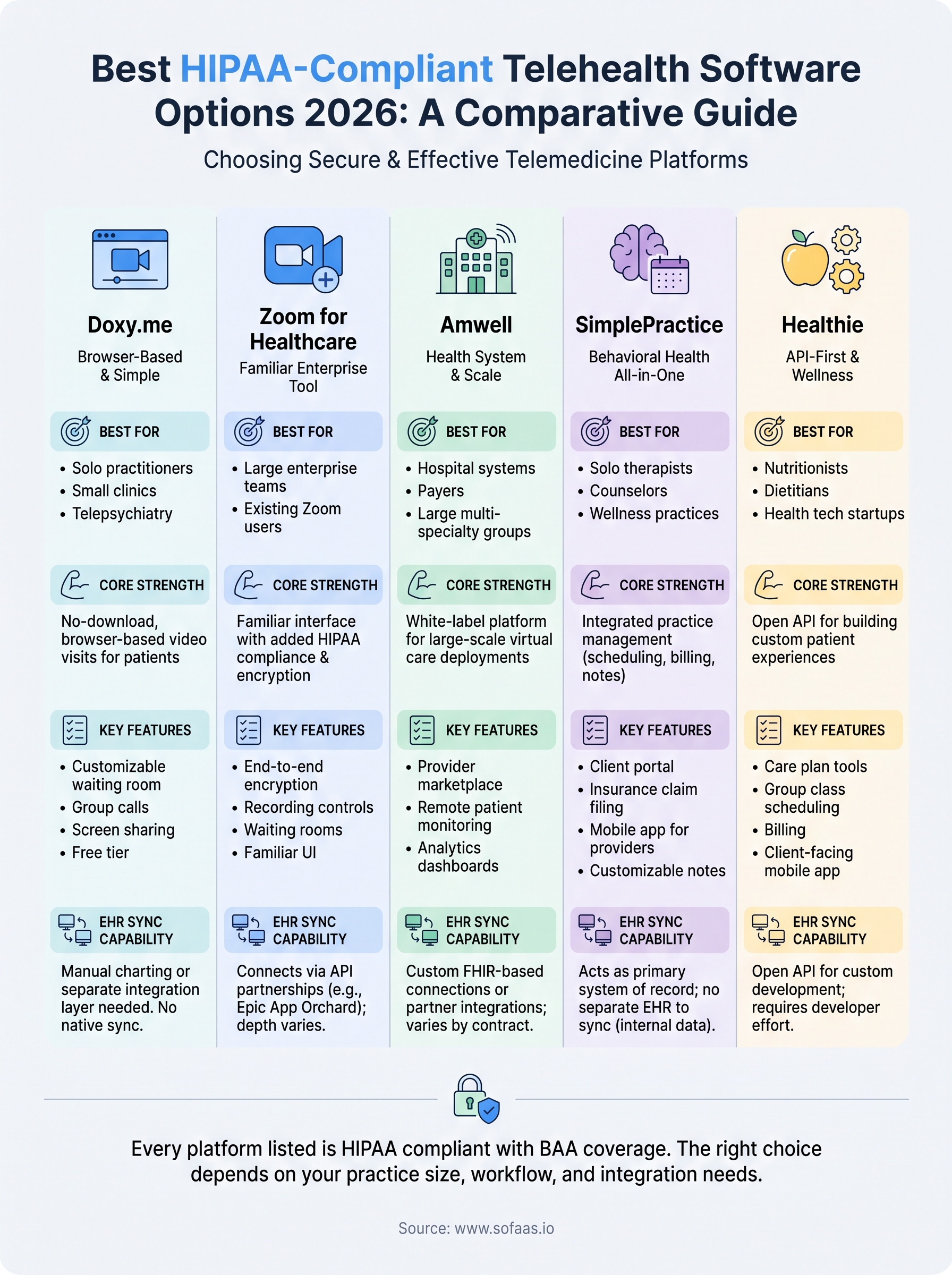
Finding the right fit for your practice
Every platform on this list clears the HIPAA compliance bar, but that's the easy part. The harder question is whether it fits how your practice actually runs. Doxy.me suits a solo clinician who wants friction-free video. Amwell suits a hospital system with an integration team. SimplePractice and Healthie suit practices that want billing and documentation baked into the same tool. Zoom for Healthcare suits a team that already lives in Zoom and just needs the compliance switch flipped on.
Whatever you pick, the video call was never the hard part. The real work happens when patient data needs to move between that platform and your EHR without manual entry or dropped fields. If you're building or buying a telehealth product that needs real Epic, Cerner, or Allscripts connectivity, launch your SMART on FHIR app in a couple of steps instead of building that integration layer from scratch.
The Future of Patient Logistics
Exploring the future of all things related to patient logistics, technology and how AI is going to re-shape the way we deliver care.
Thank you! Your submission has been received!
Oops! Something went wrong while submitting the form.