10 Best HIPAA-Compliant Texting Software Options in 2026

Texting a patient or a care team member feels normal in 2026, but doing it wrong can trigger a HIPAA violation and a fine that starts at $100 and climbs fast. If your team is still using standard SMS or consumer apps like WhatsApp for anything involving protected health information, you're carrying risk that a few hundred dollars a month in software can eliminate. That's exactly why so many healthcare organizations are searching for hipaa compliant texting software right now.
This article gets straight to the point: which platforms actually deliver secure messaging with the encryption, access controls, and audit trails HIPAA requires, and which ones fall short once you dig into the fine print. We looked at signed Business Associate Agreements, message retention policies, and how each tool handles patient consent, not just marketing claims.
Below you'll find ten hipaa compliant messaging software options worth evaluating in 2026, from tools built for care coordination between staff to platforms designed for direct patient outreach. We built SoFaaS to solve a related problem, connecting healthcare apps to EHRs securely, so we know firsthand how much compliance detail matters when patient data is involved. Use this list to match the right texting solution to your workflow, your budget, and your team's size.'
1. What makes texting software HIPAA-compliant
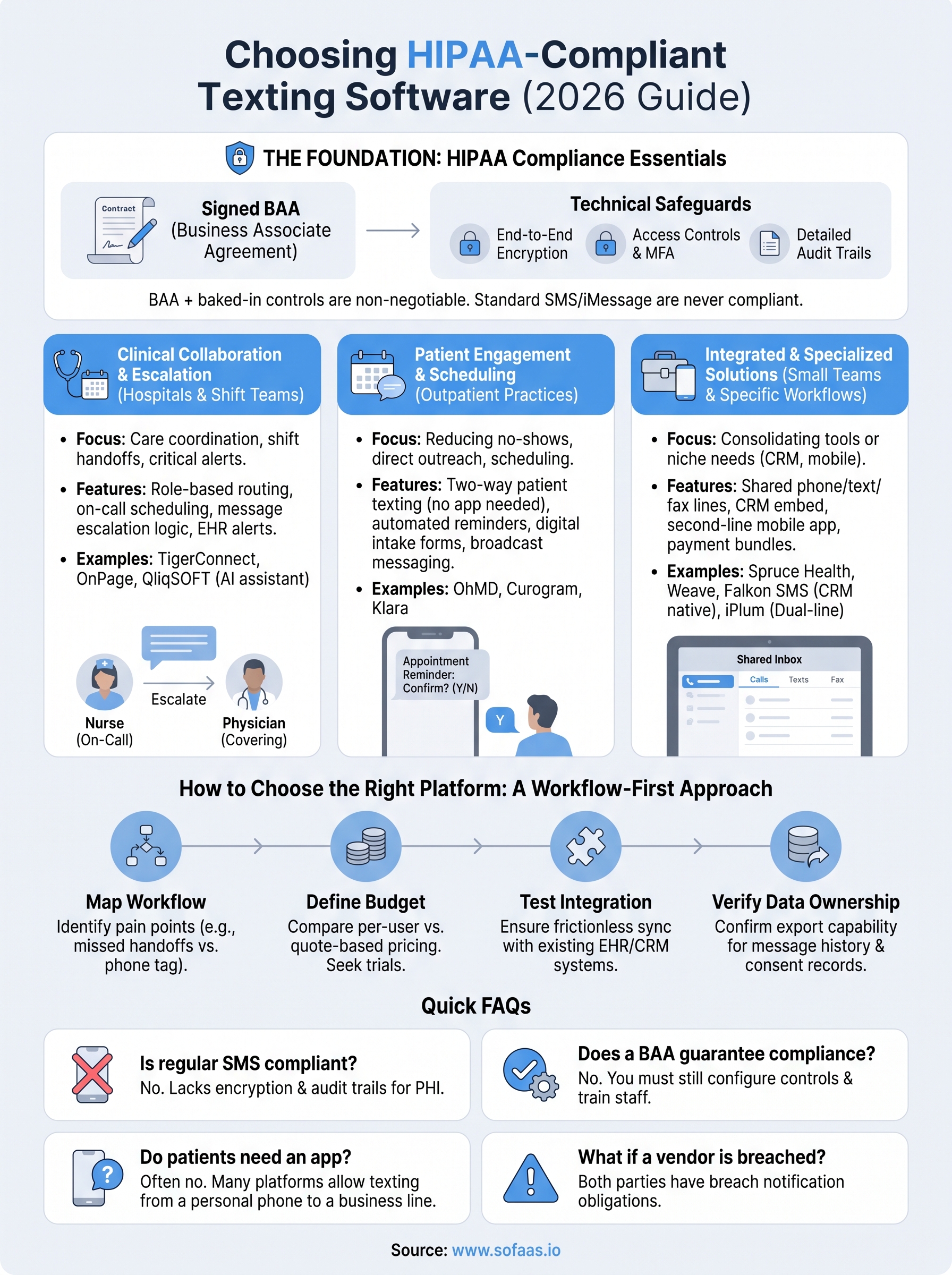
HIPAA doesn't certify software, so no vendor can hand you a government seal that says "compliant." Instead, compliance comes down to a handful of technical and administrative safeguards that the platform must support and that your organization must actually configure and use. A Business Associate Agreement (BAA) is the starting point. If a vendor won't sign one, walk away, no matter how polished the app looks. The BAA is a legal contract that makes the vendor responsible for protecting patient data under the same rules that apply to you, and it's required under the HHS HIPAA Rules whenever protected health information passes through a third party.
A texting app without a signed BAA is a liability, not a solution, no matter how secure its marketing claims sound.
Beyond the contract, the technology itself needs specific controls baked in. End-to-end encryption protects messages both in transit and at rest, so intercepted data is unreadable without the right keys. Access controls like unique user logins, role-based permissions, and multi-factor authentication keep the wrong people out of patient conversations even if a device is lost or stolen. Audit logs matter just as much: HIPAA requires the ability to track who accessed what message and when, which is exactly what regulators ask for during an investigation.
Consider these as the non-negotiable checklist items when you evaluate any platform on this list:
- Signed BAA available before you send a single message
- Encryption for data in transit and at rest
- Unique, auditable user authentication (ideally with MFA)
- Automatic session timeouts and remote wipe for lost devices
- Detailed audit trails showing message history and access
- Configurable message retention and deletion policies
- Secure, revocable patient consent capture for outbound texts
Deployment also affects your risk exposure. Standard SMS and iMessage route through carrier networks that aren't encrypted end-to-end and don't offer audit logging, which is why they're never appropriate for PHI, even for something as simple as an appointment reminder that names a patient. Purpose-built platforms instead route messages through their own encrypted infrastructure, often paired with a secure app or web portal that patients and staff both use.
Governance matters as much as the software itself. Even a fully compliant platform becomes a liability if staff aren't trained on acceptable use, if devices aren't locked with passcodes, or if old messages sit around indefinitely instead of following a documented retention schedule. Retention policies should be explicit: how long messages stay accessible, when they're archived, and when they're permanently deleted. Skipping this step is one of the most common ways organizations end up out of compliance despite paying for the right tool.
With those fundamentals in mind, here's how ten of the leading HIPAA compliant texting software platforms stack up on features, target users, and pricing.
2. TigerConnect
TigerConnect built its name on clinical care coordination, and it remains one of the most recognized names in hipaa compliant messaging software for hospitals and health systems. The platform centers on secure, role-based messaging that connects physicians, nurses, and administrative staff in one encrypted environment, with patient texting layered on top for appointment reminders and post-discharge follow-up.

Key features
TigerConnect's core strength is its clinical collaboration engine, which routes messages to on-call staff based on role rather than a specific person, so a message reaches whoever is covering a shift. Other standout capabilities include:
- Role-based and scheduling-aware message routing
- Voice calling and video visits inside the same encrypted app
- Integration with nurse call systems and EHR alerts
- Read receipts and delivery confirmation for time-sensitive messages
- Centralized admin console for provisioning and deprovisioning users
Routing messages by role instead of by name closes the gap that causes missed handoffs during shift changes.
Who it's for
Hospitals and multi-site health systems with complex on-call schedules get the most value here. Larger care teams that need to coordinate across departments, not just send appointment texts, will appreciate the depth of the clinical workflow tools. Smaller practices without shift-based staffing usually find the platform more robust, and more expensive, than what their day-to-day texting needs require.
Pricing
TigerConnect doesn't publish public pricing, and quotes are built around organization size, module selection, and whether you need the full clinical communication suite or a lighter patient engagement tier. Expect a sales-led process with a demo and a custom quote rather than a self-serve signup, which is typical for enterprise health system software but can slow things down if you're trying to move fast. Budget for an implementation period as well, since larger deployments often involve EHR integration work before staff start using it daily.
3. OnPage
OnPage built its reputation on critical alerting, not casual chat, and that distinction shapes everything about the platform. Instead of competing on features for everyday patient texting, OnPage focuses on making sure urgent clinical messages actually reach someone, with escalation logic that keeps pinging until a human responds. That focus makes it one of the more specialized entries in hipaa compliant texting software, built for situations where a missed message has real consequences.
Key features
Escalation is the headline feature: if a message goes unread within a set window, OnPage automatically forwards it to a backup responder or the entire on-call chain. Other capabilities include:
- Persistent, audible alerts that override phone silent mode for true emergencies
- On-call scheduling with automatic handoffs between shifts
- Secure group messaging alongside one-to-one clinical chat
- Incident tracking so admins can see exactly when a critical alert was acknowledged
- Integration with nurse call and EHR alerting systems
When a message can't wait, escalation logic matters more than any chat feature.
Who it's for
Hospitals, answering services, and IT teams managing critical infrastructure alerts get the clearest benefit from OnPage. Practices that need guaranteed acknowledgment of urgent messages, like a code alert or a system outage notification, will find the escalation workflow hard to replicate elsewhere. Smaller clinics focused purely on patient appointment reminders and general secure messaging will likely find OnPage more specialized than they need, since it wasn't built primarily for outbound patient communication.
Pricing
OnPage prices per user per month, with tiers based on how much escalation and integration functionality you need. Entry-level plans start in the range of $10 to $15 per user monthly for basic secure messaging, while advanced tiers with full escalation workflows, EHR integration, and IT alerting run higher and typically require a custom quote. Annual contracts bring the per-user cost down, and OnPage offers a free trial so technical teams can test escalation logic against their own on-call rotation before committing.
4. OhMD
OhMD takes a different angle than TigerConnect or OnPage: it's built around patient texting first, with staff messaging layered in as a secondary use case. The pitch is simple. Patients already text, so let them text your practice directly instead of forcing them into a separate patient portal app they'll never download. That patient-facing focus makes OhMD one of the more approachable options in hipaa compliant messaging software for practices that live and die by patient no-show rates and phone tag.
Key features
OhMD's standout feature is that patients don't need to install anything. They text a practice's existing phone number, and staff respond through a secure web dashboard that keeps the conversation encrypted and logged. Other notable capabilities include:
- No-app-required patient texting from any existing practice phone number
- Group messaging for care teams alongside direct patient chat
- Broadcast messaging for appointment reminders and practice announcements
- Integration with major EHRs to pull patient context into conversations
- Digital forms and intake collected directly through text threads
Patients respond faster to a text than a portal login, and OhMD builds its whole product around that fact.
Who it's for
Outpatient practices, specialty clinics, and smaller health systems that want to cut down on missed appointments and phone-based scheduling get the most out of OhMD. Front-desk-heavy operations that spend hours a day on hold with insurance and patients alike will notice the workflow shift almost immediately. Large hospital systems needing deep on-call escalation or nurse-call integration should look elsewhere, since OhMD's strength is patient communication, not complex clinical routing.
Pricing
OhMD publishes tiered pricing rather than hiding everything behind a sales call, which is a relief compared to some entries on this list. Plans typically scale by provider count and feature set, with a starter tier covering core texting and a higher tier adding broadcast messaging, forms, and deeper EHR integration. Expect a range roughly between $50 and $150 per provider per month depending on the tier, with volume discounts available for multi-location practices that negotiate directly with sales.
5. Spruce Health
Spruce Health positions itself as an all-in-one virtual care platform, and texting is just one piece of a bigger communication suite that includes calling, video visits, and even fax. Practices that got tired of stitching together five different tools for phone, text, and telehealth often land on Spruce because it consolidates everything into a single hipaa compliant texting software subscription tied to one business phone number.

Key features
Spruce gives your practice a dedicated business line that handles calls, texts, and faxes without exposing anyone's personal cell number. That shared-line model means any staff member can pick up a conversation thread without losing context. Other notable capabilities include:
- Shared team inbox for calls, texts, and faxes tied to one business number
- Video visits launched directly from a text conversation
- Automated appointment reminders and intake workflows
- Secure internal staff messaging alongside patient-facing texts
- E-fax support, which is still surprisingly common in referral workflows
Consolidating phone, text, fax, and video into one line removes the app-switching that slows down small front-desk teams.
Who it's for
Small to mid-sized practices, solo providers, and telehealth-first startups get the most value from Spruce. Teams that don't want separate vendors for phone, fax, and secure messaging will appreciate having one bill and one login instead of three. Larger health systems with complex on-call routing needs, similar to what TigerConnect or OnPage handle, will likely outgrow Spruce's simpler workflow model.
Pricing
Spruce publishes tiered plans starting around $79 per month for a basic package covering one phone number and core texting and calling features. Higher tiers add more users, advanced automation, and API access, typically landing between $150 and $400 per month depending on team size. A free trial lets you test the shared inbox before committing, which is useful for practices comparing Spruce directly against OhMD's patient-first texting model.
6. Falkon SMS
Falkon SMS takes the opposite approach from the all-in-one suites on this list, focusing narrowly on getting HIPAA-compliant texting working inside the tools your practice already uses. Instead of asking staff to learn a new app, Falkon layers secure messaging on top of platforms like Salesforce, Slack, and Microsoft Teams, so conversations with patients happen where your team already spends its day.
Key features
Falkon's core feature is native integration rather than a standalone inbox, which sets it apart from most other entries here. Other capabilities worth noting:
- Two-way texting embedded directly inside Salesforce, Teams, and similar platforms
- Automated appointment reminders and follow-up sequences
- Bulk messaging for practice-wide announcements
- Message templates for common patient responses
- Audit logging tied to existing CRM records for a single source of truth
Building compliant texting into the CRM you already run avoids the double data entry that kills adoption.
Who it's for
Organizations already invested in Salesforce Health Cloud or a similar CRM get the clearest payoff from Falkon SMS. Practices that track patient relationships and referral sources inside a CRM, rather than a dedicated EHR, will find the integration saves real time compared to toggling between two systems. Teams without an existing CRM footprint, or those wanting a purpose-built texting app with its own dashboard, will likely prefer a standalone option like OhMD or Spruce Health instead.
Pricing
Falkon SMS doesn't publish flat public pricing, since cost depends heavily on which CRM platform you're integrating with and how many users need access. Expect a quote-based process that factors in your existing software stack, message volume, and whether you need custom workflow automation built on top of the base texting layer. Ask specifically about setup fees tied to the integration work, since that upfront cost varies more here than with standalone hipaa compliant messaging software platforms.
7. iPlum
iPlum takes a phone-first approach to compliance, turning a second line on your existing smartphone into a fully HIPAA-compliant texting number without issuing new hardware. That makes it a favorite among solo providers and mobile clinicians who need a dedicated business number for calls and texts but don't want to carry a second device or replace their personal phone setup.
Key features
iPlum's core feature is the dual-number setup, letting one phone run a personal line and a compliant business line side by side with separate voicemail, texting, and call logs. Other notable capabilities include:
- Secure texting and calling on a dedicated second number
- Auto-attendant and call routing for solo and small-group practices
- Encrypted voicemail transcription
- Fax-to-email support for referral paperwork
- Admin console for managing multiple lines across a team
A second compliant number on the same phone beats issuing separate devices for every mobile provider.
Who it's for
Solo practitioners, home health and hospice clinicians, and mobile providers who work from personal devices get the clearest benefit from iPlum. Anyone tired of exposing a personal cell number to patients, or juggling a separate company phone just for compliant texting, will find the dual-line model solves a real problem. Larger care teams needing shared inboxes or clinical routing across departments will likely need a platform built for team collaboration instead, since iPlum is built around individual lines rather than a shared team dashboard.
Pricing
iPlum publishes its pricing rather than hiding it behind a sales call, starting around $12 to $15 per month per line for basic secure calling and texting. Higher tiers add features like call recording, advanced auto-attendant menus, and multi-line team management, typically running $20 to $35 per line monthly. Annual billing lowers the per-month cost, and a free trial lets solo providers test the dual-number setup before signing up for a paid plan.
8. Klara
Klara built its platform around consolidating every patient touchpoint, texting, phone, and even other clinics' referral communication, into one thread tied to a patient's chart. Rather than treating texting as a standalone feature, Klara positions it as the connective layer between front desk, providers, and outside specialists, which makes it one of the more workflow-heavy entries in hipaa compliant messaging software.
Key features
Klara's biggest differentiator is patient-to-provider messaging that automatically routes to the right team member based on the reason for the message, rather than dumping everything into one inbox. Other notable capabilities include:
- Automated pre- and post-visit messaging sequences tied to appointment type
- Cross-clinic referral communication for practices coordinating with specialists
- Digital forms and payment collection sent directly through a text thread
- Group messaging for internal staff alongside patient conversations
- EHR integration that syncs conversation history into the patient chart
Routing messages by intent, not just by inbox, keeps referral coordination from getting buried under routine appointment texts.
Who it's for
Multi-provider practices and specialty groups that regularly coordinate with outside referral sources get the most out of Klara. Practices juggling a high volume of pre-visit paperwork, insurance verification, and post-visit follow-up will appreciate how much of that shifts into an automated text sequence instead of phone calls. Solo providers or small clinics with simple appointment reminder needs will likely find Klara's referral and workflow tools more than they need, and better served by a lighter option like OhMD.
Pricing
Klara doesn't publish flat pricing publicly, and quotes are built around provider count, message volume, and which automation modules you need active. Expect a sales-led process similar to TigerConnect's, with a demo that walks through your specific referral and intake workflows before a quote gets built. Ask about implementation timelines up front, since practices integrating Klara with an existing EHR often need a few weeks of setup before staff go live.
9. Curogram
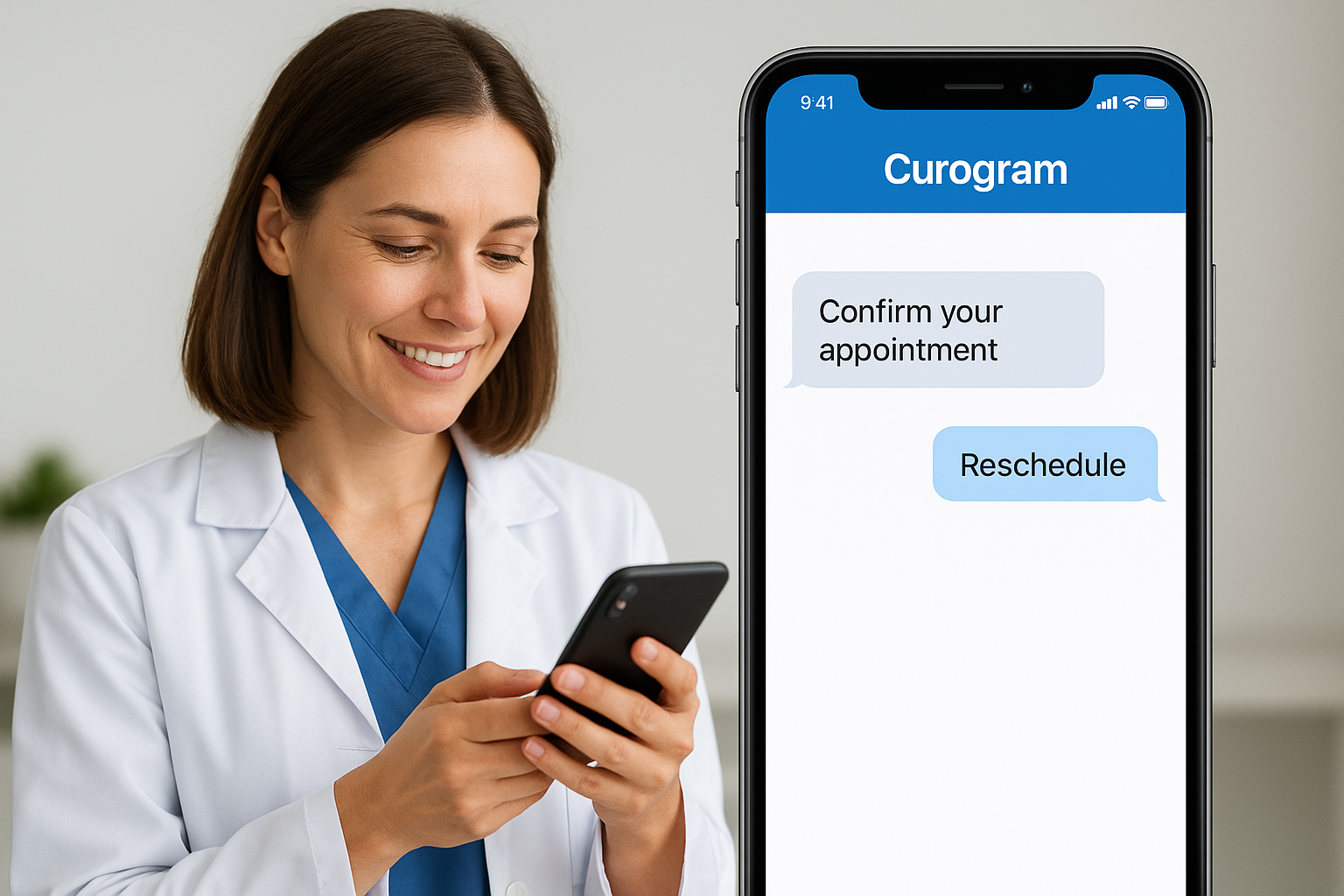
Curogram markets itself as a scheduling-first communication platform, built for practices that want texting, telehealth, and appointment management running through one system instead of three separate logins. Groups already frustrated with no-shows and phone-tag scheduling often pick Curogram because it treats two-way texting as the front door to booking, not an add-on bolted onto an existing calendar tool. That scheduling focus makes it a strong fit for practices searching for hipaa compliant messaging software that also solves a staffing problem, not just a compliance checkbox.
Key features
Curogram's standout capability is automated appointment scheduling conducted entirely through text, letting patients confirm, reschedule, or cancel without a phone call. Other notable capabilities include:
- Mass texting for appointment reminders and practice-wide announcements
- Built-in telehealth video visits launched from the same text thread
- Waitlist automation that fills last-minute cancellations by texting eligible patients
- Two-way group messaging for internal staff coordination
- Integration with major practice management and EHR systems
Letting patients reschedule by text instead of a phone call cuts front-desk call volume more than almost any other single change.
Who it's for
High-volume outpatient practices, especially those in specialties with frequent rescheduling like dental, dermatology, and physical therapy, get the clearest benefit from Curogram. Front desks drowning in inbound scheduling calls will notice the workload shift almost immediately once patients start texting instead of calling. Solo providers with light scheduling needs or hospitals needing deep clinical escalation will likely find Curogram's strength, automating high patient volume, doesn't match their situation.
Pricing
Curogram prices per provider per month, with published starting rates in the range of $199 monthly for a base package covering texting, reminders, and basic scheduling automation. Higher tiers that add telehealth, waitlist automation, and deeper EHR integration run higher and typically require a custom quote based on practice size. A demo walks through the scheduling workflow before you commit to a contract term.
10. QliqSOFT
QliqSOFT built its platform around clinical communication first, then added an AI-driven virtual health assistant called Jill on top, aiming to automate routine patient outreach instead of relying entirely on staff to send every message. That combination makes it one of the more forward-looking entries in hipaa compliant messaging software, especially for organizations trying to cut down on repetitive check-in calls without losing the compliance controls a texting platform needs.
Key features
QliqSOFT's standout feature is its AI virtual assistant, which handles pre-visit instructions, post-discharge check-ins, and symptom triage through automated text conversations that escalate to a human when a patient's response needs one. Other notable capabilities include:
- Secure staff-to-staff messaging with role-based routing
- Automated care plan reminders and medication adherence check-ins
- Two-way patient texting with read receipts and delivery confirmation
- Care team broadcast messaging for shift updates
- Integration with major EHRs to pull patient context into conversations
Automating routine check-ins with AI frees staff to spend their texting time on patients who actually need a human response.
Who it's for
Hospitals and larger outpatient groups managing high patient volumes, particularly around discharge follow-up and chronic condition monitoring, get the clearest value from QliqSOFT. Systems already stretched thin on staff for phone-based check-ins will notice the biggest workload reduction once automated sequences take over routine outreach. Smaller practices with a handful of providers and simple appointment reminder needs will likely find the AI layer more sophisticated, and more expensive, than what their day-to-day secure messaging requires.
Pricing
QliqSOFT doesn't publish flat public pricing, and quotes are built around organization size, message volume, and whether you're licensing the core texting platform alone or adding the Jill AI assistant module. Expect a sales-led process with a demo that walks through your specific discharge and care coordination workflows before a custom quote gets built. Ask directly about implementation timelines, since EHR integration work often adds several weeks before staff and the AI assistant go live together.
11. Weave
Weave rounds out this list as the platform built specifically for dental, optometry, veterinary, and small medical practices that want texting bundled with phone, payments, and reputation management in one system. Rather than treating HIPAA compliant texting software as a standalone product, Weave wraps it into a broader front-office tool that most of these practices were already shopping for, which is why it shows up so often in dental and vision software comparisons rather than pure messaging lists.
Key features
Weave's core strength is tying texting directly to the phone system, so missed calls automatically trigger a text instead of a voicemail that never gets checked. Other notable capabilities include:
- Missed-call text-back that converts unanswered calls into a text thread
- Two-way texting integrated with practice management and scheduling software
- Text-to-pay for collecting balances without a phone call
- Automated review requests sent after appointments
- Team chat for internal staff communication alongside patient texts
Turning every missed call into a text thread recovers appointments that would otherwise just disappear.
Who it's for
Small dental, optometry, veterinary, and chiropractic practices get the clearest value from Weave, especially single-location offices that want one vendor handling phones, texting, payments, and reviews together. Front desks juggling a high call volume alongside patient billing will appreciate not needing separate software for each task. Hospitals or larger multi-department health systems needing clinical escalation or nurse-call integration should look toward TigerConnect or OnPage instead, since Weave targets outpatient front-office workflows, not inpatient coordination.
Pricing
Weave doesn't publish flat public pricing, and quotes depend on practice size, number of locations, and which modules you activate beyond core secure messaging. Expect a sales-led process with a demo, typically landing in the $200 to $500 per month range for a single-location practice once phone, text, and payment features are bundled together. Multi-location groups negotiate custom contracts, and a trial period lets front-desk staff test the missed-call workflow before committing.
12. How to choose the right platform for your team
Matching a platform to your workflow matters more than picking whatever tops a review site. A hospital drowning in on-call handoffs needs escalation logic and role-based routing, while a two-provider dermatology clinic just needs patients to stop calling for reschedules. Start by mapping your actual pain point, whether that's missed appointments, slow referral coordination, or staff burning hours on phone tag, before you even look at a demo.

Budget shapes the shortlist fast. Enterprise tools like TigerConnect and QliqSOFT solve real problems for large systems but come with sales-led pricing and implementation timelines that don't make sense for a solo practitioner. Smaller, published-pricing options like OhMD, iPlum, or Spruce Health let you test the shared inbox or dual-line setup before committing budget you can't easily walk back from.
The best hipaa compliant texting software is the one your staff will actually use every day, not the one with the longest feature list.
Integration depth deserves its own line item on your checklist. A platform that syncs with your existing EHR or practice management system saves staff from re-entering patient context in two places, which is exactly the kind of friction that kills adoption within a few weeks of rollout.
Run through this before signing anything:
- Confirm a signed BAA is available and reviewed by someone who understands HIPAA, not just sales
- Test the platform with your actual staff, not just an admin, during a trial period
- Check integration with your EHR, practice management, or CRM system
- Compare per-user versus per-provider pricing against your actual headcount
- Ask about data export and message retention if you ever switch vendors
Vendor lock-in is a real risk with hipaa compliant messaging software, since message history and patient consent records don't always export cleanly. Verify how you'd retrieve your data before you need to, not after a contract dispute forces the question.
13. Frequently asked questions
Is regular texting ever HIPAA compliant?
Standard SMS and iMessage are never appropriate for protected health information, even for something as simple as confirming an appointment time by name. Carrier networks don't offer end-to-end encryption or audit logging, so there's no way to prove who accessed a message or when. Practices that need to text patients directly should use a platform built for hipaa compliant texting software, not the default messaging app on a phone.
If a text mentions a diagnosis, a medication, or an appointment reason, it needs to travel through encrypted, auditable infrastructure, not a carrier's SMS network.
Does a signed BAA guarantee compliance?
No. A Business Associate Agreement makes the vendor contractually responsible for safeguarding data, but your organization still has to configure access controls, train staff on acceptable use, and enforce retention policies. Signing the BAA is step one, not the finish line.
Can patients text from their own phone number?
Yes, most platforms on this list, including OhMD and Curogram, let patients text a practice's existing business number from their personal phone without installing an app. The encryption and logging happen on the practice side, so patients get a normal texting experience while staff work through a secure dashboard.
How much does compliant texting typically cost?
Pricing spans a wide range depending on team size and features. Solo providers can get started for $12 to $50 per month with tools like iPlum, while multi-location practices bundling texting with phone and payments often land between $200 and $500 monthly. Enterprise health systems needing clinical routing typically negotiate custom contracts.
What happens if a vendor gets breached?
Even with a signed BAA, your organization shares reporting obligations under the HHS breach notification rule. Ask any vendor upfront how quickly they notify customers of a suspected breach, since that timeline directly affects your own compliance response.
Finding the right fit for your practice
No single platform on this list wins for every practice. A hospital juggling on-call handoffs needs escalation logic from TigerConnect or OnPage, while a two-provider clinic drowning in reschedule calls does better with OhMD or Curogram. Hipaa compliant texting software only pays off when it matches your actual workflow, not the platform with the flashiest demo. Weigh the BAA, the pricing model, and how well it plugs into your existing EHR before you sign anything.
Getting messaging right is one piece of a bigger compliance puzzle. If your team is also building or scaling a healthcare app that needs to pull patient data directly from Epic, Cerner, or Allscripts, you're facing the same encryption, audit logging, and consent questions we covered above, just on the integration side. That's the exact problem SoFaaS was built to solve. Launch your SMART on FHIR app in a couple of steps and skip months of integration work most teams don't have the expertise, or the time, to build from scratch.
The Future of Patient Logistics
Exploring the future of all things related to patient logistics, technology and how AI is going to re-shape the way we deliver care.
Thank you! Your submission has been received!
Oops! Something went wrong while submitting the form.