Azure Key Vault Secrets: How They Work And Best Practices

Every healthcare application that connects to an EHR system handles sensitive credentials, OAuth tokens, API keys, database connection strings, encryption keys. Hardcoding these values or storing them in configuration files is a recipe for a security incident. Azure Key Vault secrets solve this problem by giving you a centralized, cloud-native vault where sensitive data is stored, accessed, and rotated under strict access policies and full audit logging.
For teams building healthcare integrations, like the ones we power at SoFaaS, proper secrets management isn't optional. It's a core requirement for HIPAA compliance and SOC 2 Type II certification. When your platform handles patient data flows between applications and EHR systems like Epic or Cerner, every credential in the chain needs to be protected, auditable, and replaceable without downtime. Azure Key Vault gives you that foundation.
This article breaks down how Azure Key Vault secrets work, how they differ from keys and certificates, and the best practices for managing them across your applications and infrastructure. Whether you're using the Azure SDK, REST API, or infrastructure-as-code tools like Terraform and Bicep, you'll walk away with practical guidance you can apply immediately.
Why Azure Key Vault secrets matter
When credentials leak, the damage happens fast. Database connection strings, API keys, and OAuth tokens stored in source code or environment variables are one misconfigured repository or one compromised developer machine away from a breach. For healthcare applications, the stakes are higher than in most industries because a credential leak doesn't just expose business data. It exposes patient data, which triggers HIPAA breach notification requirements and potential penalties that can be severe.
Storing secrets outside a managed vault is not just a technical risk; it is a compliance and liability risk that regulators and auditors take seriously.
The real cost of poor secrets management
Most engineering teams underestimate how many credentials exist across a production system. A typical healthcare application accumulates dozens of secrets: EHR API credentials, database passwords, SMTP credentials, webhook signing keys, and third-party service tokens. Each one is a potential attack vector if it isn't stored, accessed, and rotated under strict controls.
When you manage these secrets manually, the problems compound quickly. Rotation becomes painful because credentials are scattered across deployment configs, CI/CD pipelines, and local developer environments. Teams avoid rotating secrets because the effort is too high, which means compromised credentials stay active longer than they should. A centralized service gives you rotation, versioning, and revocation as straightforward operations your team can actually perform on a consistent schedule.
Compliance requirements that depend on secrets management
If your application handles Protected Health Information (PHI), HIPAA requires you to implement access controls, audit controls, and integrity controls over all systems that store or transmit that data. That includes every system that holds a credential used to access PHI. Without a structured approach to secrets management, you cannot reliably demonstrate that access to sensitive credentials was authorized, logged, and revoked when appropriate.
SOC 2 Type II adds another layer: auditors want to see evidence that your access controls work consistently over time, not just at a single point in review. Azure Key Vault generates immutable audit logs for every secret access, which gives you the evidence trail you need to satisfy auditors. For teams building integrations that touch live patient data flowing through EHR systems, this audit capability is a core part of what makes the platform defensible during a security review.
Auditability and access control at scale
As your application grows, the number of services accessing secrets grows with it. Role-Based Access Control (RBAC) through Azure Key Vault lets you define exactly which identities, whether human users, service principals, or managed identities, can read, write, or manage specific secrets. This granularity matters because least-privilege access is one of the foundational principles of both HIPAA and modern cloud security architecture.
Azure Key Vault secrets integrate directly with Microsoft Entra ID (formerly Azure Active Directory), which means access policies inherit the same identity lifecycle management you already have in place. When a contractor's account is deprovisioned, their access to secrets disappears automatically. Managed identity bindings mean that when a microservice is retired, you remove its identity and the access goes with it. This tight coupling between identity management and secrets management is what makes the system auditable and scalable without adding significant operational overhead to your team.
Secrets vs keys and certificates
Azure Key Vault organizes sensitive data into three distinct object types: secrets, keys, and certificates. Understanding the difference matters because each type is designed for a specific purpose, and using the wrong one creates unnecessary complexity or gaps in your security posture. The distinction isn't just semantic. It determines how the data is stored, what operations you can perform on it, and how access control is structured.

What secrets store
Azure Key Vault secrets hold arbitrary string values: passwords, API keys, OAuth tokens, connection strings, and any other sensitive text your application needs at runtime. The vault stores the value as an opaque blob. You write it in, you read it out. The vault handles versioning, expiration policies, and access logging automatically, but it doesn't interpret or operate on the value itself. Secrets are the most flexible of the three types, which is why most teams use them most frequently.
What keys do
Keys in Azure Key Vault are cryptographic key materials used to perform operations like encryption, decryption, signing, and verification. The critical distinction is that the raw key material never leaves the vault. When your application needs to encrypt data, it sends the data to the vault and the vault performs the operation. This design means a compromised application cannot extract the key and use it elsewhere.
Keys are for cryptographic operations; secrets are for storing values your application reads directly.
Keys support both software-protected and hardware-protected (HSM-backed) storage, which gives you a range of options depending on your compliance requirements. For most healthcare applications that need to sign tokens or encrypt PHI before storage, hardware-backed keys are worth the added cost.
What certificates handle
Certificates in Azure Key Vault manage the full lifecycle of X.509 certificates, including issuance, renewal, and private key storage. When you create a certificate object, the vault generates the associated private key and keeps it protected. You can integrate directly with certificate authorities like DigiCert or Let's Encrypt so that renewals happen automatically before expiration. This eliminates the operational risk of expired TLS certificates taking down a production endpoint.
Choosing the right object type
Picking the right type keeps your vault organized and your access policies precise. Use keys when you need cryptographic operations without exposing raw material. Use certificates when you manage TLS endpoints or code signing. Use secrets for everything else: tokens, passwords, and configuration values your application reads at startup or runtime.
How Azure Key Vault secrets work
When you store a value in Azure Key Vault, the vault wraps it in a structured secret object that carries more than just the value itself. Every secret has a unique URI that includes the vault name, the secret name, and optionally a version identifier. This URI is what your application uses to retrieve the value at runtime, and it gives you precise control over which version of a secret gets served to which service.
The secret object structure
Each Azure Key Vault secret object consists of a value field plus a set of metadata attributes. These attributes include a content type field (useful for signaling whether the value is a password, a connection string, or a JSON blob), an enabled or disabled status flag, and optional activation and expiration timestamps. Setting an expiration timestamp means the vault automatically stops serving the secret after that date, which forces your team to rotate credentials on a defined schedule rather than letting them drift indefinitely across environments.
Expiration timestamps turn secret rotation from an informal intention into an enforced policy.
Versioning and how it protects you
Every time you update a secret's value, Azure Key Vault creates a new version rather than overwriting the old one. The previous version stays accessible by its specific version URI until you explicitly disable or delete it. This means you can roll back to an older credential without downtime if a rotation introduces a problem. Your application can target the latest version by omitting the version segment from the URI, or it can pin to a specific version for stricter control during phased deployments or canary releases.
How your application retrieves a secret
At runtime, your application authenticates to Azure Key Vault using a managed identity or service principal, then makes a GET request to the secret's URI through the Azure SDK or REST API. The vault validates the caller's identity against its access policies or RBAC assignments, then returns the plaintext value over an encrypted TLS connection. The secret value never appears in logs, and the vault records every retrieval in its audit trail automatically. For applications running on Azure services like App Service or Azure Functions, managed identity authentication removes the need to manage any separate credential just to access the vault itself, which eliminates an entire class of bootstrap credential problems.

How to manage secrets safely
Storing secrets in Azure Key Vault is only the first step. How you configure, rotate, and access those secrets determines whether the vault actually improves your security posture or just adds a layer of complexity on top of the same bad habits. The practices below give you a concrete framework for managing azure key vault secrets in a way that holds up under both operational pressure and compliance review.
Set expiration dates and rotate on a schedule
Every secret you create should carry an explicit expiration date. Without one, secrets accumulate indefinitely and rotation never happens because there is no forcing function. When you set an expiry, the vault stops serving the secret automatically after that date, which turns rotation into a scheduled operational task rather than a reactive scramble after a potential compromise.
Unrotated credentials are one of the most common findings in cloud security audits, and expiration policies are the most direct way to close that gap.
You can also configure Azure Key Vault rotation policies alongside Azure Event Grid to trigger automated rotation workflows. When a secret nears its expiration, an event fires and your rotation function generates a new credential, updates the vault, and notifies dependent services. This approach removes the manual overhead that causes teams to skip rotation in the first place.
Use managed identities instead of stored credentials
The most common mistake teams make when first adopting Key Vault is authenticating to the vault using a static service principal client secret. You're storing a secret to protect secrets, which creates a circular dependency and an additional credential to manage. Managed identities eliminate this problem entirely by binding the vault access credential to the Azure resource itself.
When you assign a managed identity to an App Service, Azure Function, or AKS pod, Azure handles the credential lifecycle behind the scenes. Your code calls the vault using the DefaultAzureCredential class from the Azure SDK, and authentication flows through the managed identity without any secret ever appearing in your configuration files or environment variables.
Scope access with RBAC and least privilege
Every service that reads from your vault should have access to only the specific secrets it actually needs. Vault-level access policies that grant broad read permission to everything in the vault violate the principle of least privilege and make it harder to audit which service accessed which credential.
Use Azure RBAC roles like Key Vault Secrets User scoped to individual secrets rather than the entire vault. This granularity means a compromised service can only expose the credentials it legitimately needs, not the full contents of your vault.
How to use secrets in apps and IaC
Pulling azure key vault secrets into your applications and infrastructure-as-code configurations closes the loop between secure storage and actual runtime use. The approach differs depending on whether you're writing application code or provisioning infrastructure, but the core principle stays the same: your code should retrieve secret values at runtime, not bake them into build artifacts, deployment scripts, or version control.
Accessing secrets in application code
The Azure SDK for .NET, Python, Java, and JavaScript each provide a SecretClient class that you initialize with your vault URI and a credential object. Using DefaultAzureCredential from the Azure Identity library, the client automatically chains through available authentication mechanisms, starting with managed identity in production and falling back to developer credentials locally. This means the same code works across environments without any configuration changes.
Separating authentication logic from your secret retrieval code makes your application portable and eliminates environment-specific credential handling entirely.
For performance-sensitive applications, avoid calling the vault on every request. Cache the secret value in memory with a TTL that aligns with your rotation schedule. The Azure SDK documentation covers built-in caching options that handle expiry and refresh automatically, so you get freshness guarantees without placing unnecessary load on the vault API.
Integrating secrets with Terraform and Bicep
When you provision infrastructure with Terraform or Bicep, you frequently need to pass secret values into resource configurations, such as database passwords for an Azure SQL instance or API keys for an App Service application setting. Both tools support reading from Key Vault at deployment time rather than accepting plaintext values in your state files or parameter files, which keeps sensitive data out of your version control history.
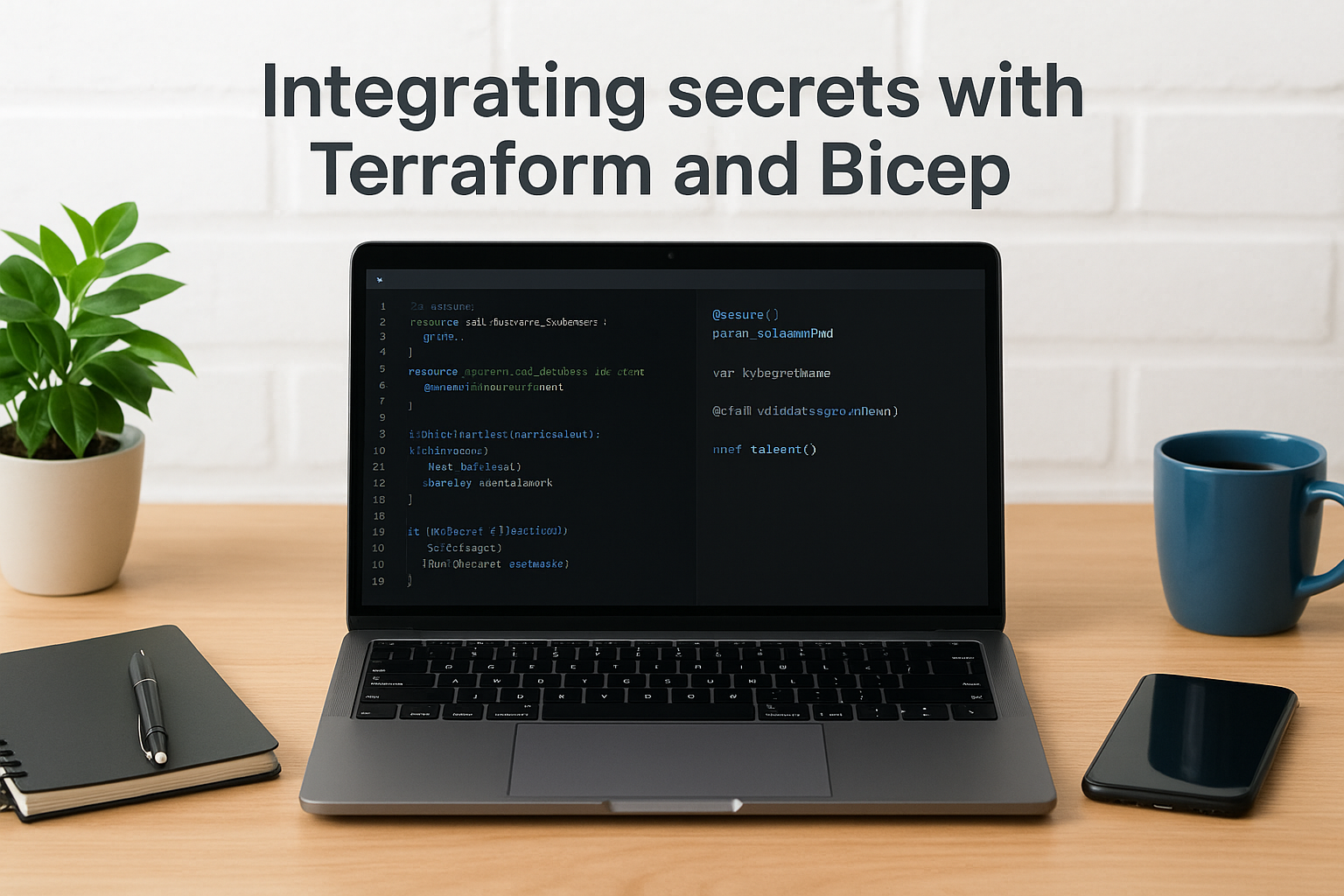
In Terraform, you reference a Key Vault secret using the azurerm_key_vault_secret data source, which pulls the current value at plan and apply time. Your state file stores the secret ID reference, not the value itself. In Bicep, you use a getSecret() function call within a secure parameter declaration, which instructs Azure Resource Manager to fetch the value directly from the vault during deployment without writing it to the deployment output or logs.
Both approaches enforce the same access model: the deployment identity needs the Key Vault Secrets User role scoped to the specific secret, which keeps your IaC pipelines running under least-privilege access just like your application services do at runtime.
Troubleshooting and common pitfalls
Even with a well-architected setup, azure key vault secrets surface specific failure patterns that can block deployments or cause silent runtime errors. Knowing where these problems typically appear, and what causes them, saves you significant debugging time when something breaks in a production environment.
Access denied errors
HTTP 403 Forbidden responses are the most common error teams encounter when first wiring up Key Vault access. The cause is almost always a missing or misconfigured RBAC role assignment. Confirm that the identity making the request, whether a managed identity, service principal, or your own user account, has the Key Vault Secrets User role assigned at the correct scope. Vault-level RBAC and legacy access policies can coexist on the same vault, which creates confusion when one grants access and the other blocks it. Check both surfaces when a permission error doesn't resolve after updating RBAC.
If your vault uses the legacy access policy model, adding an RBAC role assignment alone won't grant access until you switch the vault's permission model to RBAC in the vault's configuration settings.
A second cause of 403 errors is network restrictions. Key Vault supports private endpoints and firewall rules that limit which virtual networks or IP ranges can reach the vault. If your application runs in a subnet not covered by the vault's network rules, every request fails regardless of identity permissions. Review the vault's networking configuration in the Azure portal and confirm your application's egress IP or virtual network is explicitly allowed.
Secret not found or returning stale values
404 errors usually mean the secret name in your code doesn't match the name stored in the vault, or the secret is disabled or expired. Vault secret names are case-sensitive, and a single character mismatch produces a not-found error that looks identical to a missing secret. Verify the exact name in the vault and confirm the enabled flag is set to true with no expired activation window blocking access.
Stale values typically appear when your application caches a secret aggressively without honoring the vault's versioning. If you pin to a specific version URI and rotate without updating that pin, your application continues reading the old credential indefinitely. Switch to the versionless URI format so requests always return the current enabled version, and set your cache TTL short enough to pick up rotations within your acceptable freshness window.
Key takeaways
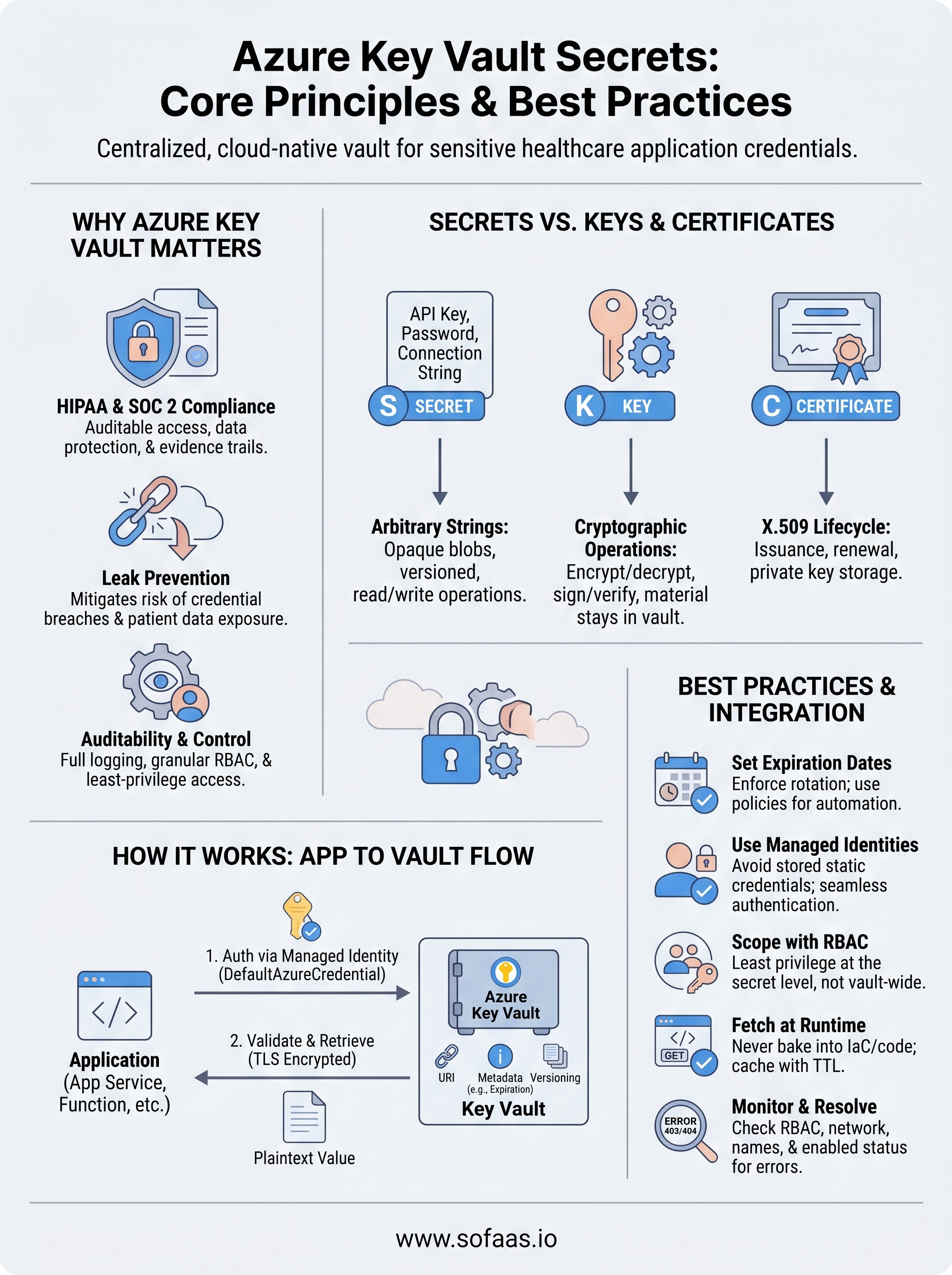
Azure Key Vault secrets give you a structured, auditable, and access-controlled place to store every sensitive credential your application depends on. The practices covered in this article, from setting expiration dates and using managed identities to scoping RBAC by individual secret and retrieving values at runtime through the SDK, form a complete foundation for secrets management that holds up under both operational pressure and compliance audits. HIPAA and SOC 2 Type II requirements both lean heavily on your ability to demonstrate controlled, logged access to credentials, and Key Vault gives you that evidence trail automatically.
Your next step is applying those same principles to the credentials your healthcare integration layer uses. When your application connects to EHR systems like Epic or Cerner, every token and API key in that flow needs the same level of protection. If you want to see how a managed platform handles that complexity end to end, explore the SoFaaS SMART on FHIR integration platform.
The Future of Patient Logistics
Exploring the future of all things related to patient logistics, technology and how AI is going to re-shape the way we deliver care.
Thank you! Your submission has been received!
Oops! Something went wrong while submitting the form.