Cisco Zero Trust Security: Architecture, Products, And Use

Healthcare data flows through dozens of systems, APIs, and third-party applications every day, and every one of those connections is a potential entry point for a breach. That reality is exactly why Cisco zero trust security has become a go-to framework for organizations that refuse to assume any user, device, or application is trustworthy by default. Instead of relying on a traditional perimeter, zero trust verifies everything, every time, regardless of where the request originates.
For healthcare IT teams and technology leaders building EHR-connected applications, understanding this model isn't optional, it's foundational. Whether you're integrating clinical workflows, syncing patient data in real time, or managing OAuth authorization flows (the kind we handle daily at SoFaaS), the underlying network and identity infrastructure must hold up to scrutiny. Cisco's zero trust architecture provides the enforcement layer that complements application-level security measures like HIPAA compliance and SOC 2 Type II controls, ensuring protection extends from the network edge all the way to the data itself.
This article breaks down Cisco's zero trust security model from architecture to implementation. You'll learn how its three-pillar framework operates, which products map to each pillar, and how organizations, particularly those in healthcare, are putting these components to work. We'll also cover licensing considerations, deployment challenges, and practical use cases so you can evaluate whether Cisco's approach fits your security strategy.
Why Cisco zero trust security matters now
The old security model assumed that everything inside your network was safe. Firewalls and VPNs defined a perimeter, and once a user or device crossed that boundary, they received relatively open access to resources. That model worked reasonably well when employees worked from a single office and all data lived on local servers. Today, that assumption is a liability, not a strategy.
The perimeter model has collapsed
Remote work, cloud adoption, and third-party integrations have dissolved the network perimeter that traditional security tools were designed to protect. Your applications, data, and users now live across multiple environments simultaneously, from on-premises data centers to public cloud providers to mobile devices in the field. When your attack surface expands in every direction at once, defending a fixed boundary stops making sense.
When there is no meaningful perimeter left to defend, verifying identity and context at every access point becomes the only rational security posture.
This shift didn't happen overnight, but the pace accelerated sharply as organizations moved workloads to services like Microsoft Azure and Amazon Web Services, and as the number of API-connected applications in regulated industries grew. Each new integration adds another potential entry point, and each one requires its own access control logic unless you have a unified framework in place to manage it consistently.
Attackers specifically target trusted connections
Threat actors have adapted. Rather than brute-forcing external defenses, many modern attacks exploit legitimate credentials and trusted pathways that already carry permission to access sensitive systems. Phishing campaigns steal valid usernames and passwords. Compromised third-party vendors provide a stepping stone into networks that otherwise appear secure. The 2020 SolarWinds incident demonstrated precisely how destructive a trusted software update channel can become when an attacker gains access to it.
Lateral movement is what makes these breaches so damaging. Once inside a network that operates on implicit trust, an attacker can move from system to system with minimal resistance. Zero trust architecture limits this damage by requiring continuous verification at each step, so a single compromised credential does not automatically translate into broad, unchecked access across your entire environment.
Regulatory requirements are tightening
Compliance obligations now push organizations toward zero trust frameworks whether they choose to embrace the philosophy or not. HIPAA Security Rule requirements mandate access controls, audit logging, and minimum necessary access principles for any organization handling protected health information. NIST published its zero trust architecture guidelines in SP 800-207, providing a formal framework that regulators and auditors increasingly reference when evaluating your security posture.
For teams building on top of EHR integrations using standards like SMART on FHIR, this pressure is especially real. Your application inherits the compliance environment of the healthcare organizations you connect with, which means your security posture matters not just for your own risk profile but for your partners' contractual and regulatory obligations as well. Cisco zero trust security gives you a structured, vendor-backed approach to meeting these requirements with documented controls rather than ad hoc solutions.
Enterprise procurement teams and auditors at health systems increasingly ask vendors about their zero trust posture before signing contracts. Getting ahead of that question with a coherent architecture built on widely recognized frameworks puts you in a stronger position than competitors still working from perimeter-based assumptions and outdated access control models.
What Cisco means by zero trust security
Cisco defines zero trust security as a model built on one foundational rule: no user, device, or application receives access by default, regardless of where it originates. This goes beyond identity authentication. Cisco's interpretation requires continuous verification of context, including device health, user behavior, location, and the sensitivity of the resource being accessed, before granting any connection. The result is a security model that treats every access request as potentially hostile until proven otherwise.
The "never trust, always verify" principle
Cisco's approach to "never trust, always verify" is not just a slogan but an operational requirement baked into its product architecture. When a user logs in from a corporate-managed laptop on a trusted network, Cisco's framework still checks whether that device meets compliance baselines, whether the user's behavior matches historical patterns, and whether the requested resource requires additional authentication. Each of those checks happens in real time, not once at login and then never again.
Continuous verification means that even a fully authenticated session can be challenged the moment the risk context changes, such as when a device falls out of compliance mid-session.
This is a meaningful departure from legacy security thinking, where passing the front door gave you relatively open access to everything inside. Under Cisco's model, access is scoped to the minimum necessary for the task at hand, and that scope is re-evaluated as conditions change.
How Cisco extends the definition
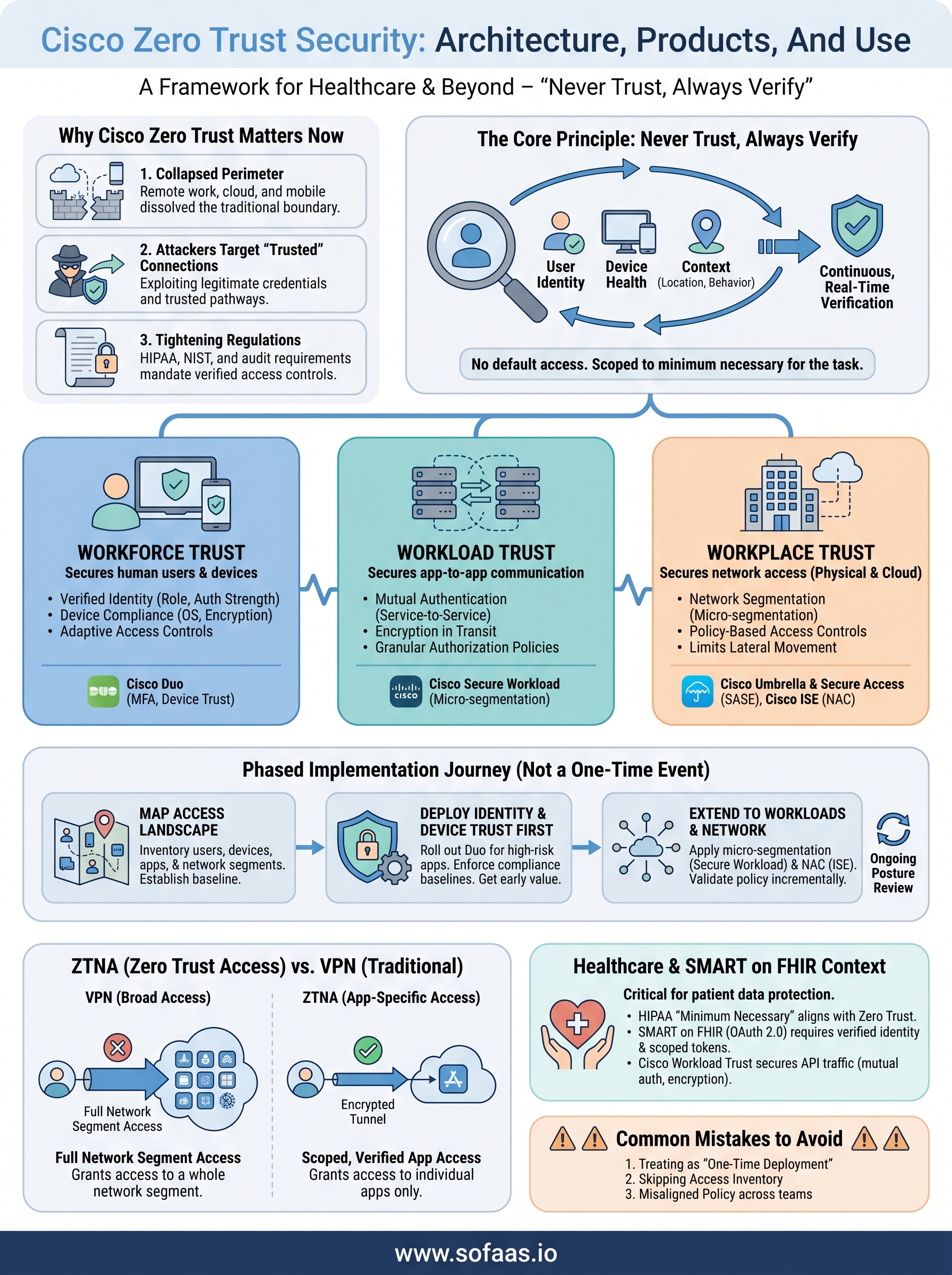
Cisco zero trust security adds a workforce, workload, and workplace structure on top of the base zero trust philosophy. Workforce trust covers human users and their devices, ensuring only authenticated people on compliant endpoints reach sensitive resources. Workload trust addresses application-to-application communication, which matters enormously for API-heavy environments where services talk to each other without a human initiating the request. Workplace trust governs how network access is granted and segmented, covering both physical locations and cloud environments.
Cisco also emphasizes that zero trust is not a product you buy once and install. It is an ongoing security posture that requires policy tuning, telemetry analysis, and integration across your existing infrastructure. That distinction matters when you're evaluating whether Cisco's framework fits your environment, because the commitment is architectural, not transactional.
Cisco zero trust pillars and key capabilities
Cisco organizes its zero trust framework around three distinct pillars: workforce, workload, and workplace. Each pillar addresses a specific domain where trust must be established, verified, and continuously enforced. Understanding how these three areas interact gives you a clearer picture of what a complete Cisco zero trust security deployment actually covers in practice.

Workforce trust
Workforce trust focuses on human users and their devices. Every person who accesses your systems, whether an employee, contractor, or partner, must authenticate through verified identity, and the device they use must meet defined compliance standards before access is granted. Cisco enforces this through identity-aware policies that evaluate user role, authentication strength, and device health simultaneously rather than checking each factor in isolation.
This pillar also handles adaptive access controls, which means the system can escalate authentication requirements based on risk signals. If a user logs in from an unfamiliar location or a device that has fallen out of compliance, the policy can step up to multi-factor authentication or block access entirely without manual intervention from your security team.
Workload trust
Workload trust covers application-to-application communication, which is where many organizations carry significant blind spots. When your services communicate with each other through APIs or microservices, each of those connections carries risk if left unverified. Cisco's workload controls require mutual authentication between services, ensuring that both sides of a connection are legitimate before data moves.
Securing workload-to-workload traffic is especially critical in healthcare environments where applications exchange sensitive patient data through FHIR APIs and OAuth-protected endpoints.
For teams building EHR-connected applications, this pillar directly addresses the trust model between your application layer and the underlying data services it depends on. Encryption in transit and service-level authorization policies prevent an attacker who compromises one service from automatically gaining access to adjacent systems.
Workplace trust
Workplace trust governs how and where network access is granted, for both physical office locations and cloud environments. Cisco uses network segmentation and policy-based access controls to ensure that users and devices only reach the network segments they specifically need. This limits lateral movement by restricting what any single account or device can access even after authentication succeeds.
Your network topology itself becomes a security control under this pillar. Micro-segmentation separates sensitive workloads from general traffic, reducing the blast radius of any breach that does occur inside your environment.
Cisco products used in a zero trust deployment
No single Cisco product delivers zero trust on its own. A complete cisco zero trust security deployment draws on several purpose-built tools that map to the workforce, workload, and workplace pillars covered earlier. Understanding which products handle which functions helps you build a coherent architecture rather than an overlapping patchwork of tools that create gaps instead of closing them.
Cisco Duo for workforce identity
Cisco Duo is the primary workforce identity tool in Cisco's zero trust portfolio. It handles multi-factor authentication, device trust verification, and adaptive access policies that respond to risk signals in real time. When a user attempts to log in, Duo checks not just their credentials but also whether their device meets your defined compliance baselines, such as OS version, disk encryption status, and screen lock configuration.
Duo integrates with a wide range of applications through standard protocols like SAML and OIDC, which makes it practical to deploy across both cloud services and on-premises applications. Policy enforcement happens at the identity layer, meaning you can apply consistent access rules regardless of where a user or application sits in your environment.
Cisco Umbrella and Secure Access
Cisco Umbrella functions as a cloud-delivered security service that enforces DNS-layer security, secure web gateway policies, and cloud access controls. It connects to your users wherever they work, applying consistent policy to internet-bound traffic without requiring traffic to backhaul through a central data center. This becomes especially relevant as your workforce accesses cloud applications directly rather than routing through a corporate network.
Umbrella's cloud-native architecture makes it one of the faster components to deploy in a zero trust stack, since it requires no on-premises hardware to get started.
Cisco Secure Access extends this into a full SASE framework, combining network security and SD-WAN capabilities into a unified service that enforces workplace trust policies across distributed environments.
Cisco Identity Services Engine and Secure Workload
Cisco Identity Services Engine (ISE) handles network access control by enforcing policy at the point of connection, which covers both wired and wireless environments. It integrates with Duo and Umbrella to share context and enforce consistent segmentation policies across your network.
Cisco Secure Workload (formerly Tetration) focuses on the workload pillar by providing micro-segmentation and application dependency mapping. It monitors east-west traffic between services and enforces granular policies that limit what each application can communicate with, reducing lateral movement risk at the workload level.
How to implement Cisco zero trust step by step
Implementing Cisco zero trust security is not a single deployment event. It is a phased process that requires you to assess where trust is currently implicit, then replace that implicit trust with verified, policy-driven controls one domain at a time. Starting with the right sequence prevents you from creating gaps that attackers can exploit during the transition period when your old and new security models briefly overlap.
Step 1: Map your current access landscape
Before you deploy any tools, you need a clear picture of who accesses what, from where, and through which pathways. That means documenting every user group, device type, application, and network segment in your environment. Look for places where access is granted on assumption rather than verified identity, such as shared service accounts, unmanaged devices, or legacy applications that bypass your identity provider entirely. This inventory becomes the policy baseline against which you measure progress and identify drift throughout the rest of the deployment.
Step 2: Deploy identity and device trust first
Your workforce pillar delivers the fastest security value. Start by rolling out Cisco Duo across your highest-risk applications, particularly any systems that handle sensitive data or connect to external partners. Configure device trust policies to enforce compliance baselines such as OS patch level, disk encryption status, and screen lock requirements, then enable adaptive authentication so the system escalates verification when risk signals change. Prioritizing identity and device controls early gives you a functional zero trust layer even before you touch network segmentation or workload policies.
Getting workforce trust operational before expanding to workload and network controls means that even an incomplete deployment provides meaningful protection from day one.
Step 3: Extend controls to workloads and network segments
Once identity controls are running consistently, shift your focus to east-west traffic and network access. Use Cisco Secure Workload to map how your applications communicate with each other, then apply micro-segmentation policies that limit each service to only the connections it actually requires. At the same time, deploy Cisco ISE to enforce network access control at the point of connection, ensuring devices meet your defined requirements before they reach sensitive segments. Work through your environment incrementally by starting with the segments that carry the highest-value data, validating policy behavior at each stage before expanding coverage outward to lower-priority areas.
Zero trust access and ZTNA vs VPN
Zero Trust Network Access (ZTNA) is the access control model that sits at the center of modern cisco zero trust security deployments. Rather than granting broad network access after a single authentication step, ZTNA grants access to specific applications and resources only, based on verified identity, device health, and context at the time of each request. Understanding how this compares to the VPN model you may already have in place helps you evaluate where your current setup creates risk and where ZTNA closes those gaps.
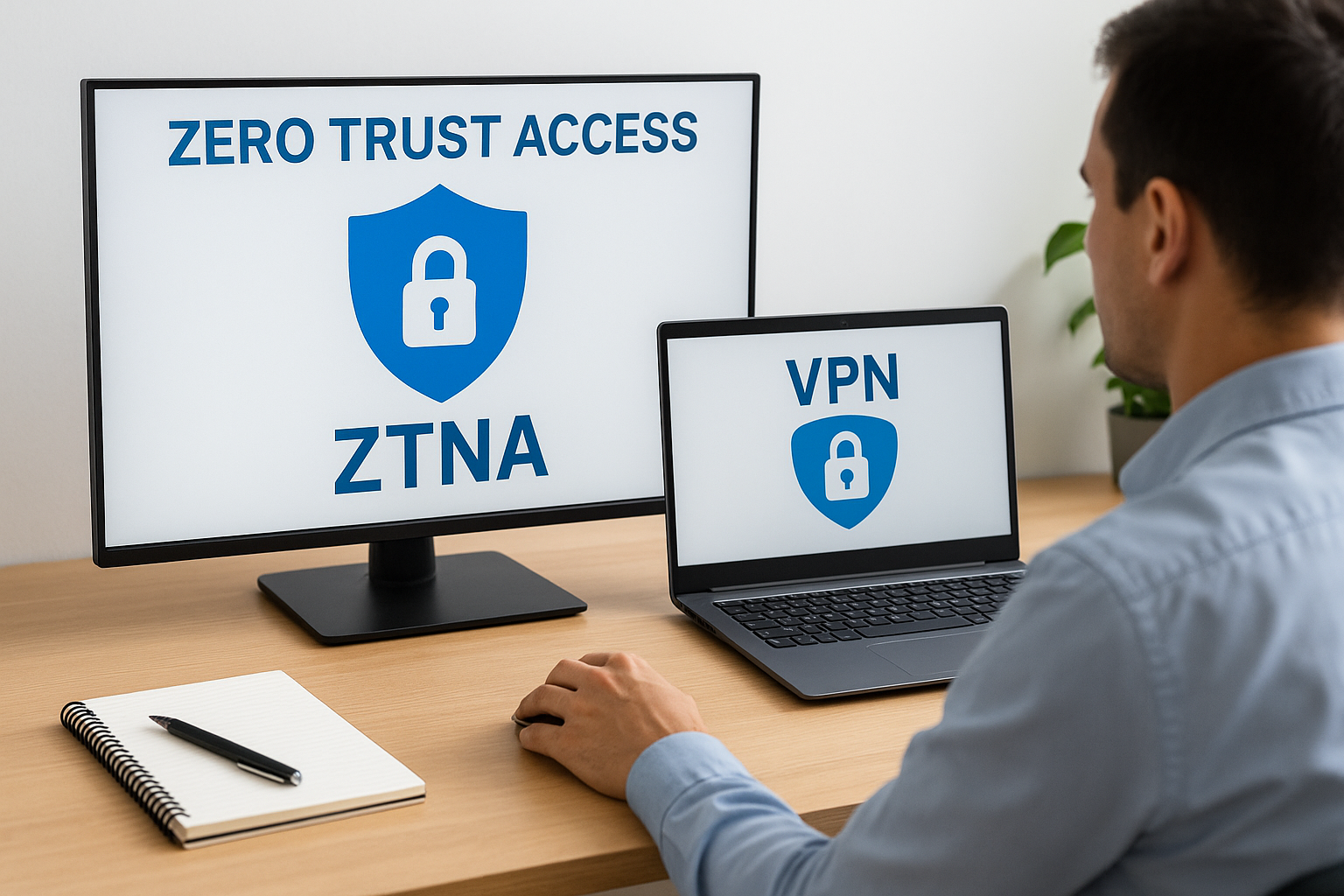
How VPNs grant access versus how ZTNA works
A VPN authenticates a user at the edge and then grants them access to a network segment, not just a single application. Once connected, the user can typically reach any resource within that segment unless you have built additional controls on top of the VPN tunnel itself. That wide-open access model makes sense when your applications and users are few in number and your environment is simple, but it becomes a liability as your infrastructure grows more distributed and your user base includes contractors, partners, and remote employees on unmanaged devices.
ZTNA flips this model by treating the application as the access boundary instead of the network, which means a compromised credential cannot automatically reach everything on the same segment.
ZTNA connects users to individual applications through encrypted, identity-verified tunnels, and each connection is independently authorized. If your device falls out of compliance mid-session, the session can be terminated without affecting other users or services. This scoping of access reduces lateral movement risk significantly because no single account provides broad footholds across your environment.
When ZTNA makes more sense than a VPN
ZTNA outperforms VPN in any environment where you need granular, application-level access controls across a distributed workforce or multi-cloud infrastructure. If your users work remotely and access SaaS applications directly, routing that traffic through a VPN concentrator adds latency without adding meaningful security. ZTNA places the enforcement point closer to the application itself, which means policy is applied consistently regardless of whether the user sits in your office, at home, or on a customer site.
You should also favor ZTNA when third-party vendors or contractors need access to specific internal tools. Granting a vendor VPN access creates network-level exposure that is difficult to scope precisely, while ZTNA limits them to exactly the application they need with full audit logging of every session.
Zero trust for healthcare and SMART on FHIR apps
Healthcare environments carry a specific combination of risk factors that make cisco zero trust security principles more urgent than in most other industries. Patient data is among the most sensitive information that exists, and the number of systems that touch it, from EHRs to billing platforms to third-party clinical applications, grows every year. Each of those connections must be secured at the identity, device, and workload level, not just at the perimeter, because a single compromised integration can expose records across your entire patient population.

Why healthcare environments need strict access controls
HIPAA's minimum necessary access standard maps directly to the zero trust principle of least-privilege access. You should only grant a user, application, or service the specific permissions it needs to perform a defined function, and those permissions should be re-evaluated continuously rather than set once and forgotten. Healthcare organizations that rely on broad access grants, such as shared service accounts or network-wide VPN tunnels, violate both the spirit of HIPAA and the core logic of zero trust.
Enforcement also needs to extend to third-party application vendors who connect to your EHR environment. When a clinical app requests patient data through an OAuth-protected API, the trust model governing that connection should verify the application's identity, the requesting user's credentials, and the compliance status of the device being used, all before the data moves.
Treating every API call as a new access request, rather than assuming an authorized session remains trustworthy throughout its duration, is exactly what healthcare's regulatory environment demands.
How SMART on FHIR fits into a zero trust architecture
SMART on FHIR uses OAuth 2.0 to manage authorization between clinical applications and EHR systems, which means its security model already requires verified identity and scoped access tokens before any data is returned. That structure aligns well with zero trust principles because each token grants access to a defined set of resources for a limited time, and expiration forces re-verification rather than allowing indefinite open sessions.
When you layer Cisco's workload trust controls on top of a SMART on FHIR implementation, you add mutual authentication between services, encrypted transit for all API traffic, and audit logging that satisfies both your internal security requirements and the documentation standards that auditors expect. Platforms like SoFaaS handle the SMART on FHIR authorization layer in a HIPAA-compliant managed environment, so your zero trust controls focus on securing the connections around it rather than rebuilding compliance infrastructure from scratch.
Common mistakes and how to avoid them
Organizations that adopt cisco zero trust security often stumble in the same places, not because the framework is flawed, but because they misunderstand what the transition actually requires. Recognizing these patterns before you hit them saves time, money, and the kind of security gaps that auditors will find even if attackers do not.
Treating zero trust as a one-time deployment
The most common mistake is treating zero trust like a product you install and check off a list. Zero trust is an ongoing security posture, not a deployment milestone. After your initial rollout, policies drift, new applications appear, and user behavior changes in ways that your original configuration did not account for. Many teams set up Duo, deploy Umbrella, and then move on without scheduling regular policy reviews or checking whether device compliance baselines still reflect your current risk tolerance. Build a review cadence into your operations from the start, rather than waiting until an incident forces the conversation.
A zero trust architecture that nobody reviews is functionally the same as one that was never deployed, because unreviewed policies accumulate exceptions that quietly undermine the controls you built.
Skipping the access inventory step
Rushing straight into tool deployment without first mapping who accesses what, through which pathways, and on which devices is a reliable way to misconfigure your policies. If you do not know which service accounts exist, which applications bypass your identity provider, or which network segments carry your most sensitive workloads, you will write policies against an incomplete picture of your environment. Those gaps become the attack surface your zero trust controls were supposed to close. Spend the time to inventory your access landscape before you configure a single policy, and revisit that inventory whenever you onboard new applications or integrate with external partners.
Deploying tools without policy alignment across teams
Security tools generate value only when the policies driving them reflect shared agreement between security, IT, and application teams. A common failure point is when your security team configures Cisco ISE or Secure Workload in isolation, without input from the developers and engineers who built the applications those tools now govern. Policies end up being too permissive because nobody wanted to break production, or too restrictive because security teams lacked context about legitimate application behavior. Align your policy design process across teams before deployment, and test policies in monitoring mode before you switch to enforcement.
Where to go from here
Cisco zero trust security gives you a proven framework for replacing implicit trust with verified, policy-driven access across every layer of your environment. The steps are clear: inventory your access landscape, deploy identity and device trust first, extend controls to workloads and network segments, and treat the whole effort as an ongoing posture rather than a finished project. Healthcare teams building EHR-connected applications carry additional obligations around HIPAA compliance, patient data protection, and third-party vendor trust, and zero trust addresses all three directly.
Your next move depends on where you sit right now. If your team is building a SMART on FHIR application and needs a compliance-ready integration layer that handles OAuth authorization, audit logging, and secure EHR connectivity without rebuilding that infrastructure from scratch, the right foundation is already available. Launch your SMART on FHIR app in a few steps and keep your focus on the application, not the plumbing.
The Future of Patient Logistics
Exploring the future of all things related to patient logistics, technology and how AI is going to re-shape the way we deliver care.
Thank you! Your submission has been received!
Oops! Something went wrong while submitting the form.