HAPI FHIR Validator: How To Validate FHIR Resources Fast

A single malformed FHIR resource can break an EHR integration, trigger failed API calls, or silently corrupt patient data. The HAPI FHIR Validator is the go-to open-source tool for catching these problems before they reach production. It checks your FHIR resources against the specification, custom profiles, and implementation guides, giving you structured feedback on exactly what's wrong and where.
But getting the validator set up, configured with the right profiles, and running efficiently isn't always straightforward. There are multiple ways to use it, as a Java library, a CLI tool, or through hosted online instances, and each approach fits different workflows. Choosing the wrong one, or misconfiguring terminology services and profile references, can leave you chasing false errors for hours.
This guide walks you through how to validate FHIR resources using HAPI FHIR step by step. You'll learn how to run validation locally, integrate it into your codebase, and interpret the results so your resources are spec-compliant before they hit any endpoint. At SoFaaS, we handle FHIR validation and EHR connectivity as part of our managed SMART on FHIR platform, but whether you're building integrations yourself or evaluating what to offload, understanding how validation works gives you a critical advantage.
What the HAPI FHIR validator checks
The HAPI FHIR validator doesn't just run a syntax check. It applies multiple layers of validation logic to your resource, working through the base FHIR specification, any custom profiles you load, and terminology bindings, all in a single pass. Understanding what it actually checks helps you interpret the output accurately and configure it correctly the first time.
Structural and type validation
The validator starts at the most basic level: structure and data types. It confirms that your resource uses the correct element names, that required fields are present, and that each value matches its declared FHIR type. For example, if you pass a string where a dateTime is expected, the validator flags it immediately. This layer also enforces cardinality constraints, so a field marked 1..1 throws an error if it appears zero times or more than once.
Below is a simplified example of what a cardinality error looks like in the validator output:
ERROR - Patient.name: minimum required = 1, but only found 0
  Path: Patient.name
  Severity: ERROR
You don't need to load any external terminology service or profile to catch these errors. The base FHIR specification definitions handle them entirely, which makes structural checks the fastest and most deterministic part of the validation run.
Profile and implementation guide conformance
Beyond base structure, the HAPI FHIR validator checks conformance against any StructureDefinition profiles you supply. A profile is a set of constraints layered on top of a base resource, such as US Core Patient, which requires specific identifiers and demographic fields that the base FHIR Patient resource doesn't mandate.
Loading the correct profile package is what separates useful validation from misleading validation. Without the right profiles, the validator gives you a false sense of security.
When you load an implementation guide (IG) package, the validator resolves all profile references within it and applies every constraint defined there. This includes must-support flags, fixed values, required extensions, and slice definitions. If your resource claims to conform to a profile via its meta.profile element, the validator actively checks every rule in that profile against your data, not just the fields you happen to populate.
Terminology and code system checks
The third major layer is terminology validation. FHIR resources use coded values constantly, from Patient.gender to Condition.code to Observation.status. The validator checks that the codes you use actually exist in the code system or value set bound to each element.
For required bindings, a wrong or unknown code is an error. For extensible bindings, the validator generates a warning if the code isn't in the preferred value set. For this layer to work fully, the validator needs access to a terminology server, such as the public FHIR terminology server hosted by HL7, or a local instance you control. Without one, terminology checks produce inconclusive warnings rather than definitive errors, which is a configuration gap you'll want to close before running validation in a CI pipeline.
Reference and cross-element consistency
The validator also checks reference target types, confirming that when your resource points to another resource, the declared type matches what the specification or profile allows. Beyond that, it evaluates invariant rules defined in profiles using FHIRPath expressions. These are conditional constraints like "if component is absent, then value[x] must be present," and violating them produces errors that pure structural checks will never catch on their own.
What you need before you validate
Before you run the HAPI FHIR validator, you need three things in place: a working Java environment, the correct HAPI FHIR dependencies, and the right profile packages for your use case. Skipping any of these steps produces incomplete validation results or runtime errors that are time-consuming to debug mid-workflow.
Java and build tool setup
The HAPI FHIR validator runs on the Java Virtual Machine, so you need JDK 11 or later installed on your machine. You can verify your current Java version by running java -version in your terminal. If your project uses Maven or Gradle, add the HAPI FHIR validation dependency directly to your build file.
Here's the Maven dependency block for the HAPI FHIR validator:
<dependency>
  <groupId>ca.uhn.hapi.fhir</groupId>
  <artifactId>hapi-fhir-validation</artifactId>
  <version>7.4.0</version>
</dependency>
<dependency>
  <groupId>ca.uhn.hapi.fhir</groupId>
  <artifactId>hapi-fhir-structures-r4</artifactId>
  <version>7.4.0</version>
</dependency>
Check the latest stable version in the official HAPI FHIR release notes before pinning a version in production. Both dependencies need to match the same HAPI FHIR version number to avoid classpath conflicts at runtime.
Profile packages and terminology access
If you're validating against a specific implementation guide, such as US Core or Da Vinci, you need to download the corresponding IG package. IG packages use the .tgz format and contain all the StructureDefinitions, ValueSets, and CodeSystems the validator needs to resolve constraints. You can find official IG packages through the HL7 FHIR package registry.
Loading the wrong IG version is one of the most common causes of misleading validation errors. Always match your IG package version to the one your EHR integration target requires.
You also need to decide whether to connect the validator to a terminology server. Without one, value set checks return inconclusive warnings rather than hard errors. For most local or CI workflows, pointing the validator at the public HAPI terminology server is the simplest option. For production pipelines that handle real patient data, run a local terminology server instance to avoid sending any identifiable information to an external endpoint.
Step 1. Validate quickly with a hosted validator
If you want to check a FHIR resource right now without writing any code, a hosted validator is the fastest path. The official HL7 FHIR Validator at validator.fhir.org runs the same underlying validation engine as the HAPI FHIR validator library, so the results you get there translate directly to what you'd see in a programmatic setup. This approach works well for one-off checks, debugging unexpected errors, or learning how validation output is structured before you integrate the tool into your codebase.
Choose your hosted option
Two hosted validators cover most use cases. The HL7 FHIR Validator at validator.fhir.org is the most reliable option for R4 and R4B resources and supports loading custom IG packages by name directly in the UI. It lets you pick your FHIR version, load a specific implementation guide, and validate JSON or XML in a single browser session without installing anything locally.
Never paste real patient data into any public tool. Always use synthetic or de-identified test resources when working with hosted validators.
The second option is the HAPI FHIR public test server endpoint, which accepts $validate operation calls over HTTP. This is useful when you want to test how validation behaves across a REST API before you build that call into your own application. Both tools return results in the standard OperationOutcome format, so switching between them doesn't change how you read the output.
Validate a resource step by step
Running your first validation takes under two minutes once you have a test resource ready. Follow these exact steps to validate a FHIR Patient resource using the HL7 hosted validator:
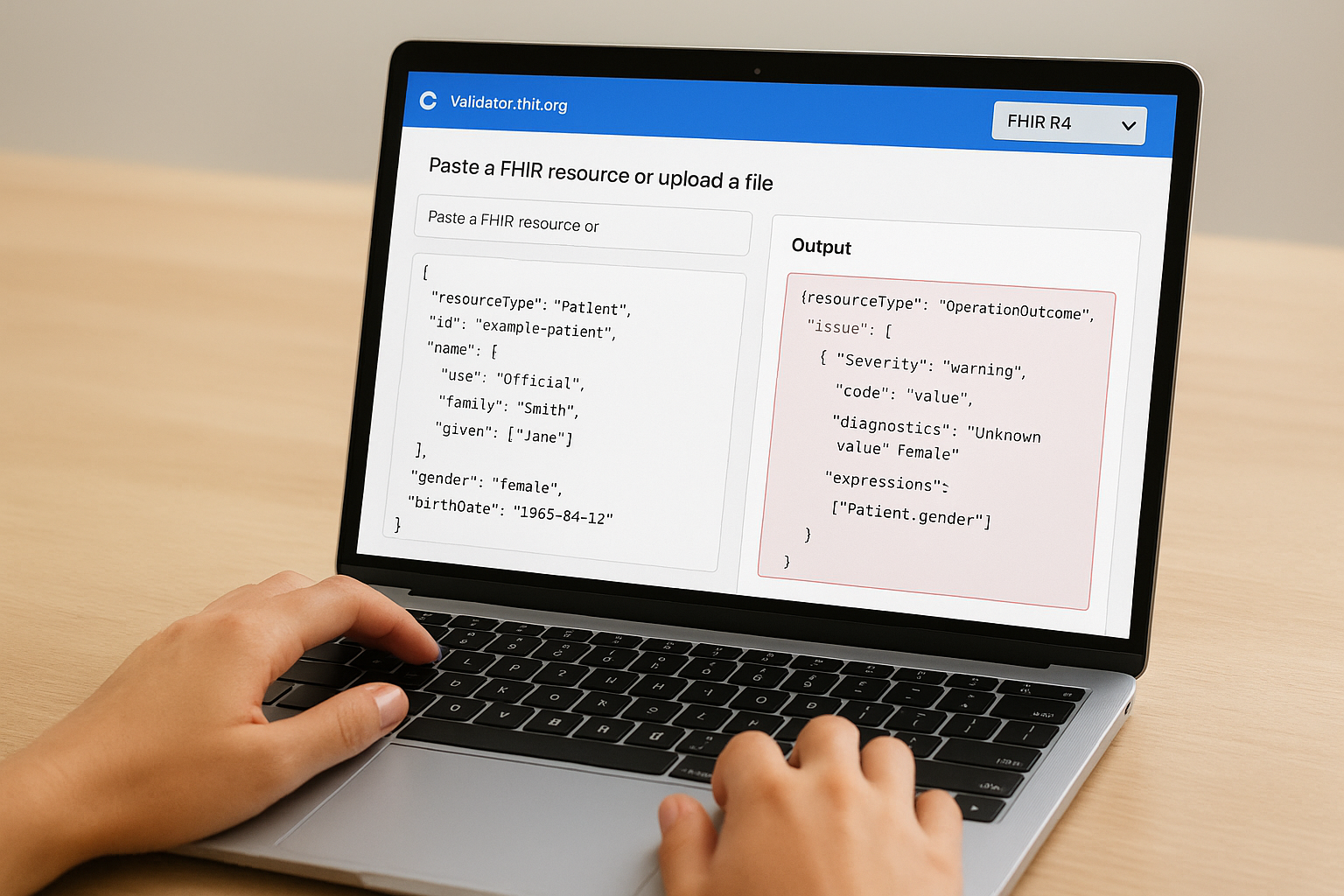
- Open validator.fhir.org in your browser.
- Select FHIR R4 from the version dropdown on the left.
- Paste the JSON resource below into the input panel.
- Click Validate and review the output panel on the right side of the screen.
Use this minimal Patient resource as your test input:
{
  "resourceType": "Patient",
  "id": "example-patient",
  "name": [
    {
      "use": "official",
      "family": "Smith",
      "given": ["Jane"]
    }
  ],
  "gender": "female",
  "birthDate": "1985-04-12"
}
The validator returns a structured OperationOutcome resource listing each issue with its severity level (information, warning, or error) and the exact FHIRPath pointing to where the problem occurs. A clean result on this base resource confirms the tool is working correctly before you layer in profile constraints or terminology checks that add complexity to the output.
Step 2. Validate in Java with HAPI FHIR
When you need validation inside your own application, the HAPI FHIR validator Java library gives you full programmatic control over every check. You can validate resources before writing them to a FHIR server, run conformance checks inside a CI pipeline, or reject non-compliant payloads at API ingestion time, all without relying on any external HTTP call or hosted tool.
Set up the validation context
The validator runs inside a FhirContext instance, which you configure once and reuse for the lifetime of your application. You need to attach a validation support chain that tells the validator where to find base StructureDefinitions, terminology lookups, and any custom profiles specific to your integration. The code below sets up a complete, working validator for FHIR R4:

FhirContext ctx = FhirContext.forR4();

ValidationSupportChain supportChain = new ValidationSupportChain(
    new DefaultProfileValidationSupport(ctx),
    new InMemoryTerminologyServerValidationSupport(ctx),
    new CommonCodeSystemsTerminologyService(ctx)
);

FhirValidator validator = ctx.newValidator();
IValidatorModule module = new FhirInstanceValidator(supportChain);
validator.registerValidatorModule(module);
Reuse the same
FhirValidatorinstance across all requests. Constructing a new one per call adds substantial overhead because the validator rebuilds its entire support chain on each instantiation.
The DefaultProfileValidationSupport class loads all base R4 StructureDefinitions from your classpath automatically. Adding InMemoryTerminologyServerValidationSupport handles common code system lookups locally, which keeps validation self-contained during development without requiring a live terminology server. If your resources use US Core or another implementation guide, load that IG package as an additional support module using PrePopulatedValidationSupport with the StructureDefinitions parsed from the package.
Run validation and read the output
Once your validator is configured, passing a resource through it takes only a few lines. The result comes back as a ValidationResult object containing all issues with their severity level and the FHIRPath location pointing to the exact element that failed.
Patient patient = new Patient();
patient.addName().setFamily("Smith").addGiven("Jane");
patient.setGender(Enumerations.AdministrativeGender.FEMALE);

ValidationResult result = validator.validateWithResult(patient);

for (SingleValidationMessage msg : result.getMessages()) {
    System.out.println(msg.getSeverity() + " - " + msg.getMessage());
    System.out.println("Path: " + msg.getLocationString());
}
Call result.isSuccessful() first to get a fast pass or fail signal, then loop through individual messages to identify exactly which fields need correcting. Each SingleValidationMessage maps directly to one issue in the OperationOutcome format you saw in the hosted validator output, so the structure is consistent whether you're debugging manually or processing results programmatically. Filter by ResultSeverityEnum.ERROR to separate hard blocking failures from WARNING or INFORMATION messages that don't prevent resource submission.
Step 3. Validate in a FHIR server with $validate
When you run a FHIR server such as the HAPI FHIR server, you get access to the $validate operation, which exposes validation as a standard HTTP endpoint. This approach is useful when your application already communicates with a FHIR server over REST, because you can validate resources without embedding any Java library into your own codebase. The server handles the validation engine, profile resolution, and terminology checks on its side and returns a structured response your application can parse directly.
The
$validateoperation is defined in the FHIR specification and works the same way across any compliant server, so the pattern you learn here applies beyond HAPI.
Send a $validate request over HTTP
The $validate operation runs at the resource-type level or against a specific resource instance. For most integration workflows, you'll validate at the resource-type level before creating a resource, which means sending a POST request to [base]/[ResourceType]/$validate with your resource in the request body.
Here is a concrete example using cURL to validate a Patient resource against a locally running HAPI FHIR server:
curl -X POST \
  http://localhost:8080/fhir/Patient/\$validate \
  -H "Content-Type: application/fhir+json" \
  -d '{
    "resourceType": "Patient",
    "id": "test-patient",
    "name": [
      {
        "use": "official",
        "family": "Smith",
        "given": ["Jane"]
      }
    ],
    "gender": "female",
    "birthDate": "1985-04-12"
  }'
The server processes the request through the same hapi fhir validator engine that you'd configure programmatically in Java, so the results are consistent regardless of which method you use. If you need to validate against a specific profile, add a profile parameter to the request URL, for example $validate?profile=http://hl7.org/fhir/us/core/StructureDefinition/us-core-patient.
Read the OperationOutcome response
The server returns an OperationOutcome resource with one issue entry for each problem it finds. Each issue contains a severity field (error, warning, or information) and a diagnostics string describing the exact problem. Your application should check the HTTP status code first: the server returns 200 OK even when validation errors exist, so you must inspect the OperationOutcome body to determine if the resource is actually compliant.
Parse the issue array and filter for "severity": "error" to identify blocking failures that require correction before you attempt a create or update operation. Entries with "severity": "warning" indicate non-blocking issues worth reviewing, but they won't prevent the resource from being accepted by a permissive server.
Wrap up and next steps
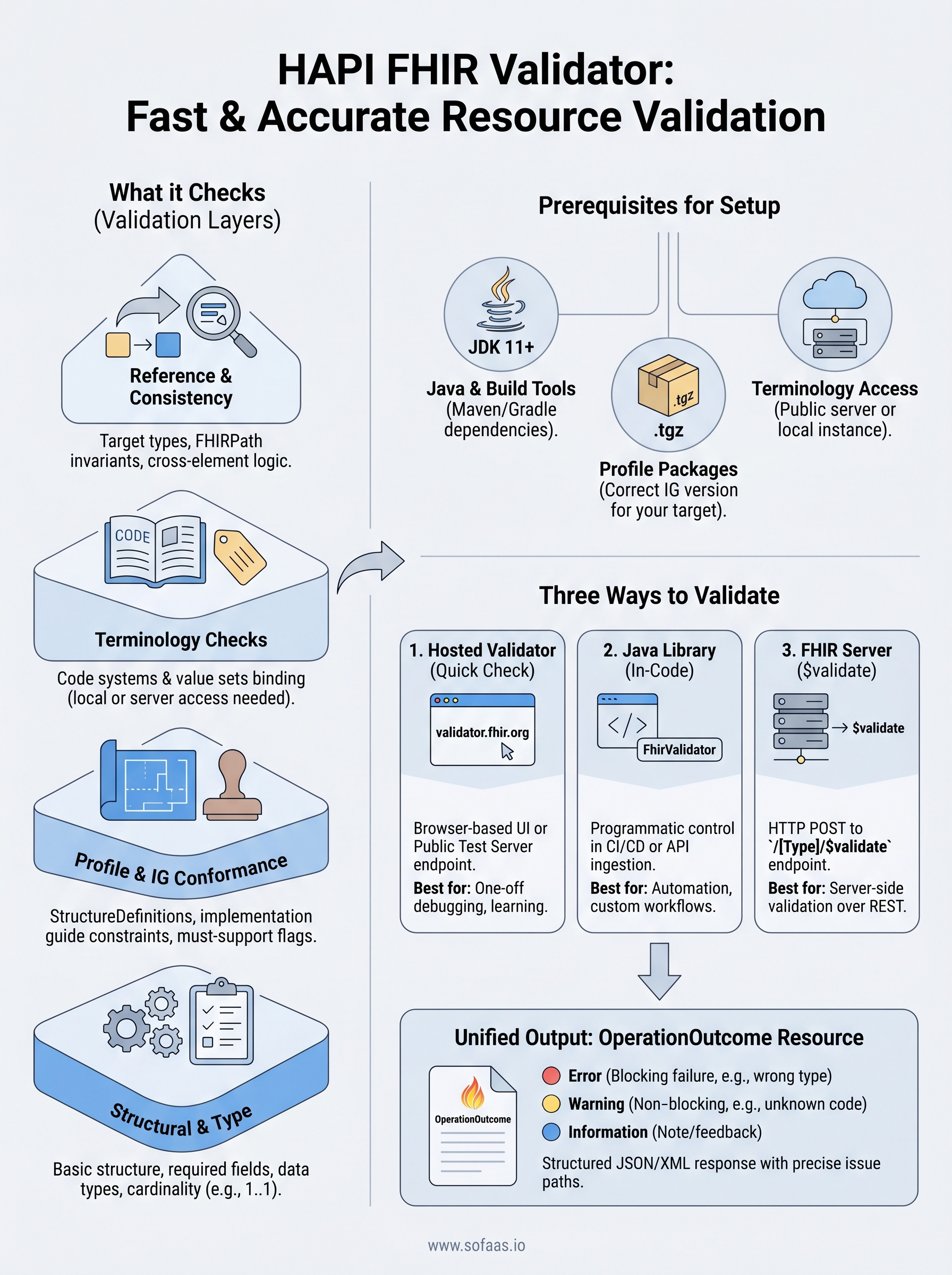
You now have three practical ways to run the hapi fhir validator against your resources: a hosted browser tool for quick checks, a Java library for programmatic control inside your codebase, and the $validate HTTP operation for server-side validation. Each approach uses the same underlying engine, so the OperationOutcome output you learn to read in one method translates directly to the others. Start with the hosted validator to get familiar with the output format, then move to the Java library or $validate endpoint once you're ready to automate checks inside your pipeline.
Building solid validation is one piece of a larger FHIR integration puzzle. Connecting your application to real EHR systems like Epic or Cerner adds layers of OAuth flows, profile-specific requirements, and compliance overhead on top of validation. If you want to skip that infrastructure work entirely, launch your SMART on FHIR app with SoFaaS and focus on your application instead.
The Future of Patient Logistics
Exploring the future of all things related to patient logistics, technology and how AI is going to re-shape the way we deliver care.
Thank you! Your submission has been received!
Oops! Something went wrong while submitting the form.