What Is OpenID Connect (OIDC)? How It Works With OAuth 2.0

What Is OpenID Connect (OIDC)? How It Works With OAuth 2.0
Healthcare applications handle sensitive patient data, making secure authentication non-negotiable. If you're building apps that connect to EHRs or manage protected health information, you've likely worked with OAuth 2.0 for authorization. But what is OpenID Connect, and why should it matter to your integration strategy?
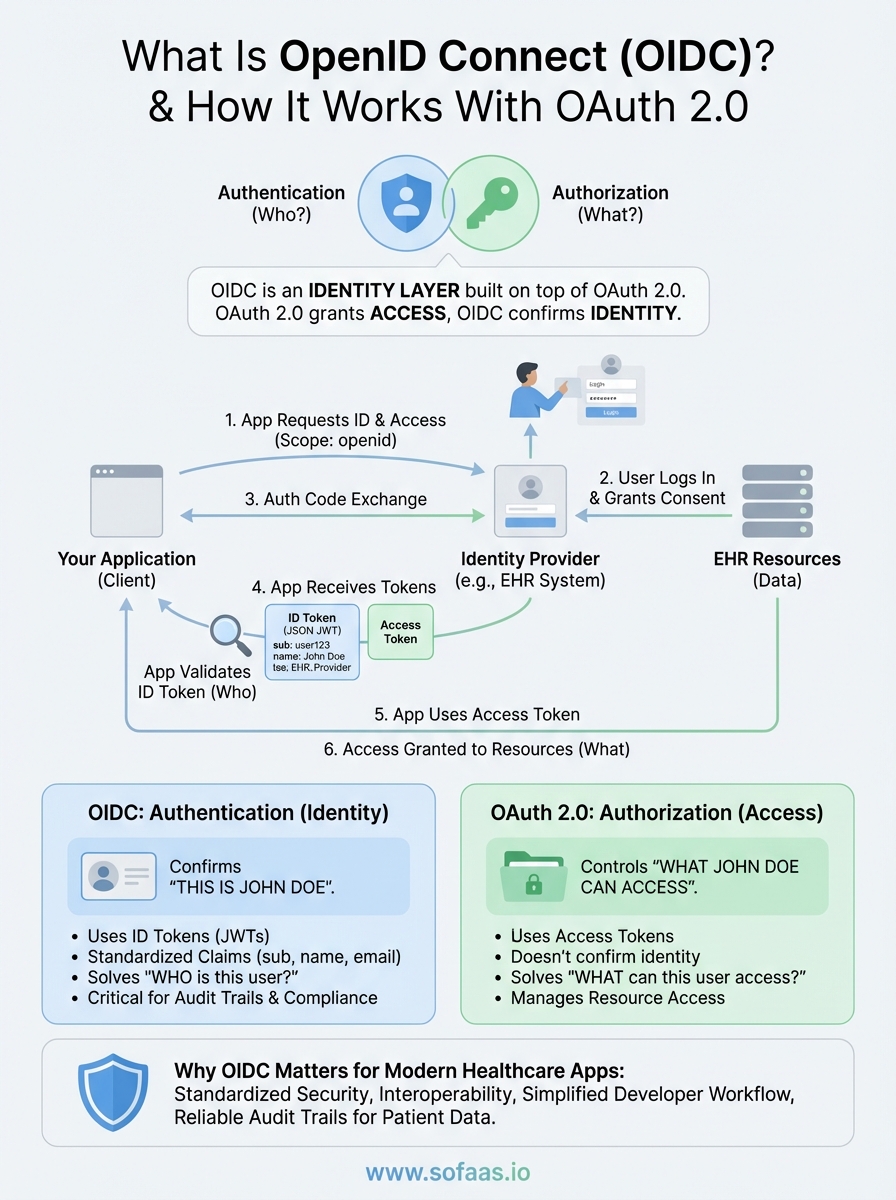
OpenID Connect (OIDC) is an identity layer built on top of OAuth 2.0 that handles authentication, verifying who a user actually is. While OAuth 2.0 grants access to resources, OIDC confirms identity. This distinction becomes critical when managing patient consent flows, where you need to verify both the user and what they're authorized to access.
At SoFaaS, we manage the complexity of SMART on FHIR integrations, which rely on OAuth 2.0 authorization flows for secure EHR connections. Understanding how OIDC extends OAuth 2.0 helps healthcare developers make informed architectural decisions. This article breaks down how OIDC works, its core components, and how it differs from related standards like SAML and the original OpenID protocol.
What OpenID Connect is and what it is not
Understanding what is OpenID Connect requires separating authentication from authorization. OIDC is a standardized protocol that sits on top of OAuth 2.0, specifically designed to verify user identity. When your healthcare application needs to confirm that "this person is Patient John Doe," you're dealing with authentication. When you need to grant that verified user access to specific EHR resources, OAuth 2.0 handles the authorization side. OIDC doesn't replace OAuth 2.0; it extends it with identity verification capabilities through standardized ID tokens.
OpenID Connect as an authentication layer
OIDC adds an identity layer by introducing ID tokens, which are JSON Web Tokens (JWTs) that contain user information called claims. These claims include basic profile data like name, email, and unique identifiers that your application can trust. The protocol standardizes how applications request these identity tokens, how authorization servers issue them, and how your application validates them. OIDC also provides UserInfo endpoints where your application can retrieve additional user profile information using an access token. This standardization means you don't build custom authentication mechanisms for each integration.
OpenID Connect solves the "who is this user?" question, while OAuth 2.0 answers "what can this user access?"
What separates OIDC from OAuth 2.0
OAuth 2.0 was never designed for authentication, even though many developers tried to use it that way. It issues access tokens that act as keys to protected resources but don't confirm identity. You might have a valid access token without knowing anything verified about the user who authorized it. OIDC fills this gap by adding ID tokens that cryptographically prove identity. In healthcare integrations, this distinction prevents authorization from happening without proper identity verification, which is critical for audit trails and compliance. Your application receives both tokens simultaneously, each serving its specific purpose in the authentication and authorization flow.
How OIDC differs from SAML and original OpenID
SAML (Security Assertion Markup Language) predates OIDC and uses XML-based assertions for both authentication and authorization. While SAML works for many enterprise scenarios, OIDC leverages modern JSON and REST APIs, making it lighter and more suitable for mobile and web applications. The original OpenID protocol (versions 1.0 and 2.0) attempted user authentication but lacked the standardization and security features OIDC provides. OpenID Connect learned from these earlier attempts, building on the proven OAuth 2.0 framework rather than creating yet another competing standard. This foundation gives you the authorization capabilities of OAuth 2.0 plus the authentication features you need for secure patient identity verification.
Why OpenID Connect matters for modern apps
Modern healthcare applications require secure authentication across multiple platforms while maintaining a seamless user experience. OIDC provides standardized identity verification that works consistently across web applications, mobile apps, and API integrations. When you build healthcare solutions that need to verify patient identity before granting EHR access, OIDC handles the authentication layer while OAuth 2.0 manages resource authorization. This separation prevents common security mistakes where developers attempt to extract identity information from OAuth 2.0 access tokens, which were never designed for that purpose.
Security and compliance benefits
OIDC strengthens your security posture by providing cryptographically signed ID tokens that your application can verify independently. You receive standardized claims about user identity that can't be tampered with, which matters significantly when audit trails demand proof of who accessed patient data. Healthcare regulations require knowing exactly which user performed which action, and OIDC's ID tokens provide this verification in a standardized format. The protocol also supports session management features that let your application track active user sessions and handle logout scenarios across multiple connected applications, preventing unauthorized access after users intend to sign out.
When handling protected health information, verifying who the user is becomes as critical as controlling what they can access.
Developer experience and standardization
Understanding what is OpenID Connect means recognizing how it simplifies development workflows across different identity providers. You write authentication code once using OIDC libraries rather than building custom integrations for each EHR or identity system. Major identity providers like Google, Microsoft, and healthcare-specific platforms support OIDC, giving you consistent implementation patterns regardless of which system your users authenticate against. This standardization reduces development time and testing complexity while improving interoperability between your application and the various EHR systems your healthcare customers use.
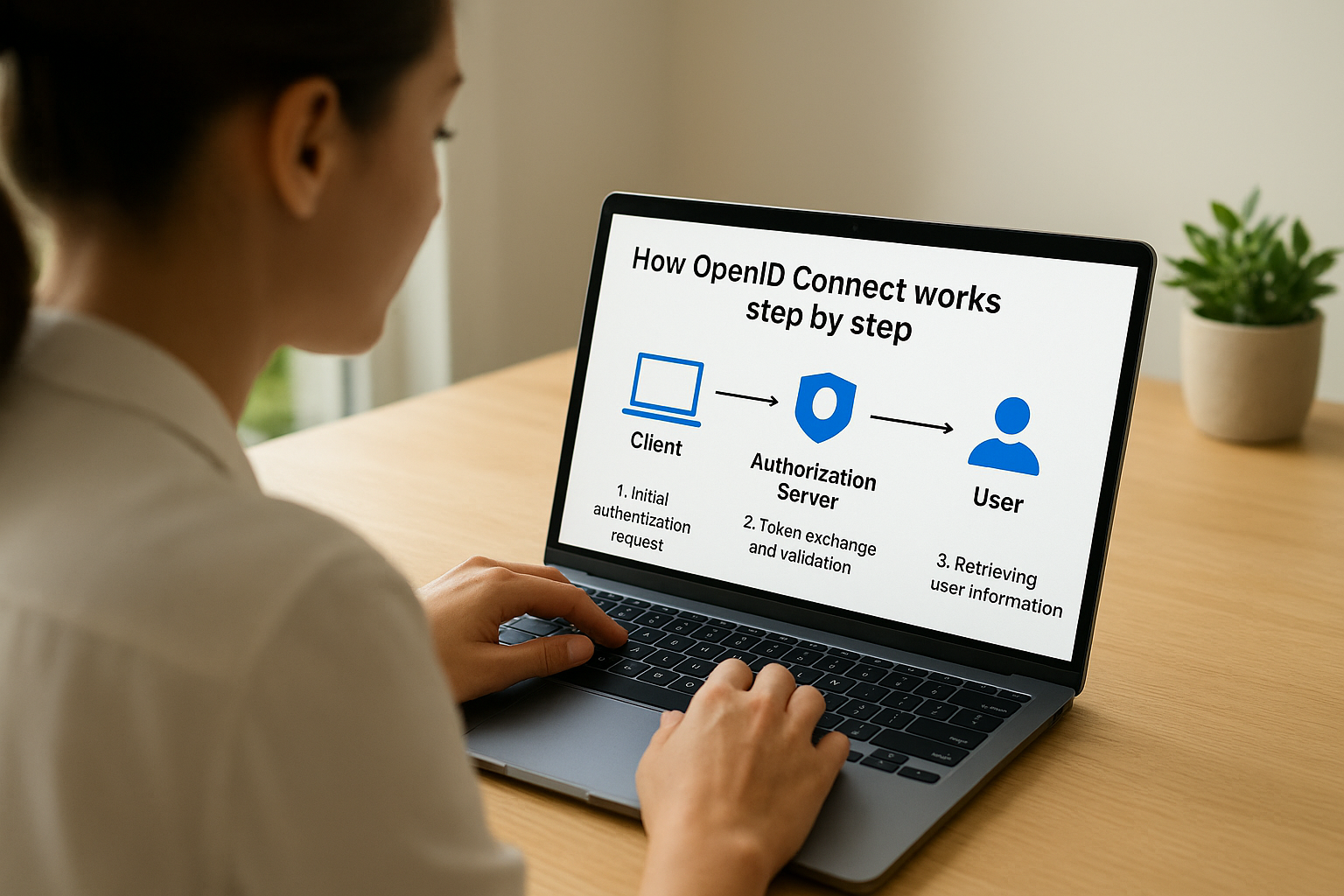
How OpenID Connect works step by step
The OIDC authentication flow follows a structured process that builds on OAuth 2.0's authorization framework. When your healthcare application needs to verify a user's identity, it initiates an authentication request that guides the user through identity verification while obtaining the necessary tokens. This process involves three main participants: your application (the client), the authorization server (the identity provider), and the user being authenticated. Each participant plays a specific role in ensuring secure identity verification.
Initial authentication request
Your application redirects users to the authorization endpoint with specific parameters that define what you're requesting. You include the openid scope in your request, which signals that you want identity verification beyond simple authorization. Additional parameters specify your application's client ID, where users should return after authentication, and which response type you expect. The authorization server then presents users with a login interface where they enter credentials or use existing sessions to prove their identity.
Understanding what is openid connect means recognizing how this initial request triggers both authentication and authorization in a single flow.
Token exchange and validation
After users authenticate successfully, the authorization server redirects them back to your application with an authorization code. Your application exchanges this code for tokens by making a backend request to the token endpoint, which returns both an access token and an ID token. The ID token contains signed claims about the user's identity that you verify using the authorization server's public key. This verification confirms the token hasn't been tampered with and actually came from the trusted identity provider.
Retrieving user information
Once you validate the ID token, you can extract basic claims like user ID and email directly from it. For additional profile information, you make a request to the UserInfo endpoint using the access token you received. This endpoint returns standardized claims about the authenticated user in JSON format, providing your application with verified identity data it can trust for authorization decisions and audit logging.
Tokens, claims, scopes, and discovery
Understanding what is openid connect requires knowing the core components that make identity verification work reliably. OIDC uses specific tokens to carry identity information, standardized claims to represent user attributes, scopes to control what data gets shared, and discovery mechanisms that let your application find the right endpoints automatically. These elements work together to create a consistent authentication experience regardless of which identity provider you integrate with.
Understanding ID tokens and claims
ID tokens are JSON Web Tokens that contain verified identity information about authenticated users. Each ID token includes standardized claims like sub (subject identifier), iss (issuer), aud (audience), and exp (expiration time) that your application validates before trusting the identity data. You also receive profile claims like name, email, and preferred username based on which scopes users authorize. These claims provide structured data your healthcare application can use for personalization, authorization decisions, and audit trails without making additional API calls.
Claims come in different types: standard claims defined by the OIDC specification, aggregated claims that point to external sources, and distributed claims that your application retrieves separately. Your application decodes the ID token as a JWT, verifies its signature using the identity provider's public key, and extracts the claims as JSON properties it can process directly. This standardization means you handle user identity consistently across different identity providers without writing custom parsing logic for each integration.
ID tokens provide cryptographically verified identity data that you can trust for authentication decisions.
Scopes and discovery endpoints
Scopes control which claims and data your application receives during authentication. The openid scope is mandatory for OIDC flows, while additional scopes like profile, email, and address let you request specific claim sets. Healthcare applications often combine these standard scopes with custom scopes that grant access to EHR resources through the underlying OAuth 2.0 authorization. Users see clear descriptions of what data your application requests during the consent screen.

Discovery endpoints eliminate manual configuration by providing machine-readable documents that describe an identity provider's capabilities. You access the well-known configuration endpoint to retrieve URLs for authorization, token, and UserInfo endpoints along with supported scopes, response types, and signing algorithms. This discovery mechanism lets your application adapt to different identity providers without hardcoding URLs or configurations.
Choosing the right OIDC flow and security
Selecting the right OIDC flow depends on your application's architecture and security requirements. Your healthcare application handles sensitive patient data, making flow selection a critical security decision rather than a simple technical choice. Different flows offer varying levels of security based on where your application runs and how it stores credentials.
Selecting the appropriate flow
The authorization code flow with PKCE (Proof Key for Code Exchange) provides the strongest security for most healthcare applications. You use this flow when your application runs on devices or browsers where users might intercept network traffic. PKCE prevents authorization code interception attacks by requiring your application to prove it initiated the authentication request. Single-page applications and mobile apps should always implement PKCE, while confidential clients like backend services can use the authorization code flow with client secrets. Implicit flow, which returns tokens directly in the URL, creates unnecessary security risks and has been deprecated in favor of authorization code with PKCE.
Understanding what is openid connect means recognizing that flow selection directly impacts your application's ability to protect patient identity data.
Implementing security best practices
Your implementation should validate ID token signatures using the identity provider's public keys retrieved from the JWKS endpoint. You verify the iss (issuer), aud (audience), and exp (expiration) claims match your expected values before trusting any identity data. Token storage requires careful consideration: never store tokens in browser local storage where JavaScript can access them. Instead, use HTTP-only cookies for web applications or secure platform-specific storage like iOS Keychain for mobile apps. Implement proper session management by respecting token expiration times and providing logout mechanisms that invalidate tokens at the identity provider, not just locally in your application.
Next steps
Understanding what is OpenID Connect gives you the foundation for implementing secure authentication in your healthcare applications. You now know how OIDC extends OAuth 2.0 with identity verification, how ID tokens provide cryptographic proof of user identity, and which flows protect patient data during authentication. This knowledge becomes practical when you integrate with EHR systems that require both authentication and authorization for every patient interaction.
Building SMART on FHIR integrations means managing complex authentication flows across multiple EHR vendors while maintaining HIPAA compliance. Rather than implementing OIDC flows and OAuth 2.0 authorization separately for each EHR connection, you can focus on your application's unique value. SoFaaS handles the authentication complexity, token management, and compliance requirements that slow down development cycles. Launch your SMART on FHIR app with pre-built EHR connectors and managed authentication flows that let you deploy in days instead of months.
The Future of Patient Logistics
Exploring the future of all things related to patient logistics, technology and how AI is going to re-shape the way we deliver care.
Thank you! Your submission has been received!
Oops! Something went wrong while submitting the form.