What Is 1Password Secrets Automation? Use Cases And Setup

Every healthcare integration touches sensitive credentials, API keys for EHR connections, OAuth tokens for patient authorization flows, certificates for HIPAA-compliant data exchange. If your team manages these secrets through shared vaults, environment variables copy-pasted into Slack, or hardcoded values buried in config files, you're sitting on a security and compliance liability. 1Password Secrets Automation was built to solve exactly this problem: programmatic, auditable, and secure access to infrastructure secrets across your applications, CI/CD pipelines, and cloud environments.
At SoFaaS, we help healthcare teams connect to EHRs like Epic and Cerner through a managed SMART on FHIR platform, and proper secrets management is a non-negotiable part of that work. Whether you're rotating tokens for a SOC 2 Type II audit or injecting credentials into a deployment pipeline, how you handle secrets matters as much as what you build with them. That's why we put this guide together for teams shipping healthcare software who need to get secrets management right.
This article breaks down what 1Password Secrets Automation actually does, where it fits in your stack, common use cases for healthcare and general engineering teams, and a step-by-step walkthrough to get it running in your environment.
What 1Password Secrets Automation is
1Password Secrets Automation is a developer-facing feature set within 1Password that gives your applications, scripts, and CI/CD pipelines direct, programmatic access to secrets stored in 1Password vaults, without requiring a human to copy-paste credentials or store them in plaintext files. Rather than treating secrets management as a manual process, it exposes your stored credentials through a set of tools designed specifically for non-human workloads.
The core components
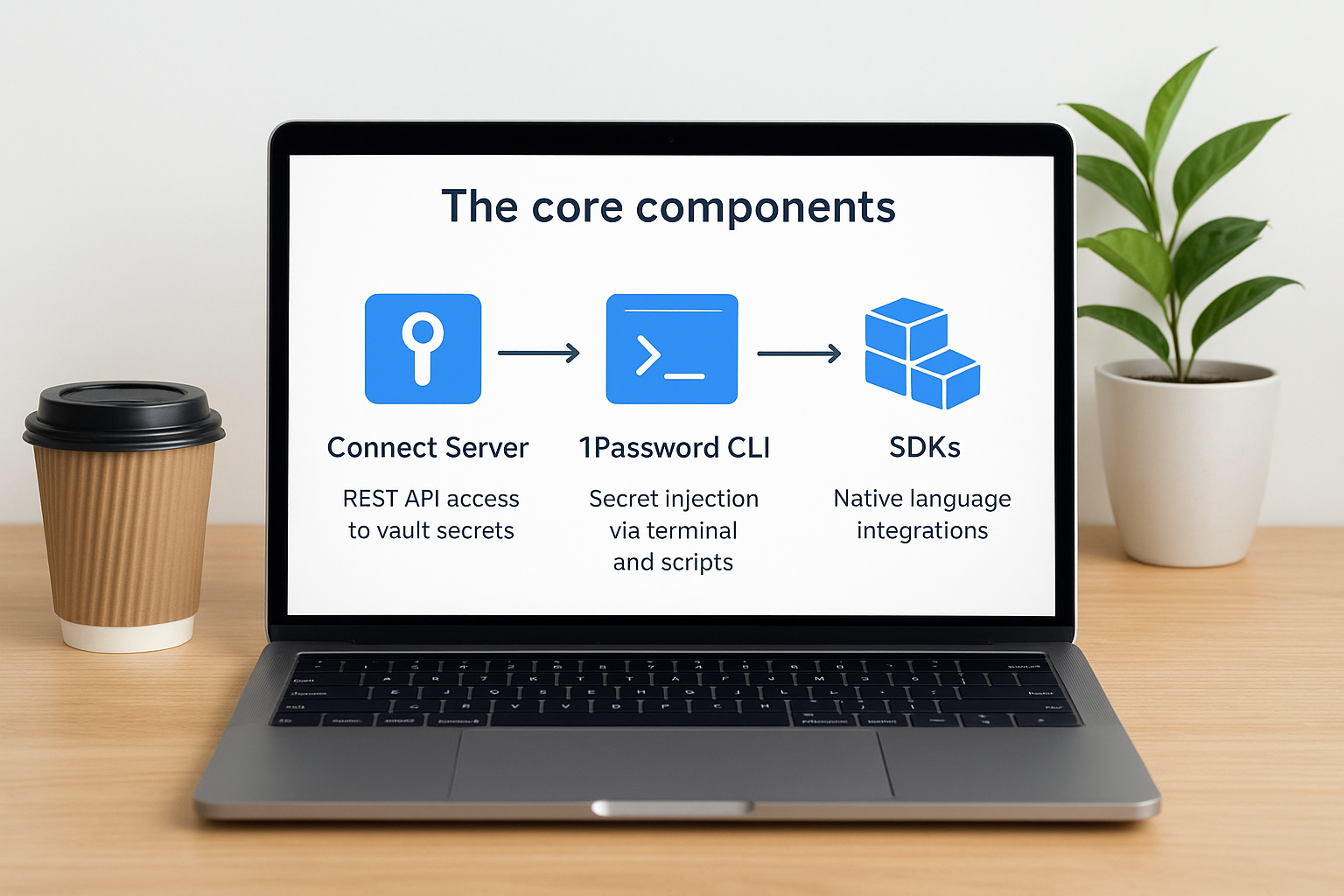
Three main tools make up 1Password Secrets Automation: the 1Password Connect Server, the 1Password CLI, and native SDKs. The Connect Server is a self-hosted or cloud-hosted service that exposes a REST API, letting your infrastructure pull secrets at runtime. The CLI allows you to inject secrets directly into shell commands and config files using a reference syntax. Together, these components give you multiple integration paths depending on your stack.
| Component | Primary purpose | Typical environment |
|---|---|---|
| Connect Server | REST API access to vault secrets | Self-hosted or managed cloud |
| 1Password CLI | Secret injection via terminal and scripts | Local machines and CI runners |
| SDKs | Native language integrations | Python, Node.js, Go, and more |
How it differs from a standard password manager
Standard password managers are built for humans: you log in, you search, you copy a value. Secrets Automation flips that model entirely by making retrieval machine-initiated and service-account-authenticated. Your application requests a secret at runtime, and the Connect Server returns the value directly, so your source code never needs to contain a hardcoded credential.
Hardcoded credentials in source code remain one of the most common entry points for compromised infrastructure, and removing them is the first practical step toward a defensible secrets posture.
This separation of secret storage from secret consumption also gives you a clean, timestamped audit trail for every access event, which carries real weight when your team prepares for a HIPAA or SOC 2 Type II review.
Why teams use it for infrastructure secrets
Infrastructure secrets are different from passwords you use once and forget. They live inside running systems, get rotated on schedules, and touch dozens of services simultaneously. Managing them manually creates gaps: someone hardcodes a token, a secret leaks into logs, or a developer leaves and their credentials stay active for months.
The compliance and operational case
For teams handling patient data or protected health information, the stakes go beyond a security incident. Regulations like HIPAA require you to demonstrate control over who accessed what, when, and why. 1Password Secrets Automation gives you a time-stamped access log for every secret retrieval, making audit preparation concrete rather than a scramble through fragmented records.
An audit log tied directly to secret access events is worth more than a policy document when a regulator asks how you control credential access.
Beyond compliance, secret sprawl actively slows teams down. When credentials live in multiple places, rotating a single API key means updating every location manually, and you will miss at least one. Centralizing secrets in one vault and pulling them programmatically through automated pipelines means a single rotation updates every consumer at once, cutting both security risk and maintenance overhead significantly.
How Secrets Automation works end to end
Understanding the full request cycle helps you design integrations that are both reliable and auditable. At its core, 1Password Secrets Automation moves secrets from a central vault to the consuming service at runtime, without any human in the middle.
The request and retrieval flow
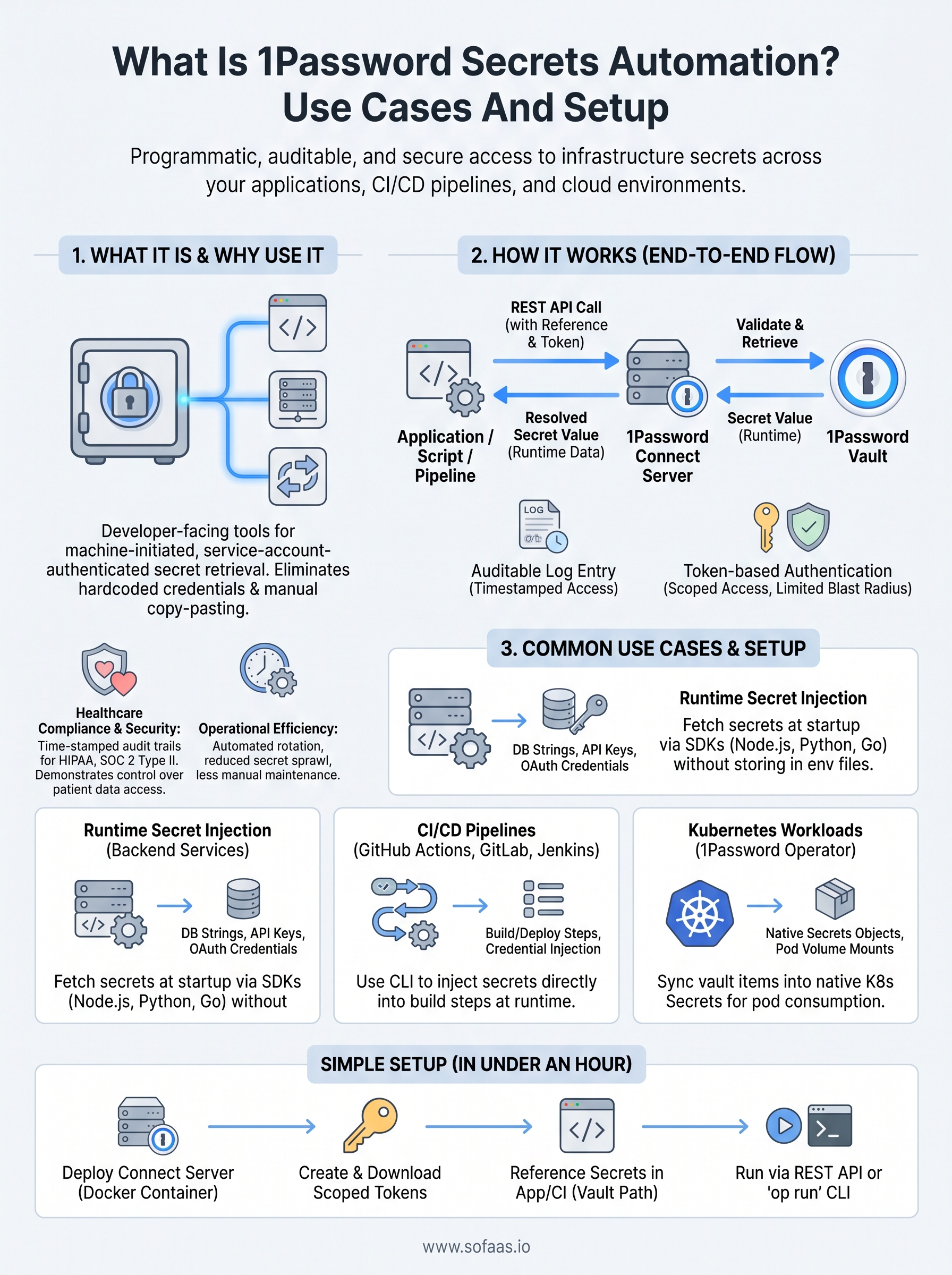
Your application or script starts the process by sending a REST API call to the Connect Server with a reference to the specific secret it needs, such as a vault item and field name. The Connect Server validates the request, retrieves the value from your 1Password vault, and returns it directly to the caller. Your code receives the secret as a runtime value, not as a file on disk or a hardcoded string.

Every retrieval gets logged with a timestamp, the requesting service identity, and the specific item accessed, giving you a precise trail for compliance reviews.
Token-based authentication and access control
Each service that pulls secrets authenticates using a Connect Server access token scoped to specific vaults. You assign tokens per workload, so a CI runner only reads the secrets it needs, and a compromised token has limited blast radius by design. Revoking a single token immediately cuts off that workload without touching credentials used by other services.
Common use cases for apps, CI, and Kubernetes
1Password Secrets Automation covers several practical scenarios your engineering team likely runs into every week. The three environments where it delivers the most immediate value are web applications pulling credentials at runtime, CI/CD pipelines that deploy code, and Kubernetes clusters managing workload identities.
Runtime secret injection for backend services
Your backend application can call the Connect Server API at startup to retrieve database connection strings, third-party API keys, and OAuth client credentials without storing any of them in environment files or source code. This pattern works cleanly for Node.js, Python, and Go services using the available SDKs.
Pulling secrets at startup rather than baking them into container images means a single vault update propagates to every running instance on the next restart.
CI/CD pipelines
Your GitHub Actions, GitLab CI, or Jenkins pipelines can use the 1Password CLI to inject secrets directly into build and deploy steps. You reference a secret by vault path, and the CLI resolves the value at runtime without writing it to disk.
Kubernetes workloads
The 1Password Operator for Kubernetes syncs vault items into native Kubernetes Secrets objects, so your pods consume credentials through standard volume mounts and environment variable references without any custom sidecar logic.
How to set up 1Password Secrets Automation
Getting 1Password Secrets Automation running in your environment takes four main steps, and most teams complete the initial setup in under an hour. The process centers on deploying a Connect Server, creating scoped tokens, and pointing your application at the correct vault references.
Deploy the Connect Server and create tokens
Start by signing into your 1Password Business account and navigating to the Integrations section. From there, you generate a Connect Server token and download the credentials file. You then deploy the Connect Server as a Docker container using the official image, passing the credentials file as an environment variable. Once the container is running, your services can reach it at the configured endpoint.
Keep your Connect Server token in a secrets store from day one, not in a plaintext config file.
Reference secrets in your application
With the Connect Server live, you reference vault items using a structured path: vault name, item name, and field name. Your application calls the REST endpoint with that reference and receives the resolved secret value at runtime, ready to use without touching disk. Two retrieval approaches cover most workflows:
- REST API call directly from your application code
op runCLI command for shell-based secret injection
Key takeaways
1Password Secrets Automation gives your team a structured, auditable way to handle infrastructure credentials across applications, pipelines, and Kubernetes workloads. Instead of scattering secrets across config files or environment variables, you centralize them in a vault and pull them programmatically at runtime, which removes hardcoded credentials from your codebase entirely.
For healthcare engineering teams, the compliance value is direct: every retrieval generates a timestamped log entry tied to a specific service identity, which is exactly what auditors want to see during HIPAA or SOC 2 Type II reviews. Scoped tokens limit each workload to only the secrets it needs, so a compromised token causes minimal damage.
Setup takes most teams under an hour: deploy the Connect Server, generate scoped tokens, and reference vault items by path in your code or CI steps. If your team is also managing EHR integrations and OAuth flows, explore how SoFaaS handles SMART on FHIR infrastructure so your developers can stay focused on building.
The Future of Patient Logistics
Exploring the future of all things related to patient logistics, technology and how AI is going to re-shape the way we deliver care.
Thank you! Your submission has been received!
Oops! Something went wrong while submitting the form.