OpenID Connect Session Management: How It Works & Logout

OpenID Connect session management defines how a Relying Party (RP) tracks whether a user is still logged in at the OpenID Provider (OP), and what happens when they're not. It covers session monitoring via silent checks, front-channel and back-channel logout, and the coordination required to keep authentication state consistent across applications. Without it, users end up in limbo: logged out of one system but still holding active tokens in another, creating both usability headaches and real security gaps.
If you're building healthcare applications that authenticate through EHR systems, this matters even more. SMART on FHIR relies on OAuth 2.0 and OpenID Connect to authorize access to patient data, which means session lifecycle directly affects data access and patient privacy. A stale session isn't just an inconvenience, it's a compliance risk. At SoFaaS, we handle the heavy lifting of OAuth and authorization management for SMART on FHIR integrations, including the session and token orchestration that most teams underestimate until it breaks in production.
This article breaks down how OpenID Connect session management actually works: the specifications behind it, how session monitoring and logout flows are implemented, and the practical considerations you need to account for when building or integrating with an OP. Whether you're implementing this yourself or evaluating a managed approach, you'll walk away with a clear understanding of the protocol mechanics and their real-world implications.
Why it matters for SMART on FHIR apps
SMART on FHIR apps authenticate users through an EHR's identity layer, which runs on OpenID Connect. That means every patient data request your app makes is tied to a session that was established at login. When that session expires or gets revoked at the EHR level, your app needs to detect it quickly, because continuing to serve data from a stale session isn't a minor technical inconvenience. It's a compliance and security risk that regulators and EHR vendors take seriously.
Sessions carry access to protected health information
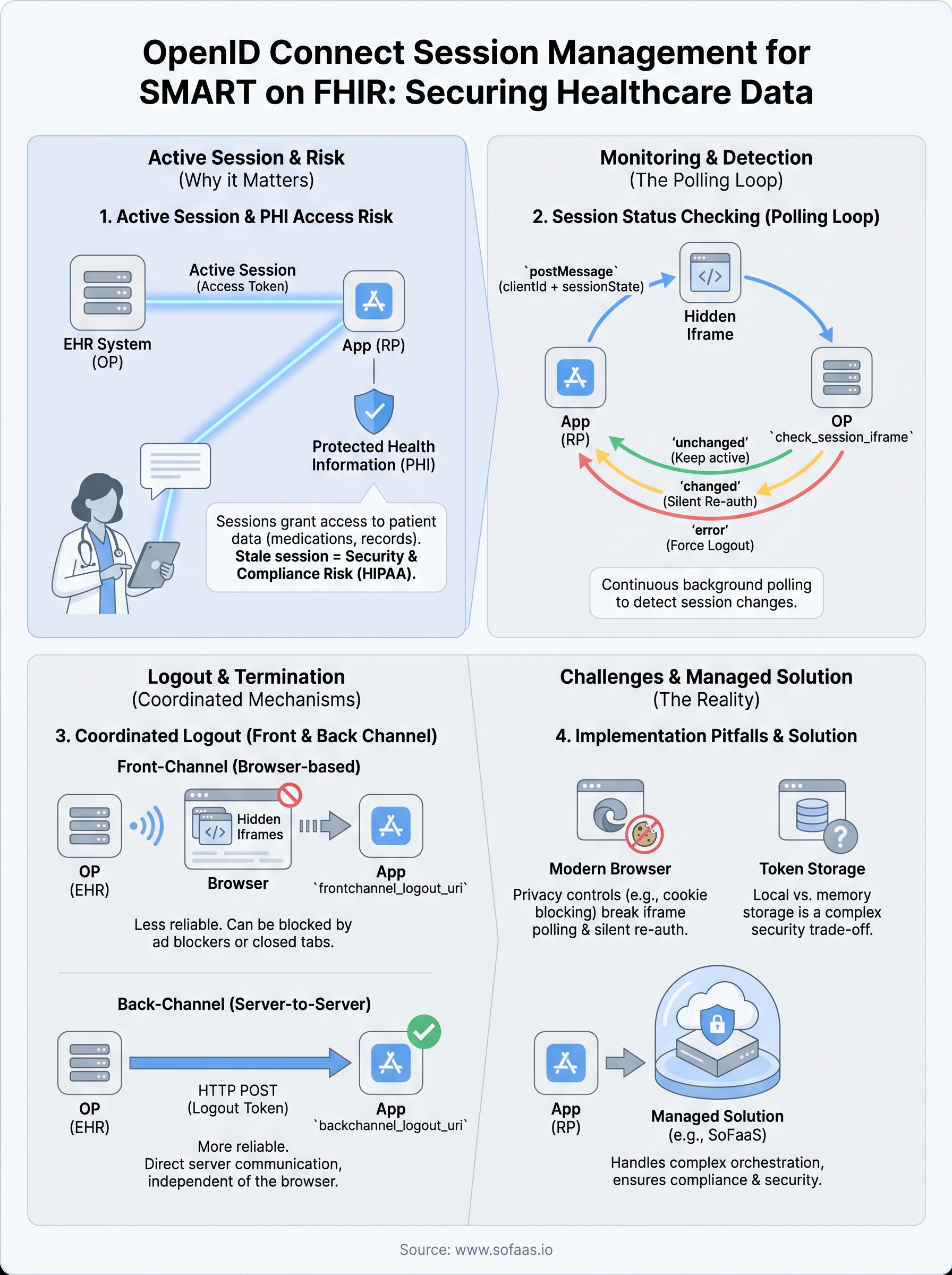
Unlike a typical web application where a stale session means a user sees outdated content, a stale SMART on FHIR session means your app may still hold a live access token granting reads or writes to protected health information (PHI). FHIR resources such as patient records, medication lists, and clinical notes fall under strict access control requirements. If a clinician logs out of the EHR but your app doesn't detect that logout event, the access token stays valid until it hits its own expiry, creating a window where unauthorized access is technically possible.
OpenID Connect session management is exactly the mechanism that closes that window, enabling your app to detect logout events and act on them in near real time.
Your app also needs to handle the reverse: when a clinician's EHR session is terminated by an admin or by an inactivity policy, your app's session must follow. Without proper session synchronization, you end up with a fragmented authentication state that neither the user nor the EHR operator can fully trust.
Compliance and EHR complexity raise the stakes
HIPAA's Security Rule requires covered entities and their business associates to implement automatic logoff controls for electronic PHI. The session management layer in a SMART on FHIR integration is exactly where that requirement lives. Failing to synchronize logout events between the OP and your application means you may fall short of that requirement even if your own app displays a logout button, because the underlying token and session may still be active.
EHR systems like Epic and Cerner act as both the OpenID Provider and the resource server, so they control the session lifecycle on both sides. Your app, operating as the Relying Party, must correctly implement the monitoring and logout flows those EHRs support. Each system handles front-channel and back-channel logout differently, and mismatches in implementation create precisely the session drift that produces compliance gaps and poor experiences for clinicians working across multiple tools.
The building blocks the spec relies on
OpenID Connect session management doesn't rely on a single specification. It's built from three separate OIDC drafts that the OpenID Foundation maintains: Session Management, Front-Channel Logout, and Back-Channel Logout. Each draft handles a different layer of the problem, and your implementation needs to account for all three to cover the full session lifecycle.
The session state parameter
When the OP issues tokens during login, it also returns a session_state value alongside the standard ID token. This string encodes a representation of the current session, derived from the client ID, origin, and a server-side secret. Your app stores this value and uses it later as the reference point for detecting session changes.
The
session_stateparameter is the foundation every polling-based session check depends on. Without it, your app has no reliable anchor point to detect when a user's session at the OP has changed.
The OP also exposes a dedicated check_session_iframe endpoint that your app loads in a hidden iframe. This iframe listens for postMessage calls from your app and responds with either "changed", "unchanged", or "error", depending on whether the session state still matches what was issued at login.
The role of logout endpoints
Your app needs to know where to send logout signals, and that starts with the end_session_endpoint published in the OP's discovery document at /.well-known/openid-configuration. This endpoint accepts the id_token_hint and an optional post_logout_redirect_uri, giving the OP the information it needs to terminate the session and redirect the user back to your app cleanly after logout completes.
How session status checking works
The session status check runs as a continuous background polling loop in your application. Your app sends a postMessage to the OP's check_session_iframe at a set interval, typically every 2 to 5 seconds, passing the client ID and the stored session_state value. The iframe compares that value against the current server-side session and returns a plain string response your app reads to determine whether anything has changed.
The iframe polling loop
Your app loads the OP's check_session_iframe URL in a hidden iframe at startup, after the user authenticates. From your own application iframe or page, you call postMessage with a string formatted as clientId + " " + sessionState. The OP's iframe receives that message, runs its internal comparison, and posts back one of three values: "unchanged", "changed", or "error". As long as the response stays "unchanged", your app keeps running normally without interrupting the user.
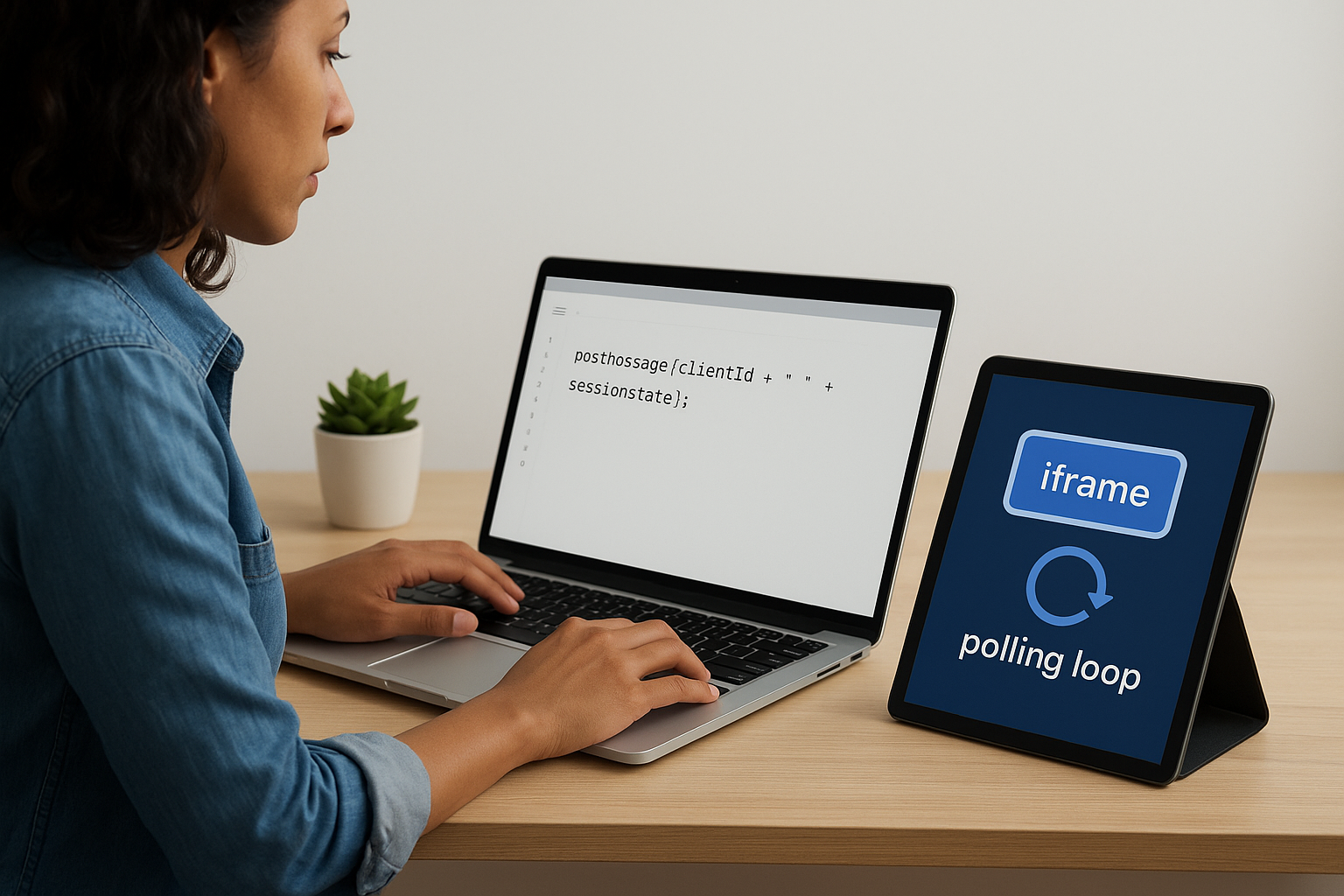
Polling frequency is a real trade-off: check too infrequently and you miss logout events for too long; check too aggressively and you create unnecessary load on the OP's infrastructure.
Handling a "changed" response
When the iframe returns "changed", your app's first move is a silent re-authentication attempt, not an immediate forced logout. You send a prompt-less authorization request in a hidden iframe to see if the OP can issue fresh tokens without user interaction. If the OP returns valid tokens, the session is still active and you update your stored session_state accordingly.
If the silent request fails or returns an error response, the session has genuinely ended at the OP. At that point, openid connect session management requires your app to treat the user as logged out, clear local tokens, and redirect the user to a login screen or a relevant unauthenticated state.
How OIDC logout works across multiple apps
When a user logs out of one application, every other app sharing that session at the OP needs to receive that signal and act on it. OpenID Connect session management solves this through two distinct logout mechanisms: front-channel and back-channel. You register your logout endpoint with the OP during client registration, and the OP calls it when a session terminates, regardless of which app triggered the logout.
Front-channel logout
Front-channel logout works through the browser itself. When a user logs out, the OP renders a page containing invisible iframes, each pointing to the frontchannel_logout_uri you registered for your application. The browser loads each URI simultaneously, and your app's server receives the request and clears the corresponding session. Because the browser handles the calls, this approach works without any server-to-server connectivity between the OP and your app.
The downside is that front-channel logout depends on the browser completing every iframe load successfully. Ad blockers, restrictive Content Security Policies, or closed browser tabs can all prevent the logout signal from reaching your app. This makes front-channel logout less reliable for high-security environments like EHR integrations.
Back-channel logout
Back-channel logout removes the browser from the equation entirely. The OP sends an HTTP POST directly to your app's backchannel_logout_uri with a signed logout token that identifies the session and user. Your server validates that token, locates the matching session, and terminates it immediately.

Back-channel logout is the more robust option for SMART on FHIR apps because it succeeds even when the user has already closed the browser tab.
Your app must respond with a 200 status code within a short timeout to confirm successful processing, or the OP may retry the request.
Browser privacy limits and implementation pitfalls
The iframe-based polling model that openid connect session management relies on was designed before browsers started aggressively restricting cross-origin storage access. Modern browsers, including Safari and Firefox, block third-party cookies by default. Since the check_session_iframe endpoint runs in a hidden iframe on a different origin than your application, it can no longer reliably read the session cookie the OP set at login. The practical result is that "changed" responses come back even when the session is still valid, triggering unnecessary re-authentication attempts and degrading the user experience.
Third-party cookie restrictions
Your silent re-authentication requests run into the same problem. A prompt-less authorization request in a hidden iframe won't succeed if the browser blocks the OP's session cookie from being read during that request. When this happens, your app interprets the failure as a genuine logout event and forces the user to log back in, even though their session at the OP is perfectly active. The fix is to treat "error" iframe responses with skepticism and fall back to back-channel logout as the primary mechanism for session termination signals.
Back-channel logout avoids the browser entirely, which makes it the more reliable signal for high-security environments where cookie restrictions are non-negotiable.
Token storage and silent auth failures
Storing access tokens and refresh tokens in browser local storage exposes them to cross-site scripting attacks, but moving them to memory-only storage creates its own session continuity problem when the user opens a new tab. Your app needs a deliberate storage strategy that balances security with continuity, such as using session storage per tab combined with back-channel logout for server-side session cleanup, rather than relying on the iframe polling loop to cover all scenarios.
Key takeaways
OpenID Connect session management is not a single spec but a set of coordinated mechanisms: iframe polling, front-channel logout, and back-channel logout. Each one covers a different failure scenario, and relying on only one leaves gaps that matter in healthcare contexts. Back-channel logout is your most reliable option in environments where browsers restrict third-party cookies, which describes most modern setups.
For SMART on FHIR apps, the stakes are higher than in standard web applications. Stale sessions mean live access tokens tied to protected health information, and HIPAA's automatic logoff requirements mean "close enough" session handling is not acceptable. You need to treat logout synchronization as a first-class concern, not an afterthought.
Building this correctly takes significant time and specialized knowledge that most development teams don't have readily available. If you want to skip the infrastructure work and move straight to building your application, launch your SMART on FHIR app with SoFaaS and let the session and token orchestration run underneath your code.
The Future of Patient Logistics
Exploring the future of all things related to patient logistics, technology and how AI is going to re-shape the way we deliver care.
Thank you! Your submission has been received!
Oops! Something went wrong while submitting the form.